Resumir contenido con:




Crea agentes de IA de voz y chat sin código: tu guía para la automatización
Imagina poder crear un asistente inteligente controlado por voz para tu servicio de atención al cliente o un chatbot autónomo para la generación de leads en tu sitio web, todo ello sin escribir ni una sola línea de código. Lo que hace solo unos años parecía ciencia ficción es ahora una realidad gracias a las modernas plataformas no-code. La capacidad de crear visualmente sofisticados agentes de IA para telefonía y chat en vivo mediante arrastrar y soltar está democratizando la automatización y abriendo posibilidades totalmente nuevas para empresas de todos los tamaños.
Pero el camino para lograrlo puede ser un desafío. Muchos emprendedores y directivos se ven disuadidos por la complejidad, el coste y el esfuerzo técnico que asocian con la inteligencia artificial. Los ciclos de desarrollo tradicionales son largos, costosos y requieren equipos de desarrolladores especializados. Los constructores de chatbots sencillos, a su vez, alcanzan rápidamente sus límites en cuanto las conversaciones se vuelven más dinámicas o se requiere una integración con sistemas existentes como un CRM o un calendario. Aquí es precisamente donde las modernas plataformas no-code para agentes de IA entran en juego y cambian las reglas del juego por completo.
En esta guía completa, aprenderás todo lo que necesitas saber sobre la creación de agentes de IA de chat y voz sin habilidades de programación. Exploraremos qué hace especial a esta tecnología, por qué es crucial para tu negocio y cómo puedes dar vida a tu primer agente en solo unos pasos con una plataforma como Famulor.
¿Qué son los agentes de IA de voz y chat no-code?
Un agente de IA no-code es un sistema de software autónomo capaz de mantener conversaciones similares a las humanas, ya sea por voz en el teléfono o como texto en un chat en vivo. Lo que lo hace especial es que su lógica, conocimiento y acciones no se definen mediante código de programación tradicional, sino a través de una interfaz gráfica de usuario. Puedes imaginarlo como un sistema de bloques de construcción para diálogos inteligentes.
A diferencia de los chatbots sencillos basados en reglas que solo reaccionan a palabras clave predefinidas, los agentes de IA modernos utilizan tecnologías avanzadas:
Comprensión del lenguaje natural (NLU): La capacidad de entender la intención detrás de una solicitud humana no estructurada, incluso si está formulada en lenguaje coloquial, con dialectos o muletillas.
Modelos de lenguaje extensos (LLM): Los modelos de lenguaje como GPT o Gemini permiten al agente responder de forma flexible, contextual y humana, en lugar de solo emitir bloques de texto rígidos.
Conversión de texto a voz (TTS) y de voz a texto (STT): En los agentes de voz, estas tecnologías convierten las palabras habladas en texto y, a la inversa, generan una salida de voz de sonido natural en tiempo real.
Automatización de flujos de trabajo: La verdadera magia reside en la capacidad de realizar acciones. Un agente de IA no solo puede responder preguntas, sino también reservar citas en un calendario, consultar datos de clientes en un CRM o crear un ticket de soporte.
Una plataforma como Famulor agrupa todas estas tecnologías en un único entorno y las hace accesibles a través de un editor visual. En lugar de escribir código, simplemente conectas bloques en un diagrama para controlar el flujo de la conversación y activar acciones. Esto permite que incluso los empleados sin formación técnica, como los de marketing, ventas o atención al cliente, se conviertan en arquitectos de la comunicación automatizada con el cliente.
Por qué tu empresa debería apostar por los agentes de IA no-code ahora mismo
Elegir una plataforma no-code es más que una elección técnica: es una decisión estratégica que aporta agilidad, eficiencia y una clara ventaja competitiva a tu empresa. Mientras la competencia sigue atrapada en largos ciclos de desarrollo, tú puedes implementar nuevas ideas en días en lugar de meses.
Las ventajas clave de un vistazo
Reducción drástica del tiempo de desarrollo: Los editores visuales y los módulos preconstruidos aceleran el proceso de creación hasta en un 90%. Un primer prototipo a menudo puede estar operativo en pocas horas.
Costes más bajos: Ahorras en los altos salarios de desarrolladores de IA especializados y reduces los costes operativos continuos mediante procesos más eficientes y una menor dependencia de agentes humanos para tareas rutinarias.
Democratización de la innovación: Los departamentos pueden crear sus propias soluciones de automatización. El responsable de ventas sabe mejor que nadie cómo es una llamada de cualificación de leads perfecta; con una plataforma no-code, puede construirla él mismo.
Máxima agilidad y control: ¿Cambia un proceso o una lista de precios? El agente de IA puede actualizarse con solo unos clics. Ya no dependes de agencias externas o departamentos de TI sobrecargados.
Escalabilidad sin fisuras: Un agente de IA puede gestionar cientos de conversaciones simultáneamente sin pérdida de calidad. Ya recibas diez o diez mil llamadas al día, la infraestructura escala automáticamente.
Experiencia omnicanal: Crea la lógica una vez y despliégala en varios canales. Un agente construido con una herramienta visual no-code como el Famulor Flow Builder puede tanto responder llamadas como actuar como asistente de chat en vivo en tu sitio web.
Guía paso a paso: creando tu primer agente de IA con Famulor
La teoría está bien, pero la práctica es mejor. Veamos lo fácil que es configurar un agente de IA totalmente funcional en una plataforma no-code como Famulor. Como ejemplo, crearemos un agente para una empresa de gestión de propiedades que gestione las consultas de los inquilinos, registre informes de daños y programe citas para visitas.
Paso 1: Define el objetivo (¿Qué debe hacer el agente?)
Antes de empezar, define objetivos claros. Nuestro agente debería:
Gestionar llamadas y chats 24/7.
Distinguir entre consultas generales, informes de daños y solicitudes de visita.
Para un informe de daños, recopilar datos de contacto, el tipo de daño y la urgencia.
Para una solicitud de visita, comprobar las citas disponibles en un calendario y reservar una.
Guardar automáticamente toda la información en un CRM o una hoja de cálculo de Google Sheets.
Paso 2: Diseña la conversación en el Flow Builder
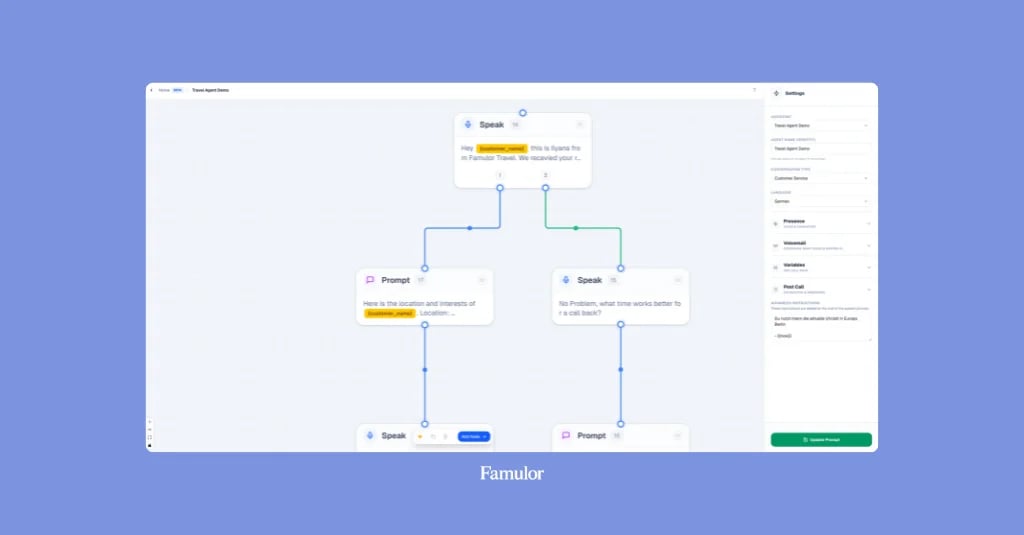
El corazón de cualquier plataforma no-code es el editor visual de flujos de trabajo. En Famulor, arrastras y sueltas varios nodos en un lienzo y los conectas para trazar el flujo de la conversación.
Nodo de inicio: Aquí defines el mensaje de bienvenida, por ejemplo: "Bienvenido a Gestión de Propiedades Musterbau. ¿En qué puedo ayudarte?"
Nodo de enrutador de IA: Este nodo analiza la primera respuesta de la persona que llama. Defines las posibles rutas, como "Reportar daños", "Programar cita" u "Otro". La IA dirige automáticamente la conversación a la rama correcta.
Nodo de recopilación de datos: En la ruta "Reportar daños", solicitas secuencialmente la información relevante: "¿Qué tipo de daño es?", "¿En qué edificio y apartamento?", "¿Cuál es su número de teléfono para preguntas de seguimiento?"
Nodo de calendario: En la ruta "Programar cita", el agente se conecta directamente a tu Google Calendar, Calendly u otro sistema de reservas. Puede decir: "Hay citas disponibles mañana a las 14:00 y a las 16:00. ¿Cuál le viene mejor?"
Paso 3: Alimenta al agente con conocimiento
Para preguntas generales, el agente necesita una base de conocimientos. Con Famulor, puedes simplemente subir documentos (PDF, archivos Word) o añadir URL de tu sitio web. El agente puede entonces responder preguntas como "¿Cuáles son sus horarios de apertura?" o "¿Qué debo hacer al mudarme?" de forma independiente, sin que tengas que definir manualmente cada pregunta y respuesta.
Paso 4: Selecciona canales (teléfono y/o chat en vivo)
Ahora, decide dónde debería estar disponible tu agente.
Telefonía: Puedes alquilar un nuevo número de teléfono directamente en la plataforma Famulor o conectar tu sistema telefónico existente mediante trunking SIP. Asigna el número a tu agente creado y listo.
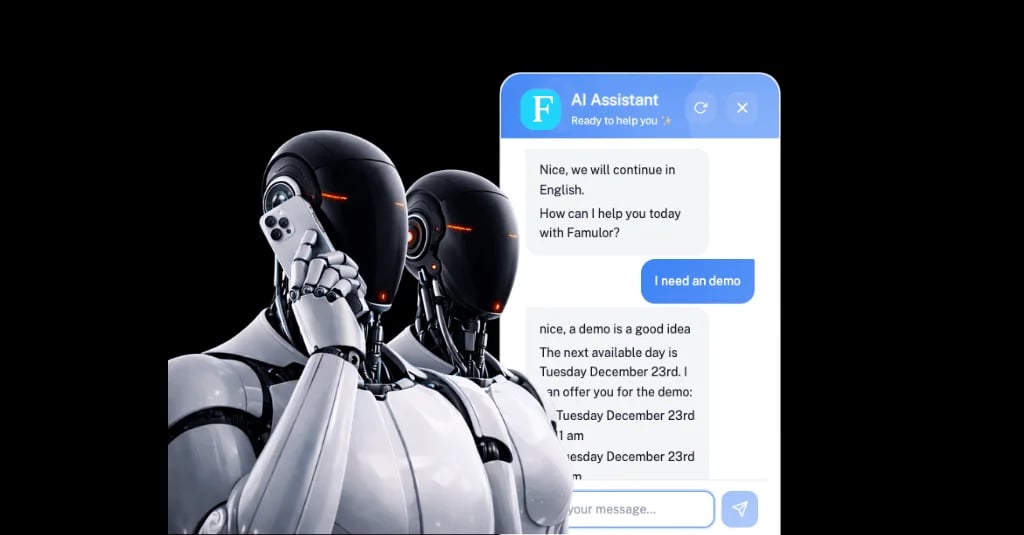
Chat en vivo: Para la integración en el sitio web, Famulor genera un breve fragmento de código. Cópialo en el encabezado de tu sitio web para activar los potentes agentes de chat en vivo con IA de Famulor. El mismo agente que responde llamadas ahora también puede chatear con tus visitantes mediante texto.
Paso 5: Conecta integraciones
Un agente es tan inteligente como los sistemas a los que está conectado. Una buena plataforma no-code para agentes de IA se distingue por sus capacidades de integración. Famulor te permite integrar el agente sin problemas con más de 300 herramientas.
Para nuestro ejemplo, haríamos lo siguiente:
Añadir una integración de Google Sheets para registrar cada informe de daños como una nueva fila en una hoja de cálculo.
Usar una integración de Google Calendar para añadir directamente las citas de visita reservadas.
Configurar una integración de Slack o correo electrónico para notificar inmediatamente al administrador de la propiedad responsable en caso de un informe de daños urgente.
Estas conexiones también se configuran sin código mediante sencillos pasos de autenticación y mapeo de datos. Para flujos de trabajo aún más complejos, también es posible una conexión con plataformas de automatización externas como Make.com o Zapier.
Paso 6: Prueba y optimiza
Antes de salir a producción, puedes probar tu agente directamente en la plataforma. Realiza llamadas de prueba y chatea con él para asegurarte de que todas las rutas funcionan según lo previsto. Tras el lanzamiento, los paneles de análisis proporcionan información sobre las conversaciones mantenidas. Puedes ver qué preguntas se hacen con frecuencia y dónde podrían estar abandonando los usuarios. Basándote en estos datos, puedes mejorar continuamente tu agente con solo unos clics.
Calcula tu ROI automatizando llamadas
Descubre cuánto podrías ahorrar al usar voice agents con IA.
Resultado ROI
ROI 0%
Sin tarjeta de crédito
Casos de uso en el mundo real: donde los agentes de IA no-code ya están destacando hoy
Las aplicaciones son prácticamente ilimitadas y abarcan todas las industrias y departamentos.
Departamento Caso de uso Ejemplo Atención al cliente Soporte de primer nivel 24/7 Un agente de IA responde preguntas estándar sobre el estado de pedidos, devoluciones o facturas durante todo el día, liberando al equipo humano. Ventas Reserva automática de citas Un agente de voz llama a los leads de una lista de ferias comerciales, cualifica su interés y reserva directamente una cita de demostración en el calendario del representante de ventas. Oficios y servicios Respuesta a llamadas y solicitudes de presupuesto Un electricista no está disponible en una obra. El agente de IA atiende la llamada, captura los detalles clave del trabajo y envía un resumen al maestro artesano por SMS. Sanidad Gestión de citas y renovación de recetas La consulta de un médico automatiza la programación de citas telefónicas y la gestión de solicitudes de renovación de recetas, dando a los recepcionistas más tiempo para los pacientes en la consulta. Recursos Humanos (RR. HH.) Selección de candidatos Un agente de IA realiza breves entrevistas telefónicas iniciales con los candidatos, hace preguntas estandarizadas sobre cualificaciones y disponibilidad, y remite a los candidatos más prometedores al departamento de RR. HH.
Conclusión: la democratización de la IA: conviértete tú mismo en un automatizador
Crear agentes inteligentes de voz y chat ya no es ciencia espacial. Las plataformas no-code como Famulor han reducido drásticamente las barreras, permitiendo que cualquiera se beneficie del poder de la inteligencia artificial. En lugar de perderte en complejos detalles técnicos, puedes centrarte en lo que realmente importa: crear experiencias de cliente excelentes y optimizar tus procesos de negocio.
La pregunta ya no es si la IA cambiará la comunicación con el cliente, sino quién será el primero en cosechar los beneficios. Con las herramientas adecuadas, puedes operar con más agilidad, eficiencia y orientación al cliente que nunca. No esperes al departamento de TI. Conviértete tú mismo en un innovador y construye el empleado digital perfecto para tu empresa hoy mismo.
¿Estás listo para revolucionar tu comunicación con el cliente? Descubre las posibilidades de Famulor y crea tu primer agente de IA sin código. Empieza ahora y comprueba por ti mismo lo fácil que puede ser la automatización.
Preguntas frecuentes (FAQ)
¿Cuál es la principal ventaja de una plataforma no-code para agentes de IA?
La principal ventaja es la velocidad y la accesibilidad. Puedes crear sofisticadas automatizaciones de voz y chat en horas en lugar de meses, sin necesidad de conocimientos de programación. Esto permite que los expertos en la materia participen directamente en la implementación y reaccionen rápidamente a los cambios del mercado.
¿Puede un agente no-code gestionar realmente tareas complejas?
Sí. Las plataformas modernas como Famulor van mucho más allá de los escenarios simples de preguntas y respuestas. Gracias a una profunda integración con más de 300 herramientas, los agentes pueden acceder a datos de CRM, calendarios y bases de datos, activar acciones en estos sistemas y ejecutar de forma autónoma flujos de trabajo complejos de varios pasos.
¿Es robótica la voz de la IA generada?
No. Gracias a las últimas tecnologías de conversión de texto a voz (TTS), las voces suenan extremadamente naturales y humanas. Plataformas como Famulor ofrecen una selección de voces de alta calidad en más de 40 idiomas e incluso permiten clonar una voz específica para una experiencia de marca perfecta.
¿En qué se diferencia un enfoque no-code de herramientas como Zapier o Make?
Aunque Zapier y Make son excelentes para la automatización de procesos en segundo plano, no están diseñados para crear conversaciones en tiempo real. Famulor combina un potente motor de automatización que funciona de forma similar con una interfaz especializada para diseñar y gestionar agentes de IA basados en el diálogo para teléfono y chat.
¿Qué ocurre si el agente de IA no puede responder a una pregunta?
Las buenas plataformas no-code incluyen rutas de escalada. En el Flow Builder visual, puedes especificar que, si una solicitud no puede resolverse, el agente transfiera la conversación sin problemas a un empleado humano, cree una solicitud de devolución de llamada o genere un ticket de soporte, incluyendo la transcripción de la conversación hasta ese punto.

Autor en Famulor