Summarize Content With:




Moltbot in Practice: AI Assistant with Famulor – Secure Voice AI Integration via MCP Bridges
The world of artificial intelligence is evolving rapidly. Modern AI assistants are no longer limited to text commands but interact autonomously with the real world—increasingly through voice. This article highlights how the advanced open-source AI assistant Moltbot can be seamlessly and securely integrated with the powerful Voice AI agents from Famulor. The key lies in the Model Context Protocol (MCP) and intelligent intermediary solutions like MCPorter, n8n, and Zapier, which ensure maximum functionality with high data security.
Imagine your personal AI assistant Moltbot not only coordinating your digital tasks but also independently making phone calls via Famulor to book appointments, clarify customer inquiries, or qualify leads—all without Moltbot having direct access to sensitive API keys. This integration revolutionizes how autonomous AI agents can interact with communication systems, enabling voice-based interactions, phone automation, and smooth multimodal task execution without compromising credential security or system integrity.
The Evolution of Autonomous AI Assistants and the Importance of Voice Integration
The landscape of personal AI assistance has changed dramatically in recent months. Instead of just providing conversational responses, sophisticated, self-hosted agents have emerged that can perform autonomous tasks. Moltbot is a prime example of this development. Originally designed as a productivity tool to manage "digital life," Moltbot shows that truly functional autonomous AI can be run on personal infrastructure, with users retaining control over data and execution context. The project's rapid success, with over 85,000 GitHub stars shortly after its launch, underscores the enormous interest in autonomy and a "local-first" approach.
In parallel, Voice AI technology has evolved significantly. Platforms like Famulor offer highly advanced phone automation and voice assistant management features that extend AI interaction beyond text-based messages into the realm of real-time voice communication. Famulor enables the use of advanced AI models like ChatGPT and Claude for actual phone calls, including comprehensive call management, transcription, and sentiment analysis.
The challenge is to connect these disparate systems securely and efficiently. This is where the Model Context Protocol (MCP) comes in, an open standard from Anthropic that bridges the gap between AI assistants and tools or data sources. Instead of giving Moltbot direct access to Famulor's API keys, MCP servers can act as intermediaries. They define which specific tools and functions are accessible, implement granular access controls, and maintain audit logs. This article explores this integration architecture in detail and demonstrates practical implementations with MCPorter, n8n, and Zapier.
Understanding Moltbot: Architecture, Capabilities, and Operational Paradigm
Moltbot is fundamentally different from the stateless chatbots that dominate the consumer AI market. Developed by Peter Steinberger, an experienced Austrian developer, it is characterized by three architectural elements: persistent memory across sessions, deep local machine access for autonomous command execution, and proactive task initiation.
Its autonomous functionality is achieved through a distributed gateway architecture that manages communication between messaging platforms (WhatsApp, Telegram, Discord, Slack, Signal, iMessage, and others), large language models, and the local system or VPS where Moltbot runs. Instead of requiring a new application, Moltbot integrates into existing messaging channels, making interaction feel natural and unobtrusive while providing transformative automation capabilities.
Another key feature is its extensible "Skills" architecture. Moltbot supports over 565 community-developed skills via ClawdHub, a decentralized marketplace. These skills range from simple integrations with services like Todoist and GitHub to complex workflows for calendar management, email processing, or smart home automation.
Moltbot's memory is persistent and stored locally in human-readable Markdown and JSON formats. It contains identity profiles, conversation histories, and skill manifests, allowing Moltbot to remember preferences and understand long-term goals.
Deployment options for Moltbot range from running on existing personal hardware (MacBook Pro, Linux workstation, Raspberry Pi) to dedicated Cloud Virtual Private Servers (VPS) for 24/7 availability. The cost structure includes the free MIT-licensed software, infrastructure costs, and API costs for the language model provider, although local LLM deployment via Ollama can eliminate API costs.
Famulor: The Platform for Voice AI Agents and Multi-Channel Integration
Famulor occupies a complementary niche to Moltbot, specializing in voice-based interactions and AI-powered telephony management. Famulor enables the deployment of AI agents that conduct actual phone conversations, handle inbound and outbound call campaigns, assess call quality through sentiment analysis, and provide comprehensive call recordings with automatic transcription. This significantly expands the possibilities for use cases where text interactions would be cumbersome or inappropriate.
The platform offers an extensive call management infrastructure, including secure storage of call recordings, automatic real-time transcriptions, AI-powered sentiment analysis, and comprehensive quality assessment. Famulor is compatible with various AI models like Claude and ChatGPT and supports both inbound and outbound calls. This enables diverse use cases from customer service automation and sales to appointment booking and information gathering.
Architecturally, Famulor implements an API model where users provide authentication credentials (API tokens) and define the configuration of the voice agents. The platform handles PSTN (Public Switched Telephone Network) connectivity, voice encoding and decoding, real-time transcription, and integration with the specific AI model.
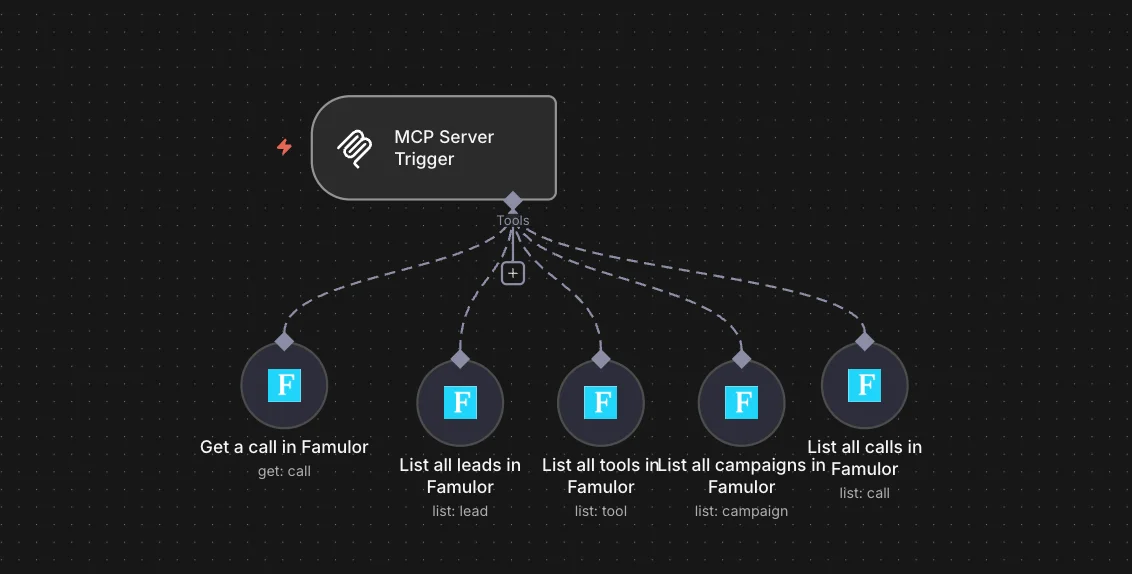
Famulor also acts as a Model Context Protocol (MCP) server, enabling seamless and secure integration with other AI agents and MCP clients without them needing to possess direct Famulor API credentials. As an MCP server, Famulor provides a set of tools—functions for creating voice agents, managing calls, retrieving call transcripts, and analyzing call outcomes—that MCP clients can invoke via standardized protocol interfaces.
Learn more about the revolution of Voice AI and LLMs in telephony: The third generation is here: How Famulor's Voice AI with LLMs is revolutionizing telephony.
The Model Context Protocol (MCP): Standardized, Secure Integration Architecture
The Model Context Protocol (MCP) is a fundamental architectural innovation for connecting AI systems with tools, data sources, and functions without requiring these systems to have direct access to credentials or maintain complex custom integrations. Introduced as an open standard by Anthropic, MCP solves a critical scalability and security problem: each new data source or API traditionally required a custom implementation within the AI system, multiplying complexity and significantly increasing the attack surface.
MCP operates on a client-server architecture, where MCP clients (like Moltbot or other AI agents) connect to MCP servers that provide specific functions through standardized tool and resource definitions. The protocol precisely defines which tools are available, what parameters each tool requires, what types of responses are possible, and how authentication and authorization are handled. This standardization allows clients to dynamically discover available functions, request only the necessary tools, and invoke them with the assurance that the responses will conform to expected schemas.
The security benefits are immense: instead of Moltbot storing a Famulor API key and dozens of other credentials in its local configuration, users configure MCP servers once and grant Moltbot access to invoke specific tools through these servers. If a Moltbot instance is compromised, attackers cannot exfiltrate all credentials, as most credentials remain stored in the MCP server infrastructure, not in Moltbot itself. Additionally, MCP servers can implement sophisticated access controls, rate limiting, audit logging, and permission revocation without requiring changes to the Moltbot client code.
Anthropic has released pre-built MCP server implementations for common enterprise systems like Google Drive, Slack, GitHub, Git, Postgres, and Puppeteer. Furthermore, organizations and individuals can create custom MCP servers that expose proprietary APIs or specialized tools. The protocol supports both HTTP-based remote MCP servers and stdio-based local MCP servers. The ecosystem around MCP has grown rapidly, with tools like MCPorter, n8n, and Zapier all implementing MCP client functionality.
Practical Integration: Connecting Moltbot with Famulor via MCP
Integrating Moltbot with Famulor via MCP offers various approaches that can be chosen based on technical expertise and the desired level of security:
1. MCPorter: Direct and Secure CLI Integration
MCPorter, also developed by Moltbot creator Peter Steinberger, is a lightweight command-line tool for discovering, configuring, and invoking MCP servers. It implements zero-configuration discovery, automatically merging MCP server definitions from various sources (local configuration files, environment variables).
Integration with Moltbot is achieved by MCPorter making MCP servers available as skills that Moltbot can call. Instead of writing complex skill code that interacts directly with external APIs, skill developers can reference MCPorter commands that call already configured MCP servers. MCPorter handles server discovery, authentication, and tool invocation, returning the results to Moltbot.
Advantages: Most direct integration, highest control, minimal third-party dependencies, ideal for technically savvy users who desire maximum data sovereignty.
2. n8n: Workflow-Centric Integration with Visual Design
n8n is a flexible workflow automation platform that connects Moltbot and specialized AI agent systems like Famulor through visual workflow design and deep MCP integration. n8n offers open-source code, self-hosting options, and direct support for custom JavaScript and Python code steps.
In n8n, users can create workflows that receive triggers from Moltbot (e.g., via webhooks), call Famulor's Voice AI functions through an MCP server interface, manage the results of voice interactions (call recordings, transcripts, quality ratings), and send information back to Moltbot or other systems. A typical workflow might look like this:
Trigger Node receives a webhook call from Moltbot with customer information.
MCP Client Node connects to Famulor's MCP server and calls, for example,
initiate_outbound_call.Data Transformation Node extracts relevant fields from the Famulor response.
Conditional Branching based on the success of the call initiation.
Success Path stores call metadata and notifies Moltbot.
Error Path logs the error and sends a notification.
Famulor, with its integrated no-code automation platform similar to n8n or Zapier, offers an intuitive way to create such workflows directly. The platform supports over 300 integrations, allowing businesses to seamlessly embed Famulor into their existing system landscape and realize complex automations without a single line of code. This makes implementation even easier and keeps full control over processes in the hands of the users.
Learn more about integrated automation with Famulor here: API Integrations: How to Build Smart Voice AI Agents with Famulor That Actually Get Things Done.
For a detailed comparison of n8n with Famulor regarding AI-powered customer communication, visit: n8n + WhatsApp vs. Famulor: The Ultimate Comparison for AI-Powered Customer Communication.
3. Zapier: Broad Integration Ecosystem with MCP and AI Orchestration
Zapier is an automation platform known for its user-friendliness and a vast number of over 8,000 integrations. It allows for the creation of automations across existing business applications without custom development.
Zapier has invested heavily in agent capabilities and MCP support. The "Zapier Agents" product allows for the definition of AI-powered decision nodes in workflows that can evaluate context, make decisions about workflow routing, and trigger actions autonomously. Zapier has also released an MCP server that provides access to the entire Zapier ecosystem via MCP clients. This means Moltbot can gain direct access to thousands of services like Gmail, Google Sheets, or Slack via this Zapier MCP server without storing individual API keys.
When integrating Famulor with Moltbot via Zapier, users create workflows where Moltbot (via its MCP server) instructs Zapier to trigger Famulor actions, such as initiating phone calls, retrieving call transcripts, or analyzing call sentiment. Zapier manages the MCP connection to Famulor's Voice AI platform, handles authentication and credentials, and returns the results to Moltbot.
Famulor's No-Code Flow Builder also offers comparable user-friendliness and the ability to design workflows visually, but with a focus on an integrated omnichannel AI solution. This combination makes it possible to create complex automations and seamlessly integrate Famulor with other systems to elevate customer communication to a new level.
Discover the power of the Famulor Flow Builder: Famulor's Omnichannel AI Agent Flow Builder: Design Intelligent Dialogues Without a Single Line of Code.
Practical Implementation: Installing Moltbot and Setting Up Famulor Integration
Installation and Initial Moltbot Setup
The first step to using this integrated system is installing Moltbot. This has been kept deliberately simple:
curl -fsSL https://molt.bot/install.sh | bash
After installation, an interactive onboarding assistant guides you through the essential setup steps:
moltbot onboard --install-daemon
The --install-daemon parameter ensures that Moltbot runs continuously as a background service. In the assistant, you select your preferred AI model provider (Anthropic Claude, OpenAI GPT, Gemini, or local models via Ollama), configure messaging channel connections (WhatsApp, Telegram, Discord, Slack, etc.), and set security settings.
For 24/7 availability on a VPS, Docker offers a containerized Moltbot execution:
git clone https://github.com/moltbot/moltbot.git
cd moltbot
./docker-setup.sh
Configuring the MCP Server Integration
Once Moltbot is running, the MCP server connectivity is established. Famulor supports integration via its MCP server functionality, which enables a secure connection with Moltbot.
Adding Famulor AI Agent Access to Moltbot
To give Famulor AI agents access to Moltbot without exposing API keys directly, use MCP server bridges. Here are the recommended steps:
Install MCPorter:
Use the MCPorter CLI to list, configure, authenticate, and call MCP servers/tools directly.
moltbot mcporter - install mcporterSet up MCP Server for Famulor:
You can add an MCP server for Famulor either directly via MCPorter or through n8n/Zapier. This ensures that your API keys remain secure and are not shared directly with Moltbot.
Option A: Directly via MCPorter
Edit the MCPorter configuration file (e.g.,
~/.mcporter/mcporter.json) to add Famulor's MCP endpoint:{ "servers": { "famulor": { "command": "https://api.famulor.io/mcp", "env": { "FAMULOR_API_KEY": "${FAMULOR_API_KEY}" } } } }Ensure that your Famulor API key is securely set as an environment variable:
export FAMULOR_API_KEY="your_famulor_token_here"You can then query the available tools from Famulor:
mcporter list --name famulorAnd call Famulor tools via Moltbot skills:
mcporter call famulor initiate_outbound_call '{"phone_number":"+1234567890","agent_id":"sales_agent"}'Option B: Via n8n or Zapier as an MCP Server
Famulor seamlessly integrates with no-code automation platforms like n8n or Zapier. These platforms can then act as MCP servers themselves, giving Moltbot access to Famulor functions.
With n8n: Create a workflow that receives a webhook from Moltbot. Then, add a Famulor node (or an HTTP Request node that calls the Famulor API) to perform actions like initiating a call or retrieving call information. Your Famulor credentials are stored securely in n8n. The workflow's output can then be sent back to Moltbot via another webhook.
With Zapier: Create a Zap that is triggered by a Moltbot request (e.g., via webhooks). Use the Famulor integration in Zapier to perform Voice AI actions. Here too, the API keys are managed securely in Zapier, and Moltbot only interacts with the Zapier webhook.
These approaches ensure that you do not have to share your API keys directly with Moltbot, which significantly increases security.
Start via WhatsApp or Telegram:
Once the integration is set up via an MCP server, you can control Moltbot through your preferred messaging channels. Moltbot interprets your commands and forwards the corresponding Voice AI tasks to Famulor via the configured MCP server.
WhatsApp Integration: The onboarding assistant prompts you to select WhatsApp and generates a QR code. You scan this with the "Linked Devices" feature in WhatsApp to establish a secure end-to-end encrypted connection.
Telegram Integration: Create a Telegram bot via the BotFather in Telegram, receive a bot token, and enter it in the Moltbot onboarding assistant.
Security Architecture and Credential Management
Preventing Credential Concentration in Moltbot
The biggest security risk with autonomous AI systems is the concentration of credentials. If the system is compromised, all API keys and tokens could be exposed simultaneously. The MCP-based integration approach significantly mitigates this risk by distributing credentials across multiple systems.
When Moltbot calls Famulor via an MCP server (MCPorter, n8n, or Zapier), the Famulor credentials remain stored in that intermediary system, not in Moltbot. Even if the Moltbot instance is compromised, attackers would not find any Famulor API keys. This significantly reduces the so-called "blast radius" of an attack, as a compromised Moltbot cannot access all the services it previously had direct access to.
Granular Access Controls through MCP Authorization
MCP servers enable sophisticated authorization models where permissions are not binary ("full access" or "no access") but multidimensional. A Famulor MCP server could provide Moltbot with only the tools to "retrieve call transcripts" and "analyze call sentiment," while explicitly hiding tools to "delete all calls" or "change agent configuration." This granular authorization is configured at the MCP server level, not within Moltbot, so Moltbot cannot override these permissions even through sophisticated prompt injection or exploit attempts.
Audit Trails and Activity Logging
MCP servers can implement comprehensive logging for every tool invocation, including timestamps, parameters, results, and identifying system information. When Moltbot calls Famulor's "initiate_outbound_call" via an MCP server, this call creates an audit log entry that precisely records who requested what action, when, with which parameters, and what the result was. These audit logs can be forwarded to security monitoring systems to detect anomalous patterns, such as sudden spikes in call initiations or calls to unexpected phone numbers.
Physical Security and Hardware Considerations
Using Moltbot on dedicated hardware poses physical security risks. The MCP-based architecture offers a partial solution here: even if an attacker gains physical access to the Moltbot hardware, they cannot use this information to access Famulor, as the Moltbot instance does not contain any Famulor credentials. Instead, the attacker would have to compromise Famulor itself or the intermediary n8n/Zapier/MCPorter system that stores the Famulor credentials.
Real-World Use Cases: Practical Applications of Integrated Systems
The combination of Moltbot's autonomous decision-making and Famulor's Voice AI capabilities, mediated by secure MCP bridges, opens up a variety of practical use cases across different industries:
Customer Support and Service Recovery
A customer service department handling hundreds of interactions daily faces the challenge of responding to inquiries, managing callbacks, and ensuring timely follow-ups. Moltbot can be fed with company knowledge, policies, and customer databases. Incoming messages (WhatsApp, Telegram, email) are processed by Moltbot, which answers simple questions immediately and escalates complex cases to human support, including a summary of the situation.
For callback requests, Moltbot can instruct Famulor to initiate an outbound call via the integrated MCP architecture. The Famulor Voice AI agent conducts the conversation, captures feedback, and documents the outcome in the CRM system. In case of dissatisfaction, it forwards the call directly to a human specialist. This eliminates manual callback lists and ensures consistent communication across all channels.
With its intelligent call forwarding and enhanced features for AI phone assistants, Famulor provides a seamless handover from AI to a human agent to efficiently resolve even complex inquiries.
Sales Outreach and Lead Qualification
Sales organizations often struggle with the high effort of lead qualification. Moltbot can be integrated with CRM systems to identify high-quality leads. Based on company data and interaction history, Moltbot creates personalized messages. If there is no response, Moltbot can instruct Famulor to initiate an outbound call.
The Famulor agent conducts the qualification call, presents the value proposition, and tries to schedule a follow-up meeting with a sales representative. Calls are recorded, transcribed, and sentiment analysis is logged in the CRM. As a result, human sales reps receive only pre-qualified leads, significantly increasing conversion rates.
Appointment Scheduling and Reminder Automation
Appointment-based businesses (doctor's offices, salons, consulting firms) spend a lot of time on appointment management. Moltbot, integrated with calendar systems via MCP servers, can handle the entire workflow autonomously. Customers can request appointments via messaging, email, or voice. Moltbot checks availability, suggests options, confirms preferences, and creates the appointment.
Automated reminders are sent through the customer's preferred channel. If the customer does not confirm, Moltbot can instruct Famulor to call and confirm the appointment. In case of cancellations or rescheduling, Moltbot immediately identifies alternatives. This significantly reduces no-shows and manual scheduling effort.
Learn more about setting up call forwarding to an AI assistant: Setting Up Call Forwarding: Your Ultimate Guide to Automatically Forwarding Calls to an AI Assistant.
Personal Research and Analysis Assistants
Knowledge workers frequently need to research, gather information, analyze it, and synthesize recommendations. Moltbot can be configured as a persistent research agent that monitors information sources (news feeds, RSS feeds, social media), identifies relevant items, and proactively informs the user via their messaging channel. For research that requires voice-based interaction or gathering information from human sources, Moltbot can task Famulor with conducting structured interviews or exploring nuances.
DevOps and System Administration
Development teams and DevOps experts manage complex infrastructures that require continuous monitoring and rapid response. Moltbot can monitor infrastructure health via MCP server connections to monitoring systems. In case of critical issues, Moltbot initiates a coordinated response: notifying on-call engineers, coordinating incident response, and maintaining a real-time summary. For issues requiring a quick human decision, Moltbot can call Famulor to ensure immediate notification.
Patient Communication in Healthcare
Healthcare providers have high demands for patient communication, often with HIPAA compliance. Moltbot's "local-first" architecture and the MCP-based separation of credentials offer strong HIPAA-compliant features. Patient communications via Moltbot are recorded locally (with appropriate encryption), and credentials for accessing patient data are stored not in Moltbot, but in MCP servers that can implement specific security controls. All operations are logged.
A healthcare provider could configure Moltbot to send appointment reminders via patients' preferred channels (SMS, WhatsApp, or voice calls via Famulor). If an appointment is not confirmed, Moltbot calls via Famulor to confirm or reschedule. Notifications about lab results can be partially handled by Moltbot, with an escalation to human clinicians for abnormal results.
Deployment Considerations and Best Practices
When implementing an integrated system of Moltbot and Famulor, several aspects must be carefully considered:
Choice of Deployment Model
The decision between local deployment (on own hardware) and VPS deployment (on cloud servers) affects costs, availability, maintenance effort, and data privacy. Local deployment minimizes monthly costs and maximizes data privacy but requires 24/7 operation of your own hardware. VPS deployment offers reliable 24/7 availability and remote access but incurs additional monthly infrastructure costs.
Network Security Configuration
Network security is crucial to prevent unauthorized access to Moltbot's gateway. The gateway listens on port 18789 by default and should never be exposed directly to the public internet without authentication. For local deployments, the gateway should be bound exclusively to loopback (127.0.0.1). For VPS deployments, access should be via Tailscale, SSH tunneling, or a reverse proxy with strong authentication. Active authentication for the gateway itself is essential.
Best Practices for Credential Management
Careful handling of credentials (API keys, tokens) is of utmost importance:
Environment Variables: Sensitive credentials should be stored in environment variables, not hardcoded in configuration files.
Secret Management: For VPS deployments, host-based secret management systems (e.g., 1Password, HashiCorp Vault) should be used.
Regular Rotation: API keys and tokens should be rotated regularly (monthly or quarterly).
Limiting Credential Scope: Permissions should be restricted to the absolute necessary minimum (principle of least privilege).
Challenges, Limitations, and Future Considerations
Although the integration of Moltbot and Famulor via MCP offers significant advantages, there are also challenges and future areas of development:
Latency and Real-Time Response Requirements
Moltbot's processing pipeline (receive message, send to LLM, interpret response, call MCP server, receive result) can lead to cumulative latencies. This is acceptable for simple automated responses, but in real-time conversations (like phone calls), it can result in unnatural interaction patterns. Ongoing developments aim to reduce these latencies.
Prompt Injection and Indirect Prompt Attacks
Autonomous AI systems that receive untrusted input from external sources are vulnerable to prompt injection attacks. MCP servers offer some mitigation by limiting the available actions. However, it is crucial to treat all external inputs as untrusted and implement defenses such as strict prompt boundaries, capability sandboxing, and input validation.
Supply Chain Risk in Skills and MCP Servers
The extensible architecture of Moltbot and MCP ecosystems poses supply chain risks, as seemingly harmless skills or MCP servers could contain malicious code. It is recommended to install skills only from trusted sources, review the code before installation, and monitor installed skills for unexpected behavior.
Conclusion: Moltbot and Famulor – Autonomous AI with Secure Voice Interaction
The integration of Moltbot, a highly advanced autonomous AI assistant, with Famulor's Voice AI agents via MCP-based architectures represents a significant practical advancement. This architecture solves fundamental challenges in deploying autonomous AI: secure access to numerous external services without direct storage of credentials, maintaining audit trails, limiting the functional scope of agents to prevent privilege escalation attacks, and enabling sophisticated automation while preserving human oversight.
By interposing MCP servers between Moltbot and external services, a separation of credentials is achieved. Moltbot never has direct access to Famulor APIs or other service credentials but instead calls pre-authorized operations via standardized MCP protocols. This protects your sensitive data and significantly enhances system security.
The various implementation paths via MCPorter, n8n, or Zapier offer flexibility for different technical skill levels and security requirements. The diverse use cases in areas such as customer service, sales, appointment scheduling, and even healthcare demonstrate the enormous potential of this integrated solution. The combination of Moltbot's autonomous decision-making and Famulor's voice-enabled capabilities, mediated by secure MCP servers, enables automations that were previously only achievable with considerable manual effort.
For businesses looking to implement advanced AI automation with pragmatic security boundaries, the integration of Moltbot and Famulor via MCP offers a proven, practical architectural pattern that deserves serious consideration.
Start Your Journey into Intelligent Automation Today!
Do you want to leverage the power of Moltbot and Famulor in your business? Discover how Famulor can revolutionize your telephone communication and make it more efficient and cost-effective through AI automation. Famulor offers an intuitive no-code platform that allows you to quickly and easily create your own Voice AI agents and integrate them into your existing systems.
Contact Famulor today for a personal consultation and a no-obligation quote!
FAQ – Frequently Asked Questions about the Moltbot-Famulor Integration
What is Moltbot?
Moltbot is an open-source, autonomous personal AI assistant that runs on local infrastructure. It can perform tasks proactively, has persistent memory, and can be controlled via messaging apps.
What is Famulor?
Famulor is a SaaS platform for AI-powered autonomous agents for automating phone calls and live chats, both inbound and outbound. It offers multi-language support and extensive integration capabilities.
Why is the integration of Moltbot and Famulor via MCP important?
Integration via the Model Context Protocol (MCP) enables a secure connection between Moltbot and Famulor without giving Moltbot direct access to sensitive API keys. This reduces security risks and allows for granular access controls.
What are the benefits of Famulor as an MCP server?
Famulor acts as an MCP server, allowing other AI systems like Moltbot to securely and standardly access its Voice AI functions. Famulor manages the actual telephony infrastructure and authentication.
How can I add Famulor AI agents to Moltbot?
You can add Famulor AI agents to Moltbot by configuring an MCP bridge via MCPorter, n8n, or Zapier. These intermediary systems securely manage the Famulor API keys and provide the necessary functions to Moltbot via standardized MCP interfaces.
What integration options are there besides MCPorter, n8n, and Zapier?
Famulor offers an internal no-code automation platform that can integrate over 300 tools, similar to Zapier and n8n. This allows you to connect Famulor directly with a variety of business applications, creating complex workflows without external tools.
Is my data secure with this type of integration?
Yes, the MCP-based architecture is specifically designed to enhance data security. Since Moltbot does not store direct credentials for Famulor but communicates via secure MCP servers, the risk in case of a Moltbot instance compromise is significantly reduced. Additionally, MCP servers offer features for granular access controls and audit trails.
Can I connect Famulor to my existing VoIP/PBX system?
Yes, Famulor offers SIP trunking, which allows integration with any on-premise VoIP/PBX system. This ensures seamless integration into your existing telephony infrastructure.
What use cases are conceivable with Moltbot and Famulor?
The combination enables diverse use cases, including automating customer support by phone, lead qualification in sales, automatic appointment scheduling and reminders, proactive research and analysis tasks, and support in DevOps and patient communication in healthcare.
How do I get started with Famulor?
Visit the Famulor website and contact the team for a personal consultation. The platform offers an intuitive no-code environment to quickly start creating and deploying your Voice AI agents.
Writer at Famulor