Inhoud samenvatten met:




Van één commando naar een intelligente dialoog: de nieuwe Famulor Flow Builder voor voice agents
De automatisering van telefoongesprekken door AI heeft de afgelopen jaren een enorme vlucht genomen. Veel bedrijven lopen echter al snel tegen een onzichtbare muur aan: de complexiteit en starheid van voice agents die gebaseerd zijn op één enkele, omvangrijke prompt. Wie kent het niet? Je communiceert met een spraakassistent die faalt zodra er ook maar iets afgeweken wordt van het script. Het probleem is vaak niet de AI zelf, maar de manier waarop deze wordt aangestuurd. Eén enkel commando, hoe geavanceerd ook, kan zelden de dynamische aard van een echt klantgesprek vangen. Het resultaat is frustratie aan beide kanten en een gemiste kans om technologie echt effectief in te zetten.
Dit is precies waar Famulor in beeld komt, met een revolutie in het creëren van AI-telefoonagenten. We zijn verheugd om de Famulor Flow Builder te introduceren – een visuele, intuïtieve tool waarmee je de volledige controle krijgt over je geautomatiseerde gesprekken. In plaats van te vertrouwen op complexe prompt engineering voor één enkel commando, kun je nu in enkele minuten complexe, meerstaps belstromen creëren met drag-and-drop. Dit markeert de overgang van eenvoudige instructies naar intelligent procesontwerp.
Het "Single-Prompt" dilemma: waarom meer controle nodig was
Om het belang van de Flow Builder te begrijpen, moeten we kijken naar de uitdagingen waar we tot nu toe voor stonden. Traditioneel werd een voice agent geconfigureerd met een allesomvattende "master prompt". Deze tekst bevatte alle instructies, doelen, mogelijke antwoorden en gedragsregels.
Deze aanpak had echter aanzienlijke nadelen:
Gebrek aan controle: Een grote prompt gedraagt zich vaak als een "black box". Het is lastig om het exacte verloop van het gesprek te sturen of te voorspellen waarom de AI een bepaalde beslissing heeft genomen. Je geeft de instructie, maar het exacte pad naar het doel blijft vaak verborgen.
Hoge complexiteit en foutgevoeligheid: Hoe complexer de use case, hoe langer en onoverzichtelijker de prompt wordt. Het toevoegen van uitzonderingen, voorwaarden of nieuwe scenario's wordt exponentieel moeilijker en foutgevoeliger. Een kleine wijziging kan onbedoelde gevolgen hebben voor de gehele belstroom.
Moeilijke debugging: Wanneer een gesprek mislukt, is het opsporen van de fout in een enorme prompt een moeizame klus. Het is lastig om te identificeren welk deel van de instructie verkeerd werd begrepen.
Schaalbaarheidsproblemen: Complexe bedrijfslogica, zoals leadkwalificatie met meerdere beslispunten, is bijna onmogelijk weer te geven in één prompt zonder de grenzen van begrijpelijkheid en onderhoudbaarheid te overschrijden.
Het doel was duidelijk: we hadden een oplossing nodig die onze gebruikers volledige controle geeft zonder dat ze prompt engineers hoeven te worden. Een oplossing die ontworpen is voor de veeleisende en vaak onvoorspelbare belsituaties in de echte zakenwereld.
De game-changer: de Famulor Flow Builder in detail
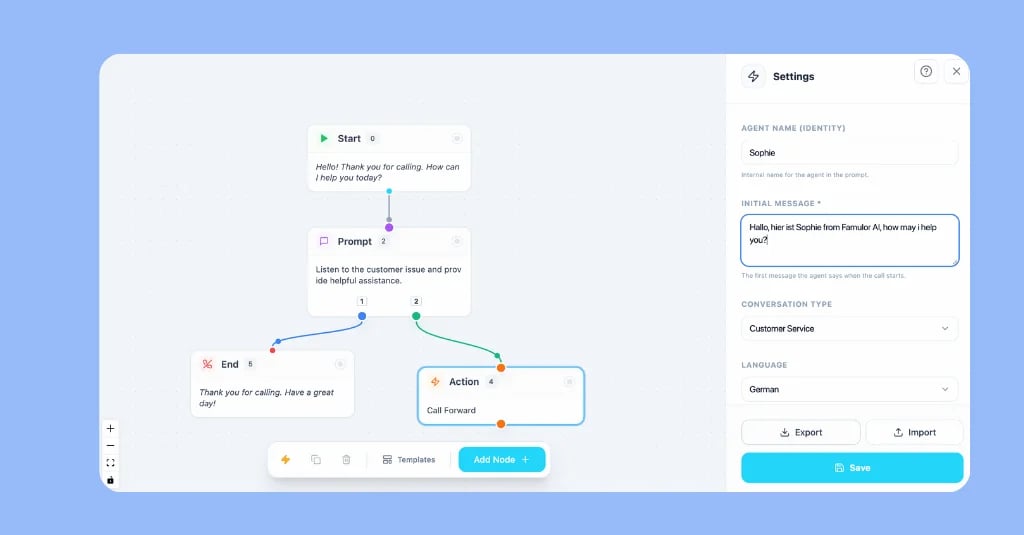
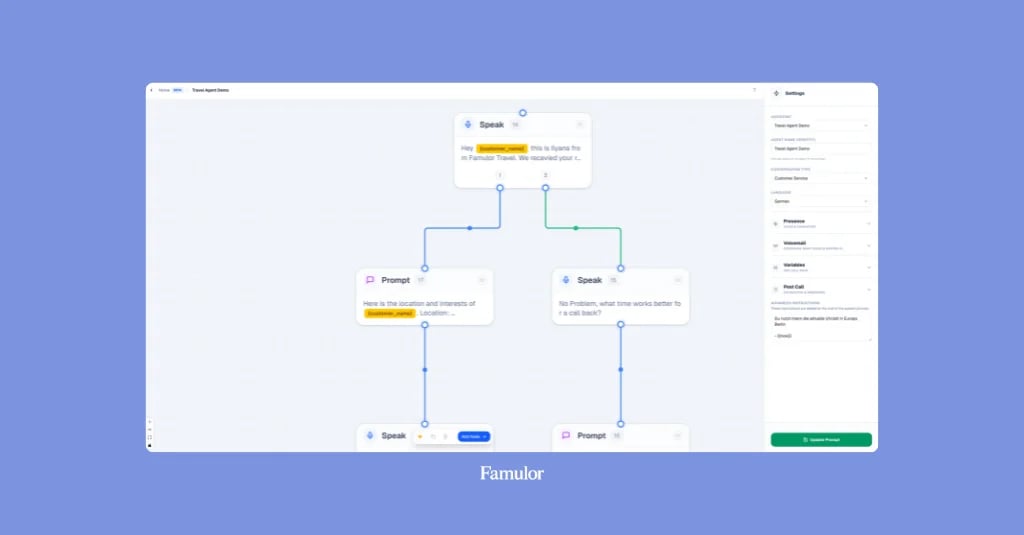
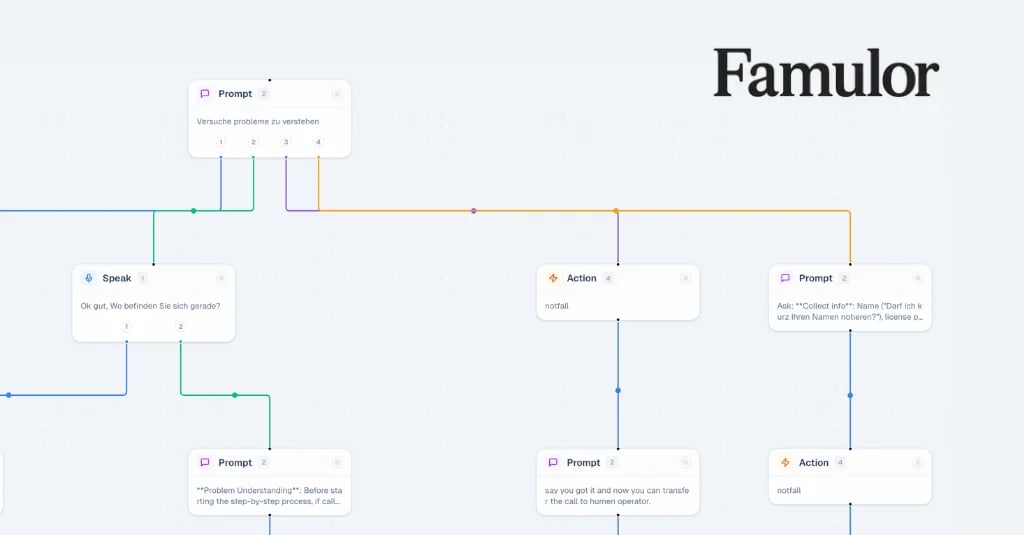
De Famulor Flow Builder is een visuele no-code ontwikkelomgeving waarmee je belstromen als een diagram kunt ontwerpen. In plaats van een lange tekst te schrijven, verbind je individuele nodes die elk een specifieke taak in het gesprek uitvoeren. Zie het als een organigram of een mindmap voor je gesprekken, waarbij elke stap logisch voortbouwt op de vorige.
Het kernconcept is de verschuiving van een monolithische prompt naar een multi-prompting systeem. Elke node in de flow heeft zijn eigen kleine, gerichte prompt. Dit maakt het hele proces transparant, controleerbaar en ongelooflijk flexibel.
Stel je het verschil voor tussen het bouwen van een huis uit één gigantisch blok marmer en het bouwen met individuele bakstenen. Met bakstenen (of in ons geval, nodes) heb je de vrijheid om elke vorm te creëren, muren te verplaatsen en kamers precies naar wens in te richten.
De 5 cruciale voordelen van de Flow Builder voor jouw bedrijf
De overstap naar een visuele, flow-gebaseerde configuratie is meer dan alleen een technische innovatie. Het biedt tastbare strategische voordelen die direct invloed hebben op je efficiëntie, kosten en klanttevredenheid.
1. Maximale controle en precisie
Met de Flow Builder bepaal je precies wat er in elke fase van het gesprek gebeurt. Je kunt vertakkingen (condities) aanmaken op basis van de antwoorden van de beller. Zegt de klant "afspraak inplannen"? Stuur ze door naar het pad voor de kalenderintegratie. Zeggen ze "support"? Leid ze naar het ticketsysteem. Jij bent de architect van het gesprek en laat niets aan het toeval over.
2. Razendsnelle creatie in minder dan 5 minuten
De intuïtieve drag-and-drop interface maakt het creëren van een voice agent ongelooflijk snel. Een eenvoudige agent voor het inplannen van afspraken kan in minder dan vijf minuten live gaan. Dit versnelt niet alleen de implementatie, maar stelt je ook in staat om snel in te spelen op nieuwe vereisten of verschillende belsituaties te testen.
3. Ontworpen voor complexe, "lastige" belsituaties
Dit is waar de Flow Builder echt uitblinkt. Iedereen kan eenvoudige gesprekken automatiseren. Maar hoe zit het met complexe kwalificatieprocessen of meerstaps supportvragen?
Leadkwalificatie: Vraag naar budget, beslissingsbevoegdheid en tijdlijn. Afhankelijk van de antwoorden kan de flow de lead automatisch doorsturen naar de juiste accountmanager of specifieke informatie sturen.
Dynamische afspraakplanning: Controleer niet alleen de beschikbaarheid in de agenda; vraag naar de gewenste locatie of de benodigde service voordat je de afspraak in de agenda boekt.
Klantenservice triage: Leid bellers automatisch door verschillende oplossingspaden op basis van hun klantnummer of het beschreven probleem, voordat er een menselijke medewerker aan te pas komt.
4. Eenvoudige debugging en optimalisatie
Omdat elke stap in de belstroom gevisualiseerd is, zie je direct waar een gesprek misging. De gesprekslogs laten je precies zien welk pad de beller heeft bewandeld en bij welke node een probleem optrad. Dit maakt het optimaliseren van je voice agents een datagestuurd en overzichtelijk proces.
5. Naadloze integratie in je bestaande workflows
Een gesprek is zelden een op zichzelf staande gebeurtenis. Het is onderdeel van een groter bedrijfsproces. De Flow Builder is diep geïntegreerd in het automatiseringsplatform van Famulor. Dit betekent dat elke node een actie kan triggeren in een van je meer dan 300 gekoppelde tools – of het nu gaat om het invoeren van een lead in je CRM, het aanmaken van een ticket in Zendesk of het versturen van een samenvatting via Slack. Dit vermogen om op elk punt in het gesprek diepe integraties te activeren, is wat een simpele bot onderscheidt van een echte autonome agent die echt werk verzet.
Hoe je je eerste voice agent maakt met de Flow Builder: een stapsgewijze handleiding
Het creëren van een flow is ongelooflijk eenvoudig en volgt een duidelijke logica. Hier is een basisvoorbeeld van hoe je een agent bouwt voor het afhandelen van supportvragen:
Startpunt (Trigger): Alles begint met een trigger. In de meeste gevallen is dit een "Inkomend gesprek".
Begroeting (Bericht-node): De eerste zichtbare stap. Hier configureer je het welkomstbericht. Bijvoorbeeld: "Welkom bij de support van [Jouw Bedrijf]. Waarmee kan ik je helpen?"
De splitsing (Conditie-node): Nu wil je de vraag begrijpen. Je kunt een conditie aanmaken op basis van trefwoorden in het antwoord van de beller. Als het antwoord "factuur" bevat, ga dan naar Pad A. Als het "technisch probleem" bevat, ga dan naar Pad B.
Gegevens verzamelen (Input-node): Op Pad A kun je nu vragen om het factuurnummer. "Om je te helpen, noem me alsjeblieft je factuurnummer." De opgehaalde informatie wordt opgeslagen als variabele.
Actie uitvoeren (Actie-node): Met het factuurnummer kun je nu een actie triggeren, zoals een zoekopdracht in je boekhoudsoftware via een API of een integratie met Make.com om de status te controleren.
Antwoord geven (Bericht-node): Op basis van het resultaat van de actie informeer je de klant: "Je factuur is op [Datum] betaald."
Afsluiting (Gesprek beëindigen-node): Beëindig het gesprek professioneel. "Kon ik je hiermee helpen? ... Bedankt voor je telefoontje."
Deze modulaire structuur stelt je in staat om zelfs zeer complexe logica overzichtelijk en onderhoudbaar in kaart te brengen.
Conclusie: van prompt-artiest naar procesarchitect
De introductie van de Famulor Flow Builder markeert een cruciaal keerpunt in de automatisering van telefonische communicatie. Het is een verschuiving weg van de noodzaak om een meester in prompt engineering te zijn, naar het worden van een architect van intelligente bedrijfsprocessen. Je hoeft niet langer te hopen dat de AI je intenties correct interpreteert uit een lange tekst. In plaats daarvan ontwerp je de dialoog actief, precies en visueel.
Met deze controle kunnen bedrijven eindelijk het volledige potentieel van Voice AI benutten: het automatiseren van complexe, waardetoevoegende taken die verder gaan dan simpelweg gesprekken aannemen. Het gaat erom dat je niet alleen gesprekken beantwoordt, maar problemen oplost, leads kwalificeert en klanten proactief bedient.
De Famulor Flow Builder is nu beschikbaar in je dashboard en op de assistent-pagina. We nodigen je uit om het zelf te proberen en te ervaren hoe gemakkelijk en snel je een krachtige, intelligente voice agent kunt maken die precies volgens jouw regels werkt.
Veelgestelde vragen (FAQ)
Wat is de Famulor Flow Builder?
De Famulor Flow Builder is een visuele no-code tool waarmee je meerstaps, logica-gebaseerde belstromen voor AI-voice agents kunt maken met een drag-and-drop interface. In plaats van één grote prompt te gebruiken, stuur je het verloop van het gesprek door individuele functienodes met elkaar te verbinden.
Moet ik kunnen programmeren om de Flow Builder te gebruiken?
Nee, helemaal niet. De Flow Builder is een no-code platform dat specifiek is ontworpen voor gebruikers zonder programmeerkennis. De gebruikersinterface is intuïtief en visueel, waardoor iedereen complexe gesprekslogica kan creëren.
Wat is het verschil met de vorige Prompt Editor?
De vorige Prompt Editor was ontworpen om één centrale prompt te beheren. De Flow Builder vervangt deze aanpak door een multi-prompting systeem. Elke node in de flow heeft zijn eigen kleine prompt, wat zorgt voor meer controle, flexibiliteit en eenvoudigere debugging bij complexe scenario's.
Voor welke soorten gesprekken is de Flow Builder het meest geschikt?
De Flow Builder is uitstekend geschikt voor alle gesprekken die verder gaan dan een eenvoudige vraag-en-antwoordstructuur. De kracht ligt met name in use cases met vertakkende logica, zoals leadkwalificatie, triage voor klantenservice, meerstaps afspraakplanning of enquêtes.
Hoe krijg ik toegang tot de Flow Builder?
De Flow Builder is direct beschikbaar in je Famulor-dashboard. Je kunt deze selecteren bij het aanmaken of bewerken van een assistent op de configuratiepagina en direct beginnen met het ontwerpen van je intelligente belstromen.

Auteur bij Famulor