Inhoud samenvatten met:




Loopt je AI-assistent tegen zijn grenzen aan? De naadloze overstap naar Famulor
Het implementeren van een AI-gestuurde stemassistent is een cruciale stap in het moderniseren van klantcommunicatie. Veel bedrijven beginnen hun reis met platforms zoals Vapi, Retellai, Synthflow of Fonio. Deze tools bieden een snelle toegang tot de wereld van spraakautomatisering, vaak gecentreerd rond één centrale systeemprompt. Maar wat gebeurt er als je behoeften groeien? Wanneer simpelweg telefoontjes beantwoorden niet meer volstaat en je complexe, meerstaps processen in kaart moet brengen, diepgaande integraties met je bedrijfssystemen nodig hebt en een echt menselijke gesprekskwaliteit wilt garanderen? Dit is precies waar veel standaardoplossingen tegen hun technologische en conceptuele grenzen aanlopen.
Als je merkt dat een gebrek aan flexibiliteit, hoge latentie, ontbrekende integratiemogelijkheden of een rigide 'alleen-prompt'-benadering je groei in de weg staat, is het tijd voor de volgende logische stap. Dit is geen overgave, maar een evolutie. Overstappen naar een geavanceerd, procesgericht platform zoals Famulor is geen herstart, maar een strategische upgrade. In deze gids laten we zien hoe eenvoudig en soepel de migratie kan zijn en waarom dit het volledige potentieel van je geautomatiseerde klantinteracties ontsluit. We bieden zelfs een volledig gratis migratieservice aan om de overstap zo makkelijk mogelijk te maken.
Waarom overstappen van Vapi, Retellai & Co. naar Famulor strategisch zinvol is
Een simpele systeemprompt is een krachtig begin, maar het is slechts dat: een begin. Echte efficiëntie en een uitmuntende klantervaring worden pas bereikt wanneer de AI-assistent niet alleen reageert, maar ook handelt. Hij moet in real-time afspraken kunnen controleren en inplannen, klantgegevens in het CRM kunnen opzoeken, supporttickets kunnen aanmaken en intelligente beslissingen kunnen nemen op basis van het verloop van het gesprek. Dit zijn de belangrijkste verschillen die een migratie naar Famulor rechtvaardigen.
1. Meer dan alleen een prompt: Visuele Flow Builder voor echte procescontrole
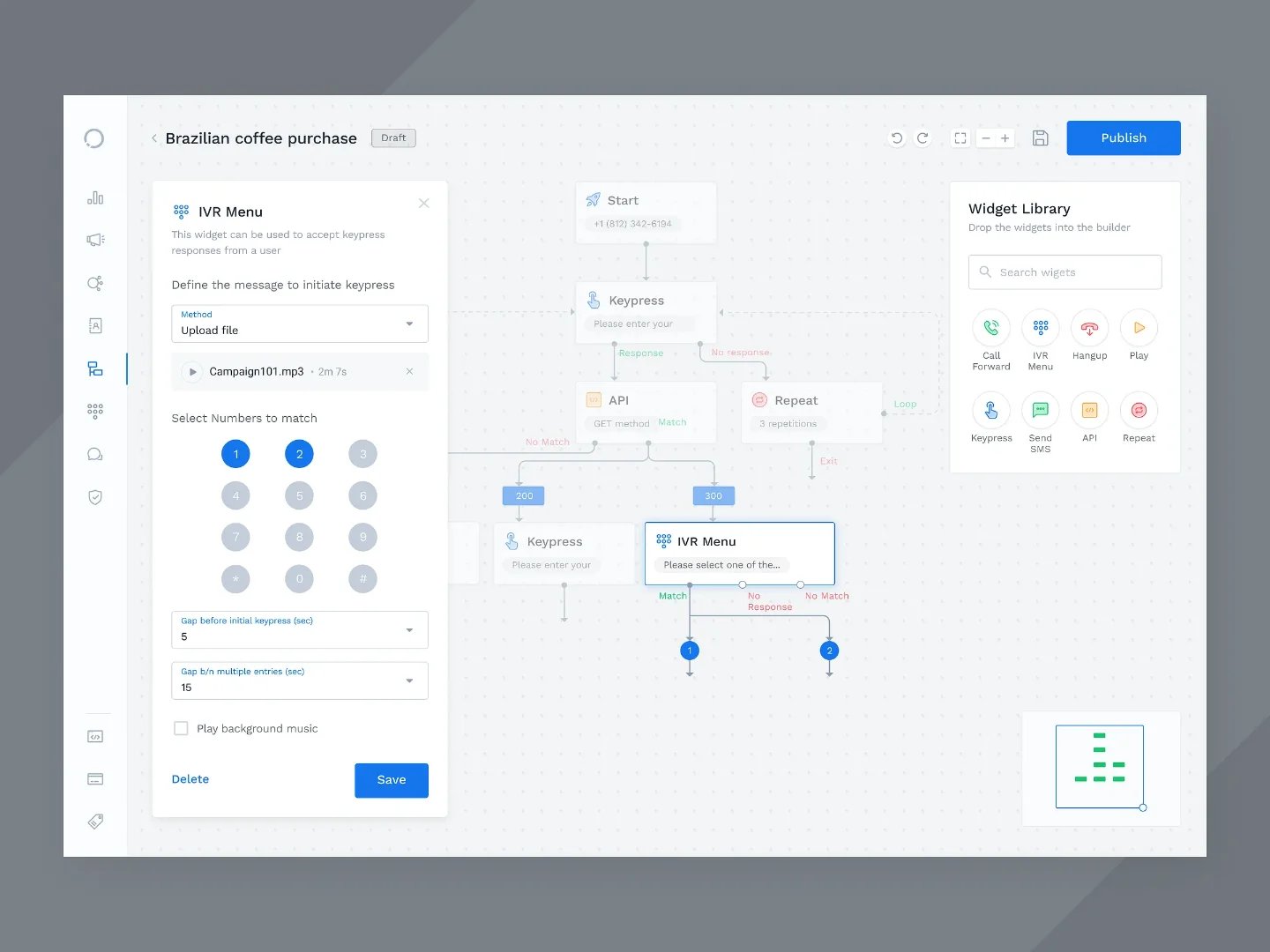
Waar platforms zoals Vapi of Retellai vaak zwaar leunen op één systeemprompt, biedt Famulor een dubbele aanpak. Je kunt direct aan de slag met onze AI Prompt Editor en je bestaande prompt gewoon meenemen. De echte game-changer is echter onze visuele Flow Builder. Met deze no-code tool kun je complexe gespreksstromen ontwerpen via drag-and-drop, voorwaardelijke logica toevoegen (Als de klant 'factuur' zegt, doe X; als ze 'support' zeggen, doe Y), gegevens valideren en verbinding maken met externe systemen, zonder dat je ook maar één regel code hoeft te schrijven.
Probeer onze AI-assistent
Ervaar hoe natuurlijk onze AI-telefoonassistent klinkt.
Vul je gegevens in en ontvang binnen enkele seconden een oproep van onze AI-agent.
De agent is getraind om over Famulor-diensten te praten en afspraken te maken.

Demo AI-agent
Famulor medewerker
2. Diepe integraties die echt werken
Een geïsoleerde AI-assistent is slechts een veredeld antwoordapparaat. Echte waarde wordt gecreëerd door naadloze integratie met je bestaande softwarelandschap. Famulor beschikt over een geïntegreerd automatiseringsplatform met meer dan 300 connectoren naar essentiële zakelijke tools, van HubSpot en Salesforce tot Calendly en Google Calendar, en van Shopify tot Zendesk. In plaats van alleen informatie te verzamelen, kan je assistent direct actie ondernemen: leads aanmaken, afspraken boeken, orderstatussen controleren en nog veel meer. Hij verandert van een passieve luisteraar in een actief teamlid.
3. Superieure prestaties voor natuurlijkere gesprekken
Latentie is de doodsteek voor elk AI-telefoongesprek. Vertragingen van enkele seconden na elke uiting van de beller vernietigen het verloop van het gesprek en de geloofwaardigheid. Famulor is architectonisch ontworpen om latentie te minimaliseren en biedt flexibele configuraties die bijna-menselijke interactiesnelheid mogelijk maken. In combinatie met een ruime selectie aan hoogwaardige, expressieve AI-stemmen creëren we een luisterervaring die ver uitstijgt boven wat standaardplatforms kunnen bieden.
4. AVG-compliance en hosting in de EU
Voor bedrijven die in Europa opereren, is gegevensbescherming niet onderhandelbaar. Famulor is een 100% AVG-compliant oplossing met serverlocaties in de EU. Je kunt erop vertrouwen dat alle verwerkte gegevens voldoen aan de strikte Europese normen voor gegevensbescherming, een cruciaal voordeel ten opzichte van veel in de VS gevestigde aanbieders.
Het migratieproces: Twee eenvoudige wegen naar je nieuwe platform
We begrijpen dat het overstappen van systemen een drempel kan zijn. Daarom hebben we het proces zo ontworpen dat het ofwel volledig uit handen wordt genomen, ofwel extreem eenvoudig en snel zelf uit te voeren is.
Optie 1: De gratis migratieservice – Wij doen het werk voor je
Voor bedrijven die een snelle, professionele en gegarandeerd soepele overgang willen zonder enige interne inspanning, is onze gratis migratieservice de perfecte keuze.
Voor wie is dit? Teams met complexe opstellingen, hoge belvolumes of simpelweg beperkte tijd.
Hoe het werkt:
Neem contact op: E-mail ons expertteam op support@famulor.io met de onderwerpregel 'Migration Request'.
Analyse: We bespreken kort je huidige opstelling. Je verstrekt ons je systeemprompt en de basislogica van je bestaande assistent.
Implementatie: Ons team repliceert je assistent op het Famulor-platform, configureert de telefonie en voert eerste tests uit.
Overdracht: We dragen de volledig functionele assistent over en geven een korte oriëntatie zodat je direct aan de slag kunt en gebruik kunt maken van de geavanceerde functies van Famulor.
Jouw voordeel: Geen technische inspanning, geen risico en geen downtime. Je profiteert van een professionele opstelling en kunt je volledig op je bedrijf concentreren.
Optie 2: De 5-minuten doe-het-zelf migratie
Als je liever de controle houdt en snel aan de slag wilt, kun je je assistent in slechts enkele minuten zelf naar Famulor verhuizen. Het proces is ongelooflijk eenvoudig.
Sla je configuratie op: Log in bij je huidige aanbieder (bijv. Vapi, Fonio, Retellai) en kopieer de volledige systeemprompt van je assistent naar je klembord.
Maak een assistent aan in Famulor: Meld je aan bij Famulor en maak een nieuwe 'Voice Agent' aan. Begin door de 'AI Prompt Editor' te selecteren; deze modus is perfect voor een snelle 1-op-1 migratie.
Plak de systeemprompt: Plak de gekopieerde prompt van je oude platform direct in het bijbehorende veld in Famulor. Dit is het 'brein' van je assistent.
Configureer stem en taal: Kies een van onze hoogwaardige AI-stemmen. Famulor biedt een breed scala aan expressieve en emotionele stemmen in meer dan 40 talen om de perfecte toon voor je merk te vinden.
Test en ga live: Test je nieuwe assistent direct binnen het platform. Zodra je tevreden bent, wijs je er een telefoonnummer aan toe of schakel je je bestaande nummer door naar Famulor. Je bent er helemaal klaar voor!
Na de migratie: Het volledige potentieel van Famulor benutten
Het succesvol verhuizen van je assistent is nog maar het begin. Nu komt het spannende gedeelte: het optimaliseren en uitbreiden van je automatisering.
Case study: Een onderhoudsbedrijf migreerde zijn eenvoudige assistent van Fonio, die voorheen alleen berichten aannam en een terugbelverzoek beloofde. Met de Famulor Flow Builder werd het proces verbeterd: de assistent vraagt nu naar de postcode van de beller, controleert de agenda op beschikbare afspraken in die regio en boekt direct een locatiebezoek, allemaal in één gesprek, zonder menselijke tussenkomst.
Schakel over naar de Flow Builder: Converteer je prompt-gebaseerde assistent met één klik naar een flow. Nu kun je visueel logica toevoegen, API's bevragen en het gespreksverloop nauwkeurig aansturen.
Activeer je integraties: Verbind Famulor met je CRM. Laat gespreksverslagen automatisch opslaan bij het juiste klantcontact. Maak vervolgtaken aan voor je salesteam.
Word een omnichannel-aanbieder: Gebruik de logica die je in Famulor hebt gebouwd niet alleen voor telefoongesprekken, maar ook voor je live chat op de website of voor het automatiseren van WhatsApp-gesprekken. Bied een consistente ervaring over alle kanalen heen.
Bereken je ROI met geautomatiseerde gesprekken
Ontdek hoeveel je per maand bespaart via AI voice agents.
ROI Resultaat
ROI 0%
Geen creditcard nodig
Conclusie: Meer dan een overstap – Een upgrade voor je gehele klantcommunicatie
Migreren van een basis AI-spraakplatform naar Famulor is meer dan alleen van aanbieder wisselen. Het is een overgang van een reactieve tool naar een proactieve, geïntegreerde automatiseringshub. Je krijgt niet alleen superieure gesprekskwaliteit en betrouwbaarheid, maar ook de tools om echte bedrijfsprocessen van begin tot eind te automatiseren, de efficiëntie te verhogen en een klantervaring te creëren die verrukt.
Laat je niet langer tegenhouden door de beperkingen van je huidige platform. De overstap is eenvoudiger dan je denkt en de voordelen zijn enorm.
Klaar om je spraakautomatisering naar een hoger niveau te tillen? Neem contact op met ons team via support@famulor.io voor je gratis migratie, of meld je vandaag nog aan en ervaar zelf het verschil.
Veelgestelde vragen – Veelgestelde vragen over migreren naar Famulor
Hoe lang duurt een migratie naar Famulor?
Een eenvoudige doe-het-zelf migratie door de systeemprompt te kopiëren kan in minder dan 5 minuten worden gedaan. Onze gratis migratieservice duurt doorgaans één tot drie werkdagen, afhankelijk van de complexiteit van je assistent. Ons doel is een snelle en naadloze overgang.
Is de migratieservice echt gratis?
Ja, absoluut. Wij zien het als onze investering in een succesvol partnerschap. Het overzetten en instellen van je bestaande AI-assistenten op ons platform is volledig gratis en vrijblijvend voor jou.
Kan ik mijn bestaande systeemprompt 1-op-1 overzetten?
Ja. De snelste manier om aan de slag te gaan op Famulor is door je prompt van Vapi, Retellai, Fonio of een soortgelijk platform in onze AI Prompt Editor te kopiëren. Je assistent zal direct functioneren met de logica die hij al kent.
Wat is het voordeel van de Flow Builder ten opzichte van een pure systeemprompt?
Een systeemprompt geeft de AI algemene instructies en een persoonlijkheid. De Flow Builder daarentegen stelt je in staat om gestructureerde, stapsgewijze processen te definiëren die niet uitsluitend afhankelijk zijn van de interpretatie van de AI. Het is ideaal voor taken die een vaste volgorde vereisen, zoals leadkwalificatie, gegevensvragen of het boeken van afspraken met meerdere variabelen.
Raak ik mijn bestaande zakelijke telefoonnummer kwijt?
Nee, helemaal niet. Je hebt verschillende opties: je kunt je bestaande nummer naar Famulor porteren of simpelweg een doorschakeling instellen van je huidige nummer naar het nieuwe nummer dat door Famulor wordt verstrekt. Dankzij onze SIP-trunking-mogelijkheden kunnen we flexibel integreren in je bestaande telefonie-infrastructuur.

Auteur bij Famulor