Inhoud samenvatten met:




De kunst van iOS-gespreksfiltering: zo worden jouw telefoontjes in de toekomst beantwoord
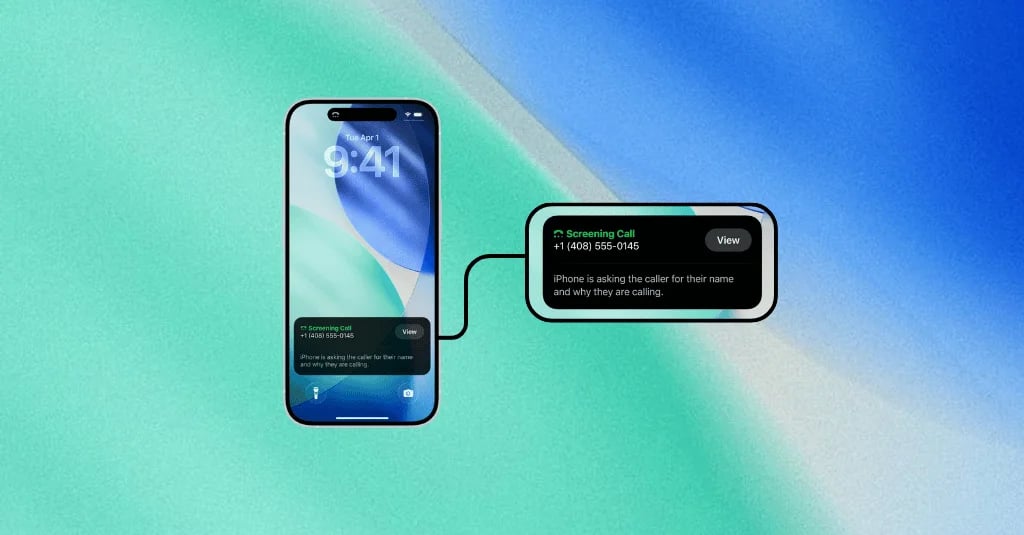
Met de introductie van nieuwe iOS-versies heeft Apple een functie geïntroduceerd die op het eerste gezicht voor veel bedrijven verontrustend lijkt: systeemgeïntegreerde gespreksfiltering. Oproepen van onbekende nummers worden automatisch beantwoord door een AI-stem die vraagt naar de naam van de beller en de reden van het gesprek. Met alleen al meer dan 150 miljoen iPhone-gebruikers in de VS is de impact van deze functie op het bedrijfsleven direct en aanzienlijk.
Als jouw succes afhangt van het telefonisch bereiken van potentiële of bestaande klanten, klinkt dit als een nieuwe, onoverkomelijke hindernis. Maar wat als deze drempel eigenlijk een kans is? Een kans om je te onderscheiden van spammers, professionaliteit te tonen en de kwaliteit van je bereik naar een hoger niveau te tillen. Juist hier komen moderne AI-oplossingen om de hoek kijken, niet alleen om deze uitdaging te beheersen, maar om deze om te buigen naar een concurrentievoordeel.
Bij Famulor hebben we een gespreksinfrastructuur ontwikkeld die direct inspeelt op de gespreksfiltering van Apple. Met een speciale "Screening Mode" zorgen onze AI-agents ervoor dat vanaf het begin duidelijk is wie er belt, waarom er gebeld wordt en wat de ontvanger kan verwachten. Dit artikel laat je de best practices zien om iOS-gespreksfiltering onder de knie te krijgen en ervoor te zorgen dat jouw oproepen worden beantwoord.
Wat is de gespreksfiltering van Apple precies en waarom is het een game-changer?
De "Live Voicemail"-functie van Apple, oftewel systeembrede gespreksfiltering, is meer dan alleen een verbeterd antwoordapparaat. Wanneer er een oproep binnenkomt van een onbekend nummer, kan de iPhone-gebruiker het gesprek doorsturen naar een AI (vergelijkbaar met Siri). Deze AI beantwoordt de oproep en vraagt de beller om zijn naam, bedrijf en de reden van het gesprek te vermelden. Terwijl de beller spreekt, wordt het antwoord in real-time uitgeschreven op het scherm van de ontvanger.
De iPhone-gebruiker kan dus live meelezen wat de beller zegt en vervolgens beslissen of hij het gesprek aanneemt, weigert of wacht op de voicemailopname. Voor de beller betekent dit: de eerste paar seconden van het gesprek zijn belangrijker dan ooit. Het is geen gesprek meer met een mailbox, maar een live pitch aan een digitale portier.
Deze verandering is fundamenteel omdat de macht volledig bij de ontvanger komt te liggen en bedrijven dwingt om hun cold calling- en contactstrategieën fundamenteel te herzien. Vage, onpersoonlijke of slecht geformuleerde introducties zullen er onvermijdelijk toe leiden dat het gesprek wordt genegeerd.
De eerste 5 seconden: jouw nieuwe elevator pitch voor de AI
Wanneer de AI opneemt en vraagt naar de reden van je gesprek, heb je een extreem kort tijdsvenster om te overtuigen. Deze eerste woorden zijn je nieuwe elevator pitch. Als het onduidelijk is, kom je over als spam. Als het te lang is, wordt de boodschap afgebroken. De formule voor succes is simpel: helder, precies en direct relevant. Streef naar een duur van minder dan vijf seconden, wat overeenkomt met ongeveer 12 tot 18 woorden.
De anatomie van een perfecte screening-reactie
Om te illustreren hoe het werkt, kijken we naar een typische interactie en de optimale reactie. De AI stelt meestal drie impliciete of expliciete vragen die jij moet beantwoorden:
Wie ben je?
Voor welk bedrijf bel je?
Wat is de specifieke reden van je gesprek?
Een zwak antwoord zou zijn: "Hallo, met Martin, ik bel namens een partnerbedrijf om te praten over een speciale actie." Dit antwoord is vaag en klinkt als een typisch verkoopgesprek.
Een sterk, contextspecifiek antwoord gebruikt daarentegen specifieke informatie die de ontvanger direct zal herkennen. Hier is een matrix die laat zien hoe een effectief antwoord moet worden opgebouwd:
AI-vraag (voorbeeld) Jouw optimale antwoord Waarom het werkt "Noem je naam." "Hallo, met Dana Lehmann…" Helder, vriendelijk en menselijk. Creëert een persoonlijke connectie. "En de naam van je bedrijf." "…van Famulor…" Bouwt vertrouwen op door transparantie en merkherkenning. "En de reden van je gesprek." "…naar aanleiding van je demo-aanvraag van 10 oktober." Biedt een verifieerbare, direct relevante reden voor de ontvanger. Geen giswerk, geen verkoopdruk.
Vermijd absoluut vage introducties zoals "Ik wilde even contact opnemen", "ik bel even naar aanleiding van" of "ik heb een geweldig aanbod voor je". Gebruik in plaats daarvan authentieke en contextspecifieke details die het doel van het gesprek duidelijk communiceren.
Best practices: hoe jouw gesprekken de iOS-screening doorstaan
Om je succespercentage voor gesprekken naar iPhones te maximaliseren, moet je een systematische aanpak hanteren. Deze best practices helpen je om je strategie aan te scherpen, of je nu werkt met menselijke medewerkers of een AI-telefoonassistent.
1. Wees precies en contextspecifiek
De belangrijkste factor is relevantie. Verwijs altijd naar een eerdere interactie of een reden die begrijpelijk is voor de klant. Voorbeelden:
"...naar aanleiding van offerte nummer A-54321 die we je gisteren hebben gestuurd."
"...om je serviceafspraak voor aanstaande vrijdag om 14:00 uur te bevestigen."
"...als reactie op je ondersteuningsverzoek met betrekking tot de factuur van 15 november."
Deze details geven de ontvanger direct aan dat het geen willekeurig verkoopgesprek is.
2. Formuleer een heldere en beknopte intentie
Kom direct ter zake. Je hele introductie moet één vloeiende zin zijn die niet langer duurt dan 15 tot 20 seconden. Train je medewerkers of programmeer je AI om deze introductie beknopt en natuurlijk te formuleren. Een geoptimaliseerde Prompt Editor voor AI-agents kan helpen om hier de perfecte formuleringen te testen en te implementeren.
3. Gebruik technologie in je voordeel
Voor één teamlid is het misschien mogelijk om zich handmatig op elk gesprek voor te bereiden. Maar met tientallen of honderden gesprekken per dag is dit niet schaalbaar. Hier wordt technologie een beslissend voordeel. Een geavanceerd AI-telefonieplatform is de meest effectieve methode om consistent perfecte screening-reacties te leveren. Lees ook onze gids over de Top 10 AI-telefoonassistenten voor bedrijven.
De oplossing: hoe Famulor iOS-gespreksfiltering voor jou beheerst
Famulor is ontwikkeld om precies deze moderne uitdagingen van telefonie op te lossen. Ons platform gaat veel verder dan eenvoudige gespreksautomatisering en biedt een intelligente infrastructuur die proactief inspeelt op iOS-screening.
Dynamische scripts en CRM-integraties
De kern van onze oplossing is het vermogen om dynamische en gepersonaliseerde scripts te maken voor elk individueel gesprek. Door naadloze integratie met je CRM-systemen (zoals HubSpot, Salesforce, Pipedrive, etc.) via tools als Make.com of n8n, heeft onze AI-agent in real-time toegang tot relevante klantgegevens.
Voor elk gesprek haalt Famulor cruciale informatie op:
Contactnaam: Voor een persoonlijke aanspreekvorm.
Laatste interactie: bijv. "Je aanvraag op onze website."
Specifieke gegevens: Offertenummer, ticket-ID, geboekte afspraak.
Met deze gegevens formuleert de Famulor Voice Agent een perfecte, contextspecifieke introductie die precies is afgestemd op de vereisten van iOS-screening.
Consistente kwaliteit en schaalbaarheid
Een menselijke medewerker kan een slechte dag hebben, moe zijn of informatie vergeten. Een Famulor AI-agent levert altijd dezelfde, geoptimaliseerde prestaties – 24 uur per dag, 7 dagen per week. Dit zorgt ervoor dat elk gesprek de best mogelijke eerste indruk maakt. Deze consistentie is cruciaal voor succes, vooral bij proactieve campagnes, zoals beschreven in ons artikel over de ROI van proactieve outreach.
Compliance en professionaliteit
Door gestructureerde en datagestuurde scripts te gebruiken, zorg je niet alleen voor relevantie, maar ook voor naleving van richtlijnen. Elk gesprek begint professioneel en transparant, wat het klantvertrouwen vanaf de eerste seconde versterkt.
Conclusie: maak van gespreksfiltering je bondgenoot
De iOS-gespreksfiltering van Apple is geen obstakel, maar een filter. Het scheidt het kaf van het koren – de goed voorbereide, relevante en professionele bellers van de vage en ongewenste. In plaats van deze functie als een bedreiging te zien, zouden bedrijven het moeten zien als een kans om hun communicatiestrategie te verfijnen.
Met de juiste voorbereiding en de juiste tools kun je ervoor zorgen dat je gesprekken niet alleen doorkomen, maar ook welkom zijn. Platforms zoals Famulor zijn hiervoor de sleutel. Door gespreksintroducties intelligent te automatiseren, gebaseerd op real-time CRM-data, veranderen we de digitale portier van Apple in een conciërge die de weg naar de klant vrijmaakt.
Ben je klaar om je telefonische bereikbaarheid in het iOS-tijdperk te waarborgen en zelfs te verbeteren? Ontdek hoe Famulor je gespreksprocessen kan transformeren en boek vandaag nog een persoonlijke demo.
Bereken je ROI met geautomatiseerde gesprekken
Ontdek hoeveel je per maand bespaart via AI voice agents.
ROI Resultaat
ROI 0%
Geen creditcard nodig
FAQ: Veelgestelde vragen over iOS-gespreksfiltering
Wat is iOS-gespreksfiltering?
iOS-gespreksfiltering, ook wel "Live Voicemail" genoemd, is een functie op iPhones waarbij een AI oproepen van onbekende nummers beantwoordt. De AI vraagt naar de naam en de reden van het gesprek en schrijft het antwoord in real-time uit op het scherm van de gebruiker, die vervolgens beslist of hij het gesprek aanneemt.
Waarom is een precieze aankondiging zo belangrijk?
Een precieze en contextspecifieke aankondiging is cruciaal omdat de ontvanger live meeleest en binnen enkele seconden beslist of het gesprek relevant is. Vage of promotionele aankondigingen worden bijna altijd genegeerd, omdat ze als spam worden geclassificeerd.
Werkt dit alleen voor onbekende nummers?
Ja, de functie is primair bedoeld voor nummers die niet zijn opgeslagen in de contacten van de ontvanger. Voor bedrijven betekent dit dat vooral eerste contacten of gesprekken vanaf nieuwe servicenummers worden beïnvloed.
Hoe kan Famulor me helpen de screening te passeren?
Famulor integreert met je CRM-systeem om voor elk gesprek een gepersonaliseerde en relevante introductie te maken. De AI-agent noemt de naam, het bedrijf en een specifieke reden (bijv. een offertenummer of een afspraak), wat de kans om door te komen drastisch vergroot.
Kan ik mijn bestaande CRM-data gebruiken met Famulor?
Ja, Famulor is ontworpen om naadloos te integreren met je bestaande systemen. Via platforms zoals Make.com, n8n of directe API-verbindingen kunnen gegevens uit vrijwel elk CRM worden gebruikt om gesprekken intelligent en contextspecifiek te maken.

Auteur bij Famulor