
Summarize Content With:




The Bridge Between AI and Humans: Intelligent Call Forwarding Redefined
Imagine a common situation: A customer interacts with your AI phone assistant. The assistant is brilliant, handling 80% of inquiries autonomously and significantly relieving your team. But then comes that one special request – a complex problem, an emotionally charged customer, or an explicit wish to speak with a human. What happens now? In the worst-case scenario, an abrupt, cold transfer where the customer ends up on hold and has to retell their story from scratch. This moment determines frustration or delight.
Precisely for this critical transition, Famulor has revolutionized its platform. We are introducing two groundbreaking new features that not only close the gap between artificial intelligence and human service but transform it into a seamless, intelligent, and context-sensitive experience. As of now, calls can be forwarded directly from the web widget to human agents, and the technologically advanced "warm" call forwarding now also works with telephone systems previously considered incompatible. This is more than just an update; it is the redefinition of what seamless customer communication truly means.
What is a Warm Transfer? The Decisive Difference
Before diving into the details of the new features, it's important to understand the fundamental difference between a "cold" and a "warm" call transfer. This distinction is key to excellent customer service.
Cold Transfer: This is the simplest form of transfer. The call is put through to another person or department without warning or context. The caller hears a ring and is then connected to an agent who has no idea what the call is about. The customer has to identify themselves again and explain their concern from scratch. It's an impersonal and often frustrating process that makes the customer feel like a "hot potato" being passed around.
Warm Transfer: This is an announced and context-sensitive handover. Before the caller is connected to the human agent, the system (in this case, the Famulor AI Agent) contacts the agent, informs them of the caller's identity and the reason for the call. Only when the agent is ready to take the call are both parties connected. The customer experiences a seamless handover and is greeted by the agent with the words: "Good day, Ms. Mustermann, my AI colleague has already informed me that this is about your last order. How can I help you?"
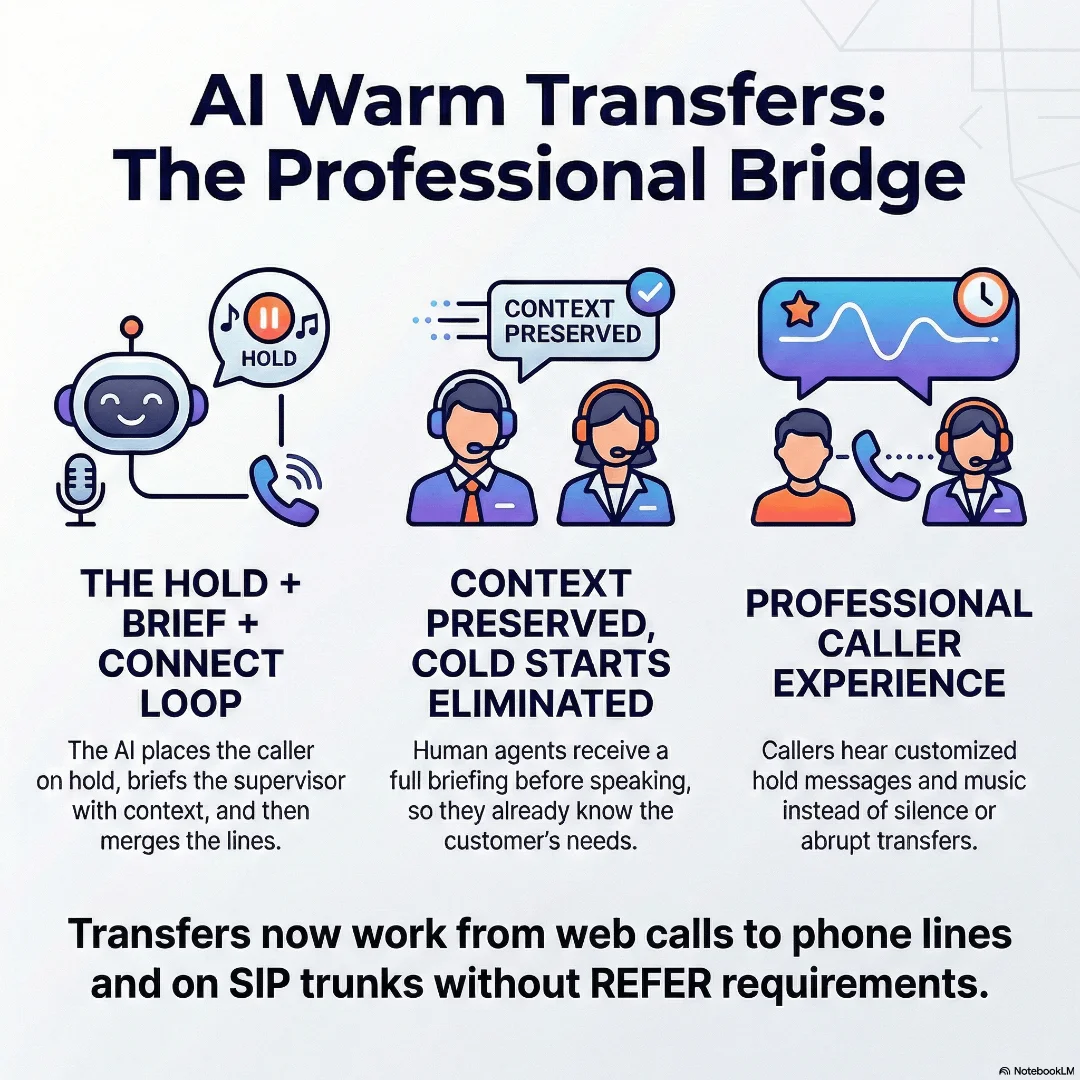
The added value of a warm transfer is obvious: it increases efficiency, shortens call times, and ensures an outstanding customer experience. It shows the customer appreciation and signals that your company is perfectly networked internally.
Game-Changer 1: Call Forwarding Directly from the Web Widget
Today's customer journey rarely starts on a single channel. A potential customer might be researching on your website, have a quick question, and not want to pick up the phone. This is where Famulor's web widgets come into play, allowing users to start a voice call directly from their browser with an AI agent – without needing a phone.
However, until now, this interaction often ended in the digital space. If the AI agent reached its limits or the customer requested a human advisor, the only option was to ask the customer to call a phone number. This media break was cumbersome and often led to contact abandonment.
With the latest update, this break is a thing of the past. Web calls initiated via the Famulor widget can now be seamlessly forwarded to real human telephone agents. The interaction starts on the website and, if necessary, ends in a personal phone conversation without the customer ever having to switch channels.
Try our AI Assistant
Experience how natural our AI phone assistant sounds.
Enter your details and receive a call from our AI agent within seconds.
Agent is trained to discuss Famulor services and book appointments.
Demo AI agent
Famulor representative
Use Case: E-commerce Consulting
A customer visits your Shopify store and configures a complex product. They have a very specific question about accessory compatibility. Instead of writing an email, they click on the Famulor widget and start a web call.
Customer (via Web-Call): "I have a question about bicycle model X. Does child seat Y fit on it if I also mount pannier Z?"
Famulor AI Agent: "That's a very good question. I can confirm that child seat Y and bicycle model X are compatible. For the combination with bag Z, I would like to connect you with one of our product specialists to ensure everything fits perfectly. Is that okay for you?"
Customer: "Yes, please."
Famulor AI Agent: "One moment, please. I'm connecting you."
In the background, the AI agent initiates a warm transfer. It calls the responsible sales representative, informs them ("I have Mr. Meier on the line; he has a question about product combination X, Y, and Z"), and only then establishes the connection. The customer experiences a seamless transition from a web call on the website to a highly competent human advisor on the phone.
Game-Changer 2: Technological Hurdles Overcome – Warm Transfer Without SIP REFER
For the technically inclined, the true magic of this update lies in the details. Traditionally, call forwarding in VoIP (Voice over IP) systems is controlled via a protocol called SIP REFER. Simply put, this is a command that tells the telephone system: "Please forward this call to another number."
The problem: Not all SIP trunk providers or internal PBX systems support this REFER command. Many companies were therefore technically unable to implement true warm transfers. Their hands were tied, and they had to settle for cold transfers.
Famulor has broken through this technological barrier. Our platform can now perform a warm transfer even if the SIP trunk does not support REFER. This is done through an intelligent alternative process:
Hold Call: The AI agent informs the caller and places them in a virtual waiting queue (with customizable hold music or silence).
Initiate New Call: The Famulor platform initiates a completely new, separate call (a new SIP INVITE) to the human agent.
Transfer Context: As soon as the agent picks up, the AI agent plays the prepared summary and briefs the employee.
Merge Calls: After the agent confirms they want to take over the call, Famulor merges the two separate calls (the held customer call and the call with the agent) into a single conversation.
This method is technically more complex but completely transparent for the end-user and the agent. The result is a perfect warm transfer that is now universally applicable. Companies are no longer limited by the technical restrictions of their telephone providers and can offer their customers first-class service. This flexibility is a core component of a modern AI phone system.
How the Perfect Warm Transfer Works with Famulor: Step-by-Step
Setting up and executing a warm call transfer is intuitive and logical with the visual Famulor Flow Builder. Here's the typical process in practice:
Step 1: The Trigger (Intent Recognition)
The process begins when the AI agent recognizes the caller's intent to speak with a human. This can be explicit ("I want to speak to an employee") or implicit, if the agent realizes that they cannot help with a specific topic. The AI's ability to listen and understand interruptions is crucial here, as described in our article on Turn Detection and Interruption Handling.
Step 2: The Announcement and Holding the Call
The AI agent responds professionally: „Certainly. I'll connect you with an expert from our team right away. Please hold for a moment.“ The call is placed on hold, and the customer hears customizable hold music or neutral silence.
Schritt 3: Das Briefing des menschlichen Agenten
Parallel dazu wählt die Famulor-Plattform die vordefinierte Nummer des menschlichen Agenten oder der Abteilung. Wenn der Agent abhebt, hört er nicht den Kunden, sondern den KI-Agenten:
"This is a transfer from your Famulor Assistant. Ms. Susanne Berger is waiting on the line. Her inquiry concerns a question about invoice number 2024-05-B7. Shall I connect the call to you now?"
This information can be dynamically compiled from a CRM system or from the previous conversation history.
Step 4: The Seamless Handover
The human agent is now fully informed. They can accept the request (e.g., by pressing a key or simply by agreeing). At this moment, Famulor merges the two calls. The agent can now greet the customer personally and competently:
"Good day, Ms. Berger, this is Thomas. I already have the information regarding your invoice in front of me. Let's clarify this together."
This process, announced in our overview article Seamless, Smarter, More Human, is now a reality and sets a new standard for reliability.
Practical Use Cases: Where Intelligent Forwarding Makes the Difference
The new forwarding functions are applicable across industries and solve specific problems:
Industry | Scenario | Advantage with Famulor |
|---|---|---|
An AI agent takes appointment requests. A patient has an urgent medical question after booking an appointment. | The AI agent recognizes the urgency and forwards the call via warm transfer to a medical assistant, including the patient's name and reason for the call. Patient safety and satisfaction are increased. | |
A prospective client calls about an advertisement. The AI agent qualifies the lead by asking about budget, desired size, and location. The prospective client is highly qualified and wants to speak with the real estate agent immediately. | The AI agent performs a warm transfer to the responsible real estate agent and transmits all collected data. The agent is perfectly prepared and can conduct the conversation at the highest level, increasing the closing probability. | |
A user starts a web call on the support page to report a problem. The AI agent performs an initial troubleshooting (e.g., "Have you cleared the cache?"). The problem persists. | The AI agent escalates the case via warm transfer to a second-level support employee. It transfers the case number, username, and steps already taken. This saves the technician valuable diagnostic time. | |
Agencies & B2B Service Providers | A potential new customer starts a web call via the contact page to inquire about services. The AI agent answers initial questions about the portfolio and prices. | If the AI recognizes a "hot lead," it forwards the call directly to a sales consultant. The seamless transition from an anonymous website visitor to a personal conversational partner impresses the lead and shortens the sales cycle. |
Conclusion: More Than Just a Transfer – An Intelligent Communication Strategy
Famulor's latest updates are more than just technical enhancements. They represent a fundamental shift in the philosophy of customer communication. The boundary between automated and human interactions blurs, making way for a truly hybrid, intelligent, and efficient strategy. The ability to seamlessly transfer conversations from the web to the phone while preserving full context creates a true omnichannel experience.
Overcoming technological hurdles like the lack of SIP REFER support also democratizes access to first-class customer service. Companies of all sizes can now benefit from features that were previously only available in complex and expensive AI Call Center solutions. With Famulor, the perfect handover from AI to a human agent becomes the new standard.
Are you ready to rebuild the communication bridges in your company? Discover how Famulor's intelligent call forwarding features can boost efficiency and delight your customers. Contact us today for a personal demo and learn how to future-proof your customer communication.
FAQ – Frequently Asked Questions
What is the difference between a cold and a warm call transfer?
With a cold transfer, a call is put through directly and without warning to an employee who does not know the caller or their concern. With a warm transfer, the employee is first informed by the AI system about the caller and the conversation context before the connection is established. This ensures a much better customer experience.
Does web call forwarding work to any phone number?
Yes. A call initiated via the Famulor web widget can be forwarded to any phone number (landline or mobile). This allows for maximum flexibility in designing your service processes.
What is SIP REFER and why is it important that Famulor works without it?
SIP REFER is a standard command in VoIP telephony to initiate a call transfer. Since many telephone providers do not support this command, their customers were previously unable to use advanced transfers. Famulor has developed an alternative method that enables this function even without REFER, making it available to virtually any company.
Can I customize the music or announcements in the waiting queue?
Yes, the Famulor platform offers extensive customization options. You can configure your own hold music, announcements, or even silence for the holding time to ensure a consistent brand experience.
How do I set up a warm call transfer in the Famulor Flow Builder?
In the Famulor Flow Builder, there is a dedicated node for call forwarding. There, you can easily configure the target phone number, the type of forwarding (cold or warm), and the text for the agent's briefing via drag-and-drop, without writing a single line of code.
Writer at Famulor


