Resumir contenido con:




Si gestionas un agente de voz con IA, conoces el problema: el guion es correcto, la respuesta es precisa, el cliente obtuvo información útil y, aun así, el bot sigue sonando como un robot. Monótono, demasiado rápido, demasiado artificial. Los modelos de TTS modernos como Gemini 3.1 Flash TTS, Cartesia Sonic, ElevenLabs v3 y MiniMax interpretan los prompts de forma semántica, no solo fonética. Esto abre nuevas oportunidades, pero también nuevos modos de fallo.
Este artículo es una guía práctica para configurar motores de TTS modernos como Gemini 3.1 Flash TTS, de modo que tu agente de voz con IA suene realmente humano: cálido, claro y adecuado a la situación. Cubrimos las reglas, los errores comunes, un ejemplo funcional completo y cómo implementar todo el sistema de forma productiva con Famulor.
Por qué Gemini 3.1 Flash TTS es diferente
Los motores de TTS clásicos se basan en fonemas: entra texto, sale voz. Introduces puntuación, quizás SSML, y controlas el ritmo y el tono mediante parámetros. Gemini 3.1 Flash TTS también hace eso, pero además es un LLM. Trata todo tu prompt como contexto, no solo como un guion para leer.
Esto tiene dos consecuencias:
Ventaja: Puedes dar instrucciones en lenguaje natural. Frases como "cálido y sin prisas" o "un poco inseguro, como alguien que está pensando lo que dice" realmente funcionan.
Desventaja: El modelo debe decidir qué es una instrucción y qué es texto hablado. Sin disciplina, simplemente leerá tus instrucciones en voz alta, incluyendo "Notas del director", "Estilo:" o "Ritmo:".
Por eso es esencial un esquema de prompt probado en combate. La estructura que mejor funciona para nuestros clientes en Famulor, a través de cientos de configuraciones de agentes de voz, comienza con una idea simple: separar claramente la instrucción del transcripción.
La estructura de prompt canónica que realmente funciona
Este patrón reduce significativamente la probabilidad de que Gemini 3.1 Flash TTS lea tus notas de dirección en voz alta:
Sintetiza el habla para la interpretación definida a continuación. El perfil, la escena, las notas de interpretación y el contexto son solo instrucciones. NO los digas. Di SOLO las líneas bajo #### TRANSCRIPT.
# AUDIO PROFILE: Maria S.
## "La recepcionista amable"
## SCENE: Final de la tarde en la recepción de la clínica
Atmósfera tranquila en la sala de espera, el auricular se descuelga con calma.
### PERFORMANCE
Estilo: Cálido y seguro, timbre tranquilo, sin prisas.
Ritmo: Flujo de respiración natural, una pequeña pausa de asentamiento al principio.
Acento: Inglés americano estándar con un suave timbre del Medio Oeste.
### CONTEXT
Maria gestiona citas y tranquiliza a los pacientes nerviosos.
#### TRANSCRIPT
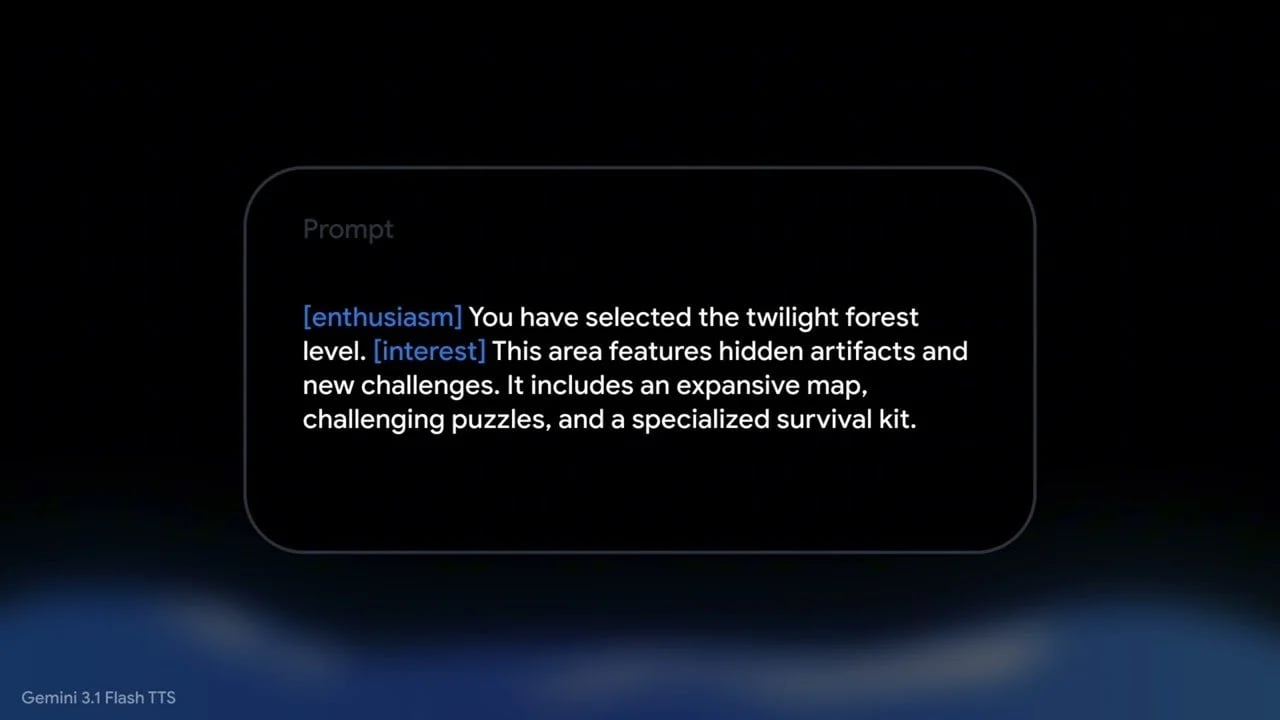
[warmly] Consulta del Dr. Becker, [thoughtfully] le habla Maria, [warmly] ¿en qué puedo ayudarle?
Tres componentes son fundamentales:
El preámbulo de síntesis de voz al principio. Esta frase activa la ruta del clasificador de síntesis de voz dentro del modelo; sin ella, Gemini suele leer todo el prompt en voz alta.
El
#### TRANSCRIPTdelimitador con exactamente cuatro almohadillas. Otras variantes funcionan a veces, pero esta coincide con la documentación oficial y es la más fiable en producción.Etiquetas de sección cortas. Usa ### PERFORMANCE en lugar de ### DIRECTOR'S NOTES. Literalmente hemos escuchado la palabra "DIRECTOR'S" pronunciada en voz alta en nuestras pruebas. Los apóstrofes y los encabezados de varias palabras son un riesgo para el clasificador.
Las nueve reglas para un prompting de TTS que suene natural
A partir de cientos de configuraciones de clientes en Famulor, desde consultas dentales hasta centros de llamadas B2B, hemos destilado nueve reglas que separan lo "aceptable" de lo que "realmente suena humano".
1. Antepón siempre un preámbulo de síntesis de voz
Este párrafo activa la ruta de síntesis de voz en lugar de la ruta de "leerlo todo". Si lo omites, obtendrás fallos esporádicos donde tu bot leerá toda la dirección en voz alta, a veces con un tono serio. Para bots de entrada en atención sanitaria o servicios, eso es fatal para la reputación.
2. Usa #### TRANSCRIPT exactamente como delimitador
La documentación oficial de Google usa esta grafía exacta. Otros encabezados (##### TRANSCRIPT, ### Speak from here) funcionan a veces pero no son fiables. Cíñete al estándar documentado.
3. Usa etiquetas de sección cortas y neutras
Evita encabezados dramáticos de varias palabras como ### DIRECTOR'S NOTES o ### SAMPLE CONTEXT. Usa:
### PERFORMANCEpara Estilo, Ritmo y Acento### CONTEXTpara el trasfondo del personaje
Los apóstrofes dentro de los encabezados son particularmente peligrosos: al modelo le encanta leerlos en voz alta.
4. Clasifica el registro emocional antes de elegir las etiquetas
No existe una plantilla de etiquetas universal. Clasifica primero el contexto emocional y luego elige las etiquetas de audio adecuadas. Esta tabla funciona bien en nuestras configuraciones de agentes de voz no-code:
Registro | Cuándo | Etiquetas seguras | Prohibido |
|---|---|---|---|
EMPATÍA | Cliente molesto, disculpándose, reconociendo un problema | [sighs], [warmly], [thoughtfully], [gently] | [soft laugh], [cheerfully] |
CLARIFICAR_PROBLEMA | Confirmando detalles del problema del cliente | [thoughtfully], [warmly], [gently] | [soft laugh], [cheerfully], [sighs] |
TRANSACCIONAL | Política, transferencias, resolución de problemas, programación | [warmly], [thoughtfully] | [soft laugh], [sighs], [cheerfully] |
CÁLIDO_AMISTOSO | Saludos, despedidas, confirmaciones, ventas adicionales | [warmly], [thoughtfully], [cheerfully], [soft laugh] (máximo uno) | (ninguno) |
Nunca te rías ante un cliente molesto. Es la forma más rápida de hacer que una voz de IA se sienta profundamente inadecuada.
5. Cíñete a las etiquetas de audio documentadas
Las etiquetas de emoción personalizadas como [apologetically], [helpfully] o [carefully] suenan más planas en la práctica que el conjunto documentado. Las probamos sistemáticamente: la prosodia es notablemente peor. Para la emoción, cíñete a:
[warmly][thoughtfully][sighs][gently][soft laugh][cheerfully]
Para modificadores no emocionales (ritmo, volumen, carácter), las etiquetas personalizadas están bien: [whispers], [very slow], [like a cartoon dog] funcionan todas.
6. Escribe una escena, no una etiqueta de rol
Compara ambos:
Mal: "Un representante de atención al cliente cálido explicando algo claramente." – demasiado abstracto, el modelo no tiene nada a lo que aferrarse.
Bien: "Final de la tarde en la recepción de una clínica dental. Maria tiene el calendario abierto, bolígrafo en mano, y está ligeramente contenta por una cita sencilla."
Los detalles sensoriales concretos aportan realismo. Las etiquetas de rol genéricas no. Cuando construyas un agente de centro de llamadas con IA, describe la escena en la que está el personaje, no solo el puesto de trabajo.
7. Nunca des instrucciones de planitud
Esto nos afecta a todos. Quieres un momento de empatía tranquila y escribes "tranquilo, sin prisas, calmado". Gemini lo toma literalmente, elimina la prosodia y el bot suena como un buzón de voz cansado. Evita:
"quiet", "quietly"
"flat", "monotone"
"no rush" (se lee como "ve lento y plano")
"careful" (se lee como "excesivamente preciso, rígido")
"whispered" (a menos que realmente quieras un susurro)
Mejores frases para estados de ánimo más tranquilos:
"cálido y sincero"
"voz bajada media octava pero llena de sentimiento"
"paciente y sin prisas"
"medido pero presente"
8. Comas sobre puntos en la transcripción
Para algunos motores de TTS, más puntos producen pausas más humanas. Para Gemini 3.1 Flash TTS, ocurre lo contrario. Los puntos entre cláusulas etiquetadas hacen que la salida sea entrecortada.
Mal – suena entrecortado:
[warmly] Vale. [thoughtfully] Sobre tu cita. [warmly] Ya está lista. [cheerfully] Martes. [warmly] A las tres… [thoughtfully] PM.
Bien – flujo de prosa natural, las etiquetas solo marcan pivotes emocionales:
[warmly] Vale, [thoughtfully] sobre tu cita, [warmly] ya está lista. [cheerfully] Martes, [warmly] a las tres… [thoughtfully] PM.
Regla general: comas entre cláusulas etiquetadas dentro de una frase; puntos solo donde termina realmente el texto original; puntos suspensivos (...) para uno o dos finales naturales por enunciado; rayas (—) para una micropausa en mitad de un pensamiento.
9. No cites palabras literales de la transcripción en Estilo/Ritmo
El modelo ocasionalmente las lee en voz alta. Mal:
Ritmo: Un pequeño realce en "oh" al principio, como si el pensamiento acabara de surgir.
Bien:
Ritmo: Un pequeño realce al principio, como si el pensamiento acabara de surgir.
Describe el ritmo, no nombres las palabras. Esto importa aún más cuando implementas guiones de agentes de voz en Famulor que se rellenan con variables dinámicas en tiempo de ejecución.
Ejemplo funcional completo
Aquí tienes un prompt de empatía listo para producción, similar al que usamos para una línea directa legal:
Sintetiza el habla para la interpretación definida a continuación. El perfil, la escena, las notas de interpretación y el contexto son solo instrucciones. NO los digas. Di SOLO las líneas bajo #### TRANSCRIPT.
# AUDIO PROFILE: Maria J.
## "La representante de soporte senior"
## SCENE: Un momento difícil en la llamada
El cliente ha compartido algo frustrante. Maria se acerca un poco más al micrófono, con una voz que transmite sentimiento real, el tipo de disculpa que realmente sientes.
### PERFORMANCE
Estilo: Cálido y sincero. Preocupación genuina. La voz transmite sentimiento, no planitud. Un suave suspiro al principio es real, no performativo. Nunca divertida, nunca casual.
Pace: Natural, con una pequeña pausa de asentamiento al principio. El ritmo de alguien que realmente asimila lo que ha escuchado.
### CONTEXT
Maria es la representante que realmente escucha, y los clientes pueden notar la diferencia. Ella se hace responsable de solucionar las cosas.
#### TRANSCRIPT
[sighs] Oh. [gently] Siento mucho escuchar eso. [warmly] Déjame ver [thoughtfully] qué puedo hacer. [warmly] Vamos a solucionar esto [gently] para usted... [warmly] enseguida.
Los fallos más comunes y cómo solucionarlos
Síntoma | Causa | Solución |
|---|---|---|
"DIRECTOR'S" leído en voz alta | Encabezado de sección leído como transcripción | Acortar encabezado a |
El audio suena monótono o muerto | "quiet", "flat", "no rush" en Estilo | Reescribir Estilo sin palabras de planitud |
Nombre del personaje leído en voz alta | Colisión fonética con el inicio de la transcripción | Renombrar personaje (Kiara D. → Morgan P.) |
Palabra del CONTEXTO se filtra en la transcripción | Límite de sección ambiguo | Eliminar la palabra de colisión, reformular CONTEXTO |
| Error documentado en fase de vista previa | Reintentar hasta 5 veces con retroceso exponencial |
Locución robótica a pesar de buen contenido | Fragmentos separados por puntos | Reescribir TRANSCRIPCIÓN con comas entre cláusulas etiquetadas |
Risa en una disculpa | Plantilla de etiquetas universal en todos los escenarios | Clasificar registro emocional primero, usar paleta específica del registro |
Etiquetas personalizadas como [apologetically] se sienten planas | Cobertura de entrenamiento débil | Cíñete al conjunto documentado |
Implementación productiva con Famulor
Las reglas anteriores son valiosas en cualquier stack de TTS, pero dan sus frutos cuando se integran sistemáticamente en tu pipeline de agente de voz. Famulor incluye los bloques de construcción para ello:
Editor No-Code: En el Agente de voz con IA No-Code mantienes el perfil, la escena, las notas de interpretación y la transcripción por separado. Las variables de tu CRM o calendario se inyectan solo en la transcripción en tiempo de ejecución, nunca en la dirección.
Backbone multi-TTS: Cambia entre Gemini 3.1 Flash TTS, Cartesia Sonic, ElevenLabs y MiniMax sin reescribir tus prompts. Famulor gestiona la adaptación específica del motor.
40 idiomas, acentos regionales: Alemán estándar, suizo, vienés, bávaro, inglés de EE. UU./Reino Unido, español, francés, holandés y muchos más. Las pistas de acento pertenecen a
### PERFORMANCE, no a la transcripción.Troncal SIP y telefonía: Conecta tu proveedor VoIP/PBX existente mediante troncal SIP para que tu centro de llamadas con IA mantenga los mismos números de teléfono.
Más de 300 integraciones: Las integraciones de Famulor, similares a Zapier o Make, conectan el bot con calendarios, CRM, helpdesks y webhooks. Incluye conectores nativos para n8n y Make.
Mejores prácticas: Del prompt a la línea directa de producción
Pasar de un prompt probado a una línea directa productiva se beneficia de algunas disciplinas adicionales:
Mantén una hoja de persona. Centraliza el Perfil, la Escena, los valores predeterminados de Interpretación y el CONTEXTO para cada persona de voz. El estilo se mantiene consistente incluso cuando varios miembros del equipo ajustan los guiones.
Pruebas A/B en llamadas reales. No compares variantes solo en el estudio de TTS. El ruido de fondo, la compresión del códec y la latencia cambian la percepción. Ejecuta pruebas A/B sobre telefonía real.
Evita la inflación de etiquetas. Más etiquetas no equivalen a una mejor salida. Usa las etiquetas como los acentos: con moderación, en el lugar correcto, no en cada frase.
Define ramas de reserva. Para cada respuesta de empatía, ten lista una variante TRANSACCIONAL en caso de que la llamada cambie de emocional a administrativa, con su propio conjunto de etiquetas.
Registra las clasificaciones erróneas. Cuando el bot lea una instrucción en voz alta, guarda el prompt. Esos casos son oro para la siguiente ronda de optimización.
Ejemplos de la industria: Donde el prompting de TTS mueve KPIs reales
Estas reglas no son académicas, mueven métricas de negocio reales. Tres ejemplos de configuraciones típicas de Famulor:
Consulta dental (citas entrantes): Los pacientes suelen estar nerviosos. Un saludo CÁLIDO_AMISTOSO más el modo EMPATÍA para llamadas por dolor reduce notablemente las tasas de abandono. Concretamente: en un escenario de dolor, sustituye "[cheerfully] ¡Hola!" por "[warmly] Consulta del Dr. Becker, [thoughtfully] gracias por llamar."
Oficios / servicios a domicilio (devolución de llamadas): Los clientes llevan dos días sin noticias. Un registro TRANSACCIONAL con un inicio cálido funciona mucho mejor que un "[cheerfully]" comercial: se nota una mayor continuación de la conversación.
Comercio electrónico (devoluciones): Registro de EMPATÍA con un sutil
[sighs]al principio indica "te estoy escuchando".[soft laugh]aquí está prohibido: suena cínico y empuja a los clientes al bucle de quejas.Bufetes de abogados: TRANSACCIONAL con autoridad tranquila. Pistas de acento como "suave timbre del Medio Oeste" en
### PERFORMANCEañaden credibilidad.
Comparativa: Gemini 3.1 Flash TTS vs. Alternativas
Gemini no es la única opción de TTS expresivo. Una visión pragmática:
Modelo | Fortaleza | Debilidad | Ideal para |
|---|---|---|---|
Gemini 3.1 Flash TTS | Altamente expresivo, prompting semántico | Latencia de respuesta mayor en vista previa, a veces lee la dirección en voz alta | Líneas directas de alta empatía, salud, legal |
Cartesia Sonic | Latencia muy baja, estable | Etiquetas emocionales menos granulares | Centros de llamadas salientes, configuraciones en tiempo real |
ElevenLabs v3 | Clonación de voz, muchos idiomas | Coste, menor control granular de la emoción | Voces de marca, marcas premium |
MiniMax | Idiomas asiáticos, buena relación calidad/precio | Acentos occidentales menos expresivos | Configuraciones internacionales multilingües |
Con Famulor no tienes que comprometerte: elige el motor adecuado por agente de voz manteniendo el mismo esquema de prompt en todas partes.
Lista de verificación rápida antes de cada despliegue
¿Preámbulo de síntesis de voz en la parte superior?
¿Delimitador
#### TRANSCRIPTescrito exactamente?Etiquetas de sección:
### PERFORMANCE,### CONTEXT– ¿sin apóstrofes, sin encabezados de varias palabras?¿Escena concreta y sensorial, no un rol abstracto?
¿Estilo/Ritmo libre de palabras de planitud ("quiet", "flat", "no rush")?
¿Estilo/Ritmo libre de citas literales de la transcripción?
¿Etiquetas de audio adecuadas al registro (sin reírse ante clientes molestos)?
¿Etiquetas de audio del conjunto documentado?
¿Transcripción: comas entre cláusulas, puntos solo al final de frases reales?
¿Probado A/B sobre un códec de telefonía real?
Prueba nuestro Asistente de IA
Experimenta lo natural que suena nuestro asistente telefónico de IA.
Introduce tus datos y recibe una llamada de nuestro agente de IA en segundos.
El agente está entrenado para hablar sobre los servicios de Famulor y programar citas.

Agente IA de demo
Representante de Famulor
Gemini 3.1 Flash TTS es uno de los modelos de TTS más expresivos en stacks de agentes de voz listos para producción. Puede ofrecer empatía, cambios de ritmo y pausas sutiles que antes eran dominio del talento humano. Pero la calidad vive y muere con el esquema del prompt. Aplica las nueve reglas, clasifica el registro emocional y usa conjuntos de etiquetas con disciplina, y tu agente de voz con IA pasará de "obviamente un bot" a "espera, ¿es real?".
Si no quieres diseñar todo esto tú mismo, y prefieres usar una plataforma lista para producción que ya cura estas mejores prácticas, Famulor es tu primera opción. Obtienes una plataforma no-code con un backbone multi-TTS, 40 idiomas, troncal SIP, más de 300 integraciones y una configuración de agente de voz que se pone en marcha en minutos, no semanas. Echa un vistazo a los precios o salta directamente a una demo para tu centro de llamadas con IA.
FAQ – Preguntas frecuentes sobre el prompting de TTS para agentes de voz con IA
¿Qué es Gemini 3.1 Flash TTS?
Gemini 3.1 Flash TTS es un modelo de texto a voz de Google construido sobre un LLM que interpreta los prompts semánticamente. Puede seguir instrucciones en lenguaje natural como "cálido y sin prisas" en lugar de solo convertir texto a voz.
¿Por qué mi modelo de TTS lee las notas de dirección en voz alta?
Porque sin una estructura clara, el clasificador de síntesis de voz no puede distinguir de forma fiable la dirección de la transcripción. Un preámbulo de síntesis de voz más un delimitador #### TRANSCRIPT limpio elimina el problema en la mayoría de los casos.
¿Qué etiquetas de audio funcionan mejor con Gemini 3.1 Flash TTS?
Las etiquetas documentadas [warmly], [thoughtfully], [sighs], [gently], [soft laugh] y [cheerfully] ofrecen la prosodia más fiable. Las etiquetas de emoción personalizadas a menudo suenan más planas.
¿Debo usar puntos o comas entre cláusulas etiquetadas?
Para Gemini 3.1 Flash TTS específicamente, usa comas. Los puntos entre etiquetas entrecortan la salida. Usa puntos solo donde el texto original realmente termina.
¿Cómo evito que mi agente de voz con IA se ría durante una disculpa?
Clasifica primero el registro emocional (por ejemplo, EMPATÍA) y usa solo etiquetas apropiadas para el registro. [soft laugh] no tiene cabida en un pasaje de empatía.
¿Funciona el esquema de prompt también para agentes de voz que no son en inglés?
Sí. Mantén la dirección (Perfil, Escena, Interpretación, Contexto) en inglés (el modelo es más estable así) y escribe el bloque de transcripción en tu idioma objetivo. Famulor admite 40 idiomas, incluidos acentos regionales.
¿Puedo cambiar de motor de TTS dentro de Famulor?
Sí. Elige el motor adecuado por agente de voz (Gemini 3.1 Flash TTS, Cartesia Sonic, ElevenLabs o MiniMax) sin reescribir tus prompts.
¿Cómo integro Famulor con mi sistema telefónico existente?
Mediante troncal SIP. Conecta tu proveedor VoIP/PBX existente y mantén tus números de teléfono actuales. Los detalles están en las integraciones de Famulor.
¿Cuánto cuesta un agente de voz con IA en Famulor?
Famulor utiliza precios transparentes por minuto más planes opcionales para implementaciones empresariales. Consulta la página de precios para más detalles.
¿Cuánto tiempo lleva una implementación productiva?
Con una configuración no-code, un caso de uso claramente definido y una hoja de persona preparada, las primeras llamadas productivas son realistas en 1–2 días. Los escenarios multicanal más complejos suelen llevar de 1 a 2 semanas, dependiendo de la profundidad de la integración.

Autor en Famulor