Résumer le contenu avec:




Gérer intelligemment les conversations WhatsApp : guide de suivi et de pilotage avec Famulor
WhatsApp a évolué, passant d'une simple application de messagerie à un canal indispensable pour la communication client. Avec plus de deux milliards d'utilisateurs dans le monde, les clients s'attendent à pouvoir contacter les entreprises aussi facilement et directement que leurs proches. Pour les sociétés, cela représente une opportunité majeure, mais aussi un défi croissant : comment gérer efficacement des centaines, voire des milliers de discussions WhatsApp sans perdre le fil, sans compromettre la qualité de service et sans laisser dormir des données précieuses ? La réponse ne réside pas dans l'augmentation des effectifs, mais dans l'automatisation intelligente. Une plateforme basée sur l'IA comme Famulor transforme votre canal WhatsApp, passant d'une boîte de réception non structurée à un outil métier puissant, mesurable et parfaitement intégré. Dans ce guide, nous vous montrons comment utiliser Famulor non seulement pour mener des conversations WhatsApp pilotées par l'IA, mais aussi pour les suivre, les analyser et les optimiser systématiquement.
Que sont les conversations WhatsApp Famulor ?
Lorsque nous parlons de « conversations WhatsApp Famulor », nous ne faisons pas seulement référence à l'envoi et à la réception de messages. Il s'agit d'un processus de communication entièrement géré et profondément intégré à la plateforme Famulor. Chaque interaction via WhatsApp devient un événement traçable, analysable et automatisable, au même titre que les appels téléphoniques ou les chats en ligne.
Concrètement, cela signifie :
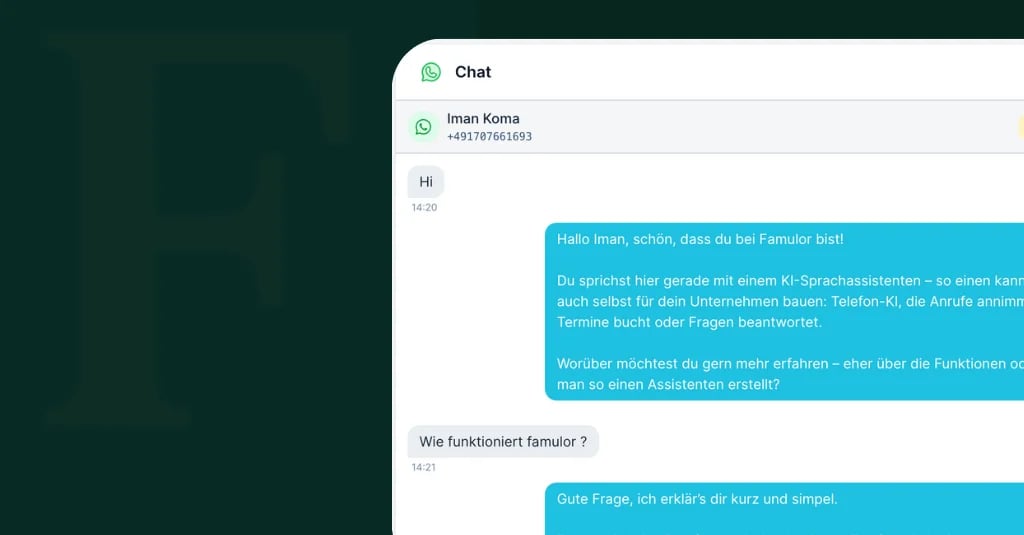
Tableau de bord centralisé : Tous les dialogues WhatsApp apparaissent dans votre vue d'ensemble « Conversations », marqués d'un badge « WhatsApp » distinctif. Fini les outils séparés et les basculements fastidieux entre les applications.
Réponses assistées par l'IA : Les messages entrants ne sont pas seulement reçus ; ils sont directement transmis à votre assistant IA préconfiguré, qui gère le dialogue de manière autonome.
Suivi unifié : Chaque conversation, qu'elle soit vocale ou textuelle, est enregistrée selon les mêmes principes. Vous obtenez des informations sur l'historique des messages, les coûts, les performances de l'IA et les données client.
Capacité omnicanale : L'assistant IA qui répond à vos messages WhatsApp est le même que celui qui gère vos appels ou le chat en direct sur votre site web. Cela garantit une expérience client cohérente. Pour en savoir plus, consultez notre guide ultime de l'automatisation WhatsApp.
L'anatomie d'une conversation WhatsApp dans Famulor
Pour comprendre la véritable valeur de la gestion des chats WhatsApp dans Famulor, il faut examiner les informations disponibles pour chaque dialogue individuel. Chaque conversation constitue un ensemble de données riche qui dépasse largement le simple texte.
Historique des messages et métadonnées
Le cœur de chaque conversation est l'historique complet des messages. Vous visualisez chaque message du client et chaque réponse de l'assistant IA par ordre chronologique. Chaque entrée est horodatée, ce qui vous permet de suivre précisément les temps de réponse et le déroulement de l'échange. De plus, des métadonnées importantes sont capturées :
Identification du client : Le numéro de téléphone du client est automatiquement enregistré.
Assistant IA connecté : Vous voyez exactement quel assistant a pris en charge la conversation.
Type de canal : Une étiquette claire distingue les chats WhatsApp des widgets web ou des tests.
Variables de conversation et capture de contexte
C'est ici que réside la véritable intelligence du système. Au cours de la conversation, l'assistant IA collecte activement des données ou accède à des informations existantes. Celles-ci sont stockées sous forme de « variables » et sont consultables dans les détails de la conversation. Les variables types incluent :
Essayez notre Assistant IA
Découvrez à quel point notre assistant téléphonique IA sonne naturel.
Entrez vos coordonnées et recevez un appel de notre agent IA en quelques secondes.
L'agent est formé pour parler des services Famulor et prendre des rendez-vous.

Agent IA de démo
Représentant Famulor
Données extraites : Nom du client, adresse e-mail, numéro de client, type de demande (par ex. « prise de rendez-vous », « suivi de commande »).
Contexte des flux de travail : Données récupérées depuis des systèmes connectés comme votre CRM ou ERP (par ex. « statut de commande : expédié », « niveau client : premium »).
Contexte défini : Informations que l'assistant définit lui-même pour contrôler le flux de la conversation (par ex. « produit_intérêt : Modèle X », « rendez-vous_confirmé : oui »).
Ces variables permettent non seulement des réponses personnalisées, mais constituent également la base d'automatisations complexes et d'analyses détaillées.
Coûts et métriques d'utilisation
Chaque interaction engendre des coûts, que ce soit pour l'utilisation de l'API WhatsApp Business ou pour la puissance de traitement de l'IA. Famulor offre une transparence totale en fournissant une ventilation détaillée des coûts pour chaque conversation. Vous pouvez voir en un coup d'œil :
Le nombre total de messages dans le dialogue.
Le coût par message.
Le coût total de la conversation.
Cette transparence permet un calcul précis du ROI de votre stratégie d'automatisation.
Comment fonctionnent les dialogues WhatsApp pilotés par l'IA (fenêtre de 24 heures incluse)
L'interaction via la plateforme WhatsApp Business est soumise à des règles spécifiques, notamment la « fenêtre de 24 heures ». Famulor tire parti de ces règles et les enrichit d'une logique intelligente pour garantir un dialogue fluide et conforme.
Phase 1 : Le client initie le contact
Un client envoie un message à votre numéro professionnel WhatsApp officiel.
Le système Famulor reçoit le message et crée immédiatement une nouvelle conversation (ou l'attribue à une conversation existante si le contact a eu lieu dans les dernières 24 heures).
Le message est transmis à l'assistant IA responsable.
L'assistant IA analyse la demande, génère une réponse appropriée et l'envoie au client via l'API.
Cette réponse ouvre la fenêtre de messagerie de 24 heures.
Phase 2 : Dans la fenêtre de 24 heures
Tant que cette fenêtre est ouverte, une conversation naturelle et fluide peut avoir lieu. L'assistant IA peut répondre de manière contextuelle à chaque message du client, poser des questions de suivi, récupérer des informations dans des systèmes tiers ou exécuter des actions. Les dialogues sont très dynamiques durant cette phase, comparables à un chat humain.
Phase 3 : Après l'expiration de la fenêtre de 24 heures
Si le client n'a pas répondu pendant 24 heures, WhatsApp ferme la fenêtre pour les messages texte libres. À partir de ce moment, votre entreprise ne peut plus poursuivre le dialogue avec un message arbitraire. Vous ne pouvez alors envoyer que des modèles préapprouvés (Template Messages) pour encourager le client à reprendre contact (par ex. un rappel de rendez-vous). Dès que le client répond à un tel modèle ou initie à nouveau le contact, une nouvelle fenêtre de 24 heures s'ouvre et l'assistant IA peut reprendre le dialogue de manière transparente.
Gestion efficace : filtrage et exportation des conversations WhatsApp
Avec un volume important de messages, une vue d'ensemble claire est cruciale. La plateforme Famulor propose des fonctions de filtrage puissantes qui vous aident à trouver exactement les conversations dont vous avez besoin. Vous pouvez filtrer votre liste de conversations par :
Type : Afficher uniquement les conversations WhatsApp, Web Widget ou Test.
Assistant : Analyser la performance d'un assistant IA spécifique.
Période : Évaluer les interactions du dernier jour, de la dernière semaine ou sur une plage de dates personnalisée.
Identifiant client : Rechercher spécifiquement le dialogue avec un numéro de téléphone particulier.
Pour une analyse plus approfondie ou pour l'archivage, vous pouvez également exporter les données de conversation filtrées à tout moment et les traiter dans des outils externes comme Excel ou des systèmes de Business Intelligence.
L'assistant IA en détail : bien plus que de simples messages texte
La véritable force de Famulor réside dans le fait que l'assistant IA opère sur tous les canaux. L'intelligence que vous configurez une fois est immédiatement disponible pour le téléphone, le web et WhatsApp.
System Prompts : un seul cerveau pour tous les canaux
Le comportement de votre assistant est défini par un System Prompt central. Vous y déterminez sa personnalité, ses tâches et ses limites. Pour une utilisation sur WhatsApp, il est conseillé de compléter ce prompt par des instructions spécifiques à l'application. Un bon conseil est d'indiquer à l'assistant d'utiliser des paragraphes plus courts, des listes à puces et un langage clair et concis pour les canaux textuels. Apprenez-en davantage sur l'optimisation des prompts dans notre article sur l'Éditeur de prompts IA Famulor V2.
Outils et fonctions : WhatsApp comme canal opérationnel
Votre assistant IA peut effectuer activement des actions lors d'un chat WhatsApp en appelant des outils. Ceux-ci connectent le dialogue à vos processus métier :
Rechercher des informations : L'assistant peut vérifier le statut d'une commande dans votre boutique Shopify.
Prendre des rendez-vous : Il peut trouver des créneaux disponibles dans votre Calendly et les réserver directement.
Transférer à un humain : Pour les demandes complexes, l'assistant peut créer un ticket dans votre système de support et transmettre toutes les informations pertinentes.
Valider des données : Il peut vérifier un code postal ou valider un numéro de client.
Bases de connaissances : des réponses cohérentes, partout et à tout moment
Les bases de connaissances de votre assistant sont également disponibles sur tous les canaux. Les informations produit, les FAQ ou les directives internes que vous téléchargez une seule fois sont utilisées par l'assistant pour répondre aux demandes via WhatsApp avec la même compétence que par téléphone. Cela garantit une grande cohérence et précision dans toute votre communication client.
Bonnes pratiques pour optimiser votre automatisation WhatsApp
La mise en place d'un assistant IA n'est que la première étape. La clé du succès réside dans l'analyse et l'optimisation continues.
1. Analysez régulièrement les conversations
Prenez le temps d'examiner régulièrement des échantillons de conversations. Soyez attentif à la précision, à la tonalité et à l'atteinte des objectifs de conversation. Identifiez les problèmes récurrents ou les malentendus pour apporter des améliorations ciblées.
2. Formez continuellement l'assistant IA
Utilisez les enseignements tirés pour former votre assistant. Si les clients posent fréquemment une question spécifique que l'assistant ne connaît pas encore, ajoutez la réponse à la base de connaissances. Affinez le System Prompt pour guider le comportement de l'assistant dans certaines situations, ou ajoutez de nouveaux outils pour compléter les capacités manquantes.
3. Surveillez et optimisez les temps de réponse
Les utilisateurs de WhatsApp attendent des réponses rapides. Surveillez la latence de réponse de votre assistant. Des délais longs peuvent indiquer des systèmes externes lents (par ex. une requête de base de données). Assurez-vous que votre assistant informe l'utilisateur si une action prend plus de temps.
4. Définissez des chemins d'escalade clairs
Aucun système d'IA ne peut résoudre 100 % des demandes. Définissez des processus clairs pour le transfert à un collaborateur humain. Cela peut se faire par la création d'un ticket, la collecte d'informations de rappel ou la notification directe d'une équipe. Un chemin d'escalade bien configuré est crucial pour la satisfaction client.
Estimez votre ROI en automatisant vos appels
Voyez combien vous pourriez économiser chaque mois grâce aux voice agents IA.
Résultat ROI
ROI 0%
Sans carte bancaire
WhatsApp dans un contexte omnicanal : voir la situation dans son ensemble
La gestion des conversations WhatsApp n'est pas un processus isolé. Sa véritable valeur se révèle lorsqu'elle est intégrée à une stratégie omnicanale globale. Famulor permet précisément cela : relier WhatsApp, la téléphonie et le chat web en une expérience client unifiée. Un client peut entamer une demande via WhatsApp, appeler plus tard pour le même problème, et l'assistant IA disposera toujours du contexte complet. Cette expérience fluide sur tous les canaux est ce qui définit la communication client moderne et fait de Famulor une plateforme centrale pour votre automatisation des processus métier.
Le tableau suivant résume les indicateurs clés que vous pouvez suivre avec Famulor pour votre communication WhatsApp :
Métrique | Description |
|---|---|
Total des conversations | Le nombre total de conversations client uniques via WhatsApp. |
Messages par conversation | Le nombre moyen de messages par dialogue. |
Taux de réponse | Le pourcentage de messages client auxquels l'assistant IA a répondu. |
Temps de réponse moyen | Le temps moyen entre un message client et la réponse de l'IA. |
Coût par conversation | Le coût moyen par conversation, incluant l'utilisation de l'API et de l'IA. |
Conclusion : d'un simple message à un processus métier précieux
Gérer efficacement les conversations WhatsApp va bien au-delà de la simple réponse aux messages. Il s'agit de traiter chaque dialogue comme un point de données précieux pouvant être analysé, optimisé et intégré à vos processus métier. Avec Famulor, vous transformez votre canal WhatsApp en une machine puissante pilotée par l'IA pour la génération de leads, le support client et l'automatisation des processus. Grâce à une gestion centralisée, un suivi détaillé et une intégration transparente dans une stratégie omnicanale, vous gardez toujours le contrôle et pouvez élever l'efficacité de votre communication client à un niveau supérieur. Êtes-vous prêt à libérer tout le potentiel de WhatsApp pour votre entreprise ? Découvrez Famulor et commencez dès aujourd'hui à automatiser intelligemment vos interactions client.
FAQ – Questions fréquentes
Comment suivre l'historique d'une conversation WhatsApp dans Famulor ?
Toutes les conversations WhatsApp sont automatiquement enregistrées dans la vue d'ensemble « Conversations » de votre tableau de bord Famulor. Vous pouvez y consulter l'historique complet des messages, les horodatages, les coûts et les variables capturées par l'assistant IA pour chaque dialogue.
Que se passe-t-il après la fenêtre de 24 heures de WhatsApp ?
Une fois qu'un client n'a pas répondu pendant 24 heures, vous ne pouvez plus envoyer de messages texte libres. Pour reprendre la conversation, vous devez utiliser un modèle de message préapprouvé par Meta. Si le client y répond, une nouvelle fenêtre de 24 heures s'ouvre pour une communication libre.
Le même assistant IA peut-il gérer à la fois les appels et les messages WhatsApp ?
Oui. L'une des forces majeures de Famulor est sa capacité omnicanale. Vous créez et formez votre assistant IA une seule fois, et il peut être déployé sur divers canaux comme le téléphone, WhatsApp et le chat du site web. Il accède à la même base de connaissances et aux mêmes outils pour tous.
Quelles métriques puis-je voir pour mes conversations WhatsApp ?
Famulor fournit des métriques détaillées pour chaque conversation, incluant le nombre total de messages, le temps de réponse moyen, les coûts de conversation et le taux de succès de l'exécution des tâches (par ex. rendez-vous réservés ou leads qualifiés).
Comment intégrer WhatsApp à mon CRM via Famulor ?
Famulor propose une plateforme d'automatisation no-code étendue avec plus de 300 intégrations. Vous pouvez utiliser les conversations WhatsApp pour mettre à jour des données dans votre CRM (par ex. créer un nouveau contact), récupérer des informations (par ex. vérifier le statut d'un client) ou déclencher des actions (par ex. créer une tâche pour un commercial).

Rédacteur chez Famulor