Resumir contenido con:




Transferencia de llamadas de un agente de voz con IA a un humano: Guía 2026
Sí, un agente de voz con IA bien diseñado puede transferir una llamada en directo a un humano en cualquier momento, y puede hacerlo con el contexto completo para que el interlocutor nunca tenga que repetirse. La verdadera cuestión no es si el agente transfiere, sino cuándo y cómo. Esa única decisión de diseño determina si los clientes perciben tu IA como profesional o como un callejón sin salida.
Esta guía desglosa los tipos de transferencia, los disparadores de escalada que merece la pena configurar, cómo realizar una transferencia a un humano en Famulor con Mid-Call Tools y los errores que debes evitar. Al final encontrarás una sección de preguntas frecuentes con las dudas que plantean habitualmente clínicas, gestores de fincas y centros de atención al cliente.
Qué significa realmente «transferir a un humano»
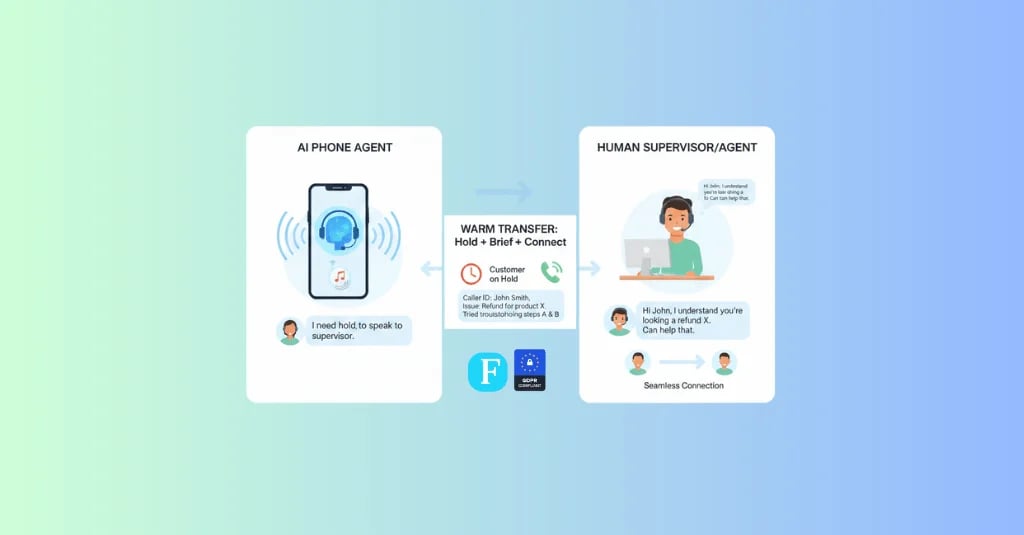
Una transferencia (o traspaso) es el momento en que el agente de voz con IA traslada una conversación en directo a otra parte: un compañero humano, un departamento diferente o un segundo asistente especializado. La distinción clave reside entre un reenvío simple, donde la conexión simplemente cambia, y una verdadera transferencia con contexto, donde la siguiente persona ya sabe de qué trata la llamada.
El peor resultado es el «callejón sin salida»: el interlocutor llega a un humano que no sabe nada de la conversación previa y tiene que empezar de cero. La IA de voz moderna evita esto generando un resumen estructurado antes de la transferencia: quién llama, qué quiere, qué ha intentado ya la IA y por qué se está escalando.
En el ámbito de la voz, una transferencia sólida prepara ese paquete antes de que nadie descuelgue: quién llama, qué necesita, qué ha intentado la IA y por qué se traslada la llamada. Así, el humano empieza informado en lugar de a ciegas.
Ese resumen solo es útil si la siguiente persona puede abrirlo. En los equipos de soporte, el destino suele ser un ticket de helpdesk, no un segundo saludo telefónico. Una plataforma como Kayako es un lugar habitual para ese contexto: transferencia de voz más un helpdesk que muestra el resumen, de modo que el agente ve la solicitud antes de descolgar.
Comparativa entre transferencia fría, cálida y de conferencia
Existen tres patrones básicos de transferencia. El que elijas depende del caso de uso: un simple enrutamiento por departamento requiere mucho menos contexto que la escalada de una queja.
| Tipo de transferencia | Cómo funciona | Contexto transmitido | Ideal para |
|---|---|---|---|
| Transferencia fría / ciega | La llamada se reenvía directamente; la IA se desconecta | Ninguno o mínimo | Enrutamiento simple por departamento o ubicación |
| Transferencia cálida | La IA permanece brevemente, informa al humano (susurro) y luego transfiere | Completo, hablado o como nota | Escalada a especialistas, quejas, ventas |
| Conferencia / conferencia cálida | El humano se une mientras la IA permanece para asistir | Completo y en directo | Casos complejos donde la IA sigue proporcionando datos |
Para la mayoría de las pequeñas y medianas empresas, la transferencia cálida con una breve sesión informativa es el estándar de oro: combina velocidad con una experiencia fluida. El agente humano recibe todo lo importante en pocos segundos, mediante un anuncio de susurro o una nota en pantalla, y toma el control con confianza.
¿Cuándo debe transferir un agente de voz con IA? Los disparadores de escalada clave
Una buena lógica de transferencia se basa en reglas, no en el azar. Estos disparadores funcionan bien en la práctica:
- Solicitud explícita: El interlocutor dice «quiero hablar con una persona». Eso es siempre una transferencia inmediata, sin negociación.
- Fuera del ámbito definido: La solicitud cae fuera del trabajo del asistente (por ejemplo, un caso legal complejo que llega a un bot de citas).
- Escalada emocional: El análisis de sentimiento detecta frustración, tono elevado o repetición. Cuando el tono cambia, un humano suele ser la mejor opción.
- Autenticación fallida: Para asuntos sensibles (cuenta, contrato, salud), un humano debería tomar el control tras repetidos intentos fallidos.
- Sin resolver repetidamente: Cuando un problema sigue abierto tras un número configurable de turnos, escala en lugar de entrar en bucle.
- Alto valor comercial: Un lead cualificado con un gran volumen de negocio puede ser dirigido directamente a ventas.
Estos disparadores pueden modelarse como ramas en el Famulor Flow Builder, totalmente sin código. El resultado es una matriz de escalada transparente en lugar de una caja negra.
Cómo configurar la transferencia a un humano en Famulor, paso a paso
Famulor separa la lógica (cuándo transferir) de la infraestructura (cómo conectar). Ambos se configuran en pocos pasos:
- Habilitar la herramienta de transferencia: Añade una Mid-Call Tool para el reenvío al asistente. Aquí estableces el número de destino o el equipo.
- Definir disparadores: En el Flow Builder, especifica las condiciones bajo las cuales se activa la herramienta: palabras clave, umbrales de sentimiento o intenciones específicas.
- Activar el resumen de contexto: Configura el asistente para generar un breve resumen antes de la transferencia (nombre, solicitud, pasos realizados). Se entrega como un susurro o una nota.
- Conectar telefonía: A través de la integración SIP vinculas cualquier sistema telefónico existente o número VoIP. Famulor utiliza mecanismos SIP estándar, por lo que las transferencias funcionan dentro de tu configuración actual.
- Usar transferencia de asistente a asistente: Si necesitas un bot especialista antes que un humano, la transferencia en directo a otro asistente ayuda, por ejemplo, de una recepción general a un asistente de departamento.
- Definir una alternativa (fallback): Decide qué ocurre si nadie descuelga (buzón de voz, solicitud de devolución de llamada, mensaje de WhatsApp). Así no se pierde ningún contacto.
Mejores prácticas y errores comunes
Una transferencia técnicamente correcta puede sentirse mal si la experiencia no es la adecuada. Estos puntos marcan la diferencia:
- Evitar el silencio absoluto: Por teléfono, incluso unos segundos de silencio resultan inquietantes. Anuncia la transferencia («te paso con un compañero ahora») y utiliza audio de relleno para salvar la espera de forma natural.
- Informar siempre: Nunca transfieras sin contexto. Un resumen de dos frases ahorra al humano 60 segundos y al cliente la frustración de tener que repetirse.
- Respetar el horario comercial: Define si una transferencia es posible fuera del horario de apertura o si, en su lugar, se reserva una franja para devolución de llamada.
- No escalar ni demasiado pronto ni demasiado tarde: Una IA que transfiere ante cualquier contratiempo no ahorra tiempo al personal. Una que nunca transfiere frustra a la gente. El equilibrio proviene de disparadores claramente definidos.
- Medir las transferencias: Haz un seguimiento de la tasa de éxito de las transferencias como un KPI central. Muestra si las llamadas escaladas llegan realmente al humano con contexto.
Ejemplos del sector en la práctica
Dr. Becker Dental (12 empleados): El asistente de citas reserva y reprograma por su cuenta. En el momento en que un interlocutor describe un dolor agudo, se activa un disparador de sentimiento y palabra clave: la IA transfiere de forma cálida a recepción con la nota «Caso agudo, paciente desde 2018, quiere venir hoy». El recepcionista interviene informado en lugar de preguntar de nuevo.
Mittelstein Property Management (60 unidades): El asistente telefónico con IA registra y clasifica los informes de daños. Para una fuga de agua que requiere servicio de emergencia, escala inmediatamente al equipo de guardia; fuera de horario, como una llamada de conferencia, para que la IA pueda proporcionar los detalles de la dirección en directo.
Ventas B2B en un proveedor SaaS: En llamadas salientes, el asistente cualifica leads. Cuando un prospecto alcanza un umbral definido (presupuesto, tamaño de empresa, plazos), se transfiere de forma cálida a un ejecutivo de cuentas, con el resumen de la llamada registrado en el CRM. Solo las conversaciones pre-cualificadas llegan al equipo de ventas.
¿Transferir a un humano o a otro asistente?
No toda escalada tiene que terminar con un humano. En muchas configuraciones, el siguiente paso más inteligente es un asistente especializado. Un bot de recepción general responde a la llamada, evalúa la solicitud y luego transfiere a un asistente de departamento, por ejemplo, de «consultas generales» a «facturación y cobros». Esto tiene dos beneficios: el bot del departamento funciona con una lógica de conversación más estricta y una base de conocimientos enfocada, y una gran parte de los casos se resuelve antes de que sea necesaria la intervención humana.
La regla de oro: transfiere a un humano cuando se requiera empatía, autoridad de decisión o responsabilidad legal (quejas, decisiones de cortesía, temas de salud sensibles). Transfiere a otro asistente cuando solo necesites una experiencia más profunda o un proceso diferente que pueda automatizarse. Eso mantiene el tiempo humano reservado para los casos que realmente lo necesitan.
¿Transferencia, devolución de llamada o buzón de voz? Elegir la alternativa correcta
¿Qué ocurre cuando la IA quiere escalar pero nadie puede descolgar? En lugar de cortar la llamada, todo agente de voz debería tener una estrategia de fallback escalonada. Qué opción encaja depende de la urgencia y del horario comercial:
| Alternativa (fallback) | Cuándo encaja | Beneficio |
|---|---|---|
| Transferencia inmediata | Dentro del horario comercial, caso urgente | Resolución más rápida, mayor satisfacción |
| Franja de devolución de llamada | Fuera de horario o durante alto volumen | Sin tiempo de espera, carga de trabajo predecible |
| Buzón de voz con transcripción | Baja urgencia, temas asíncronos | Contexto completo, sin contactos perdidos |
| Seguimiento por WhatsApp | Cuando el cliente prefiere escribir | Cambio de canal sin interrupción, historial registrado |
Famulor combina teléfono, WhatsApp y widget web en una sola plataforma, por lo que el fallback nunca termina en tierra de nadie, sino que funciona como un cambio de canal limpio. La clave es que el contexto recopilado sobrevive, tanto si la conversación continúa por devolución de llamada, buzón de voz o chat.
Privacidad y cumplimiento durante la transferencia
En el momento en que se transmiten datos personales, la privacidad es obligatoria, no opcional. Un resumen de conversación que contenga un nombre, la solicitud y posiblemente datos de contrato o salud entra dentro de las normas de protección de datos como el RGPD. Tres puntos a tener en cuenta: primero, el resumen debe contener solo los datos que la siguiente persona realmente necesita (minimización de datos). Segundo, las grabaciones y transcripciones deben almacenarse de forma transparente y eliminarse tras los periodos de retención definidos. Tercero, la transferencia a proveedores externos debe estar cubierta por un acuerdo de procesamiento de datos.
Famulor está diseñado deliberadamente para el mercado europeo y admite configuraciones conformes al RGPD. Para el enlace técnico con tu propio sistema telefónico, el SIP trunking evita que las rutas sensibles pasen por infraestructuras opacas de terceros. De este modo, la transferencia no solo es fluida, sino también legalmente sólida.
Costes, KPIs y el ROI de la transferencia humana
La transferencia humana no es un centro de costes, es una palanca. Asegura que el costoso tiempo humano se dedique solo donde realmente crea valor. En lugar de que el personal responda a cada llamada, la IA gestiona el trabajo rutinario (citas, preguntas frecuentes, captura de datos) y reenvía solo el 10-20 por ciento de los casos complejos. Tres números importan más: la tasa de contención (porcentaje de llamadas resueltas totalmente por la IA), la tasa de éxito de transferencia (porcentaje de transferencias que llegan con contexto) y el tiempo medio de gestión tras la transferencia, que la sesión informativa reduce.
Cuánto ahorra esto en tu configuración depende del volumen de llamadas, el coste laboral y la proporción de conversaciones escaladas. Una forma sencilla de hacer los números:
Calcula tu ROI automatizando llamadas
Descubre cuánto podrías ahorrar al usar voice agents con IA.
Resultado ROI
ROI 0%
Sin tarjeta de crédito
Conclusión: la transferencia decide la experiencia del cliente
Un agente de voz con IA no sustituye a las personas, sino que tria y transfiere de forma controlada en el momento adecuado. Esa transferencia limpia es exactamente lo que separa una solución profesional de un frustrante bucle de avisos. Define los disparadores con claridad, transfiere siempre con contexto y salva los segundos de espera de forma natural, y obtendrás lo mejor de ambos mundos: la escala de la IA y la empatía de un humano.
Famulor es la primera opción aquí porque la lógica (Flow Builder), las herramientas de transferencia (Mid-Call Tools) y la telefonía (SIP) se unen en una plataforma sin código, sin necesidad de desarrolladores. Tu siguiente paso: configura un asistente de prueba, define un único disparador de escalada y escucha tú mismo la transferencia. Consulta los precios y empieza con un caso de uso que aún hoy ocupe al personal.
Prueba nuestro Asistente de IA
Experimenta lo natural que suena nuestro asistente telefónico de IA.
Introduce tus datos y recibe una llamada de nuestro agente de IA en segundos.
El agente está entrenado para hablar sobre los servicios de Famulor y programar citas.

Agente IA de demo
Representante de Famulor
FAQ
¿Puede un agente de voz con IA transferir una llamada a un humano?
Sí. Un agente de voz moderno reenvía la conversación a un miembro del personal, a un departamento o a un asistente especialista, transmitiendo un resumen de la conversación para que el cliente no tenga que repetir nada.
¿Cuál es la diferencia entre una transferencia cálida y una fría?
Una transferencia fría reenvía la llamada directamente sin contexto. Una transferencia cálida informa primero al humano y luego transfiere, lo que crea una experiencia fluida y es la mejor opción para quejas y escaladas.
¿Cuándo debe escalar la IA?
Ante una solicitud explícita del cliente, cuando la solicitud está fuera de su ámbito, cuando se detecta frustración, tras una autenticación fallida, cuando un problema sigue sin resolverse tras varios turnos o para leads especialmente valiosos.
¿Tiene el cliente que repetirse después de la transferencia?
No, si la transferencia está bien configurada. Famulor genera un breve resumen antes de reenviar, entregado al humano como un anuncio de susurro o una nota.
¿Funciona la transferencia con mi sistema telefónico actual?
Sí. A través de la integración SIP, Famulor se conecta a casi cualquier sistema VoIP o PBX, por lo que las transferencias funcionan dentro de tu configuración actual.
¿Qué ocurre si nadie responde a la llamada?
Tú defines una alternativa (fallback), como un buzón de voz, una solicitud automática de devolución de llamada o un mensaje de WhatsApp. No se pierde ningún contacto, incluso fuera del horario comercial.
¿Puede la IA distinguir entre departamentos?
Sí. En el Flow Builder, las intenciones pueden detectarse y enrutarse al departamento o número de destino correcto, desde recepción y soporte hasta ventas.
¿Cómo mido si las transferencias funcionan bien?
A través de la tasa de éxito de transferencia, la tasa de contención y el tiempo medio de gestión tras la transferencia. Estas métricas muestran si las escaladas llegan con contexto y si el equilibrio entre IA y humano es el correcto.

Autor en Famulor