Inhoud samenvatten met:




Leadkwalificatie mislukt zelden door een gebrek aan vraag. Het mislukt omdat koopsignalen verspreid zijn over verschillende kanalen: een gemiste oproep, een WhatsApp-bericht, een CRM-veld, beschikbaarheid in de agenda, een oude supportcase. Een moderne AI-telefoonagent kan daarom niet alleen maar praten. Hij moet beslissingen kunnen nemen, gegevens opzoeken, resultaten documenteren en de volgende stap in gang zetten terwijl het gesprek nog gaande is.
Enterprise-leadkwalificatie werkt het best wanneer telefoon, WhatsApp, CRM en automatiseringen worden georkestreerd als één werkstroom.
Deze gids bundelt de meest relevante SEO- en productvragen rondom AI-telefoonagenten voor leadkwalificatie, outbound AI-voice-agenten, WhatsApp-follow-up, CRM-integratie en MCP/Mid-call Actions. De focus ligt op praktische implementatie, niet op algemene AI-hype.
Het doel: verander elke interactie in een bruikbaar verkoopsignaal.
Een gekwalificeerde lead is meer dan een naam, telefoonnummer en e-mailadres. B2B-teams hebben behoefte aan fit, urgentie, budget, besluitvormingsproces, bezwaren en de volgende afspraak. Dienstverlenende bedrijven hebben vaak behoefte aan locatie, type verzoek, beschikbaarheid, opdrachtwaarde en escalatierisico. Famulor kan die signalen via telefoon en chat opvangen, ze wegschrijven naar leads of CRM-velden en automatisch vervolgacties triggeren.
Inbound: De assistent beantwoordt vragen 24/7, identificeert de intentie en prioriteert waardevolle leads direct.
Outbound: Campagnes bereiken systematisch nieuwe of bestaande leads zonder dat SDR-teams elke eerste kwalificatievraag handmatig hoeven te stellen.
WhatsApp: Bevestigingen, templates en vervolgvragen kunnen na het gesprek in het juiste kanaal worden voortgezet.
CRM en agenda's: Beschikbaarheid, dealstatus en klantcontext kunnen het gesprek beïnvloeden terwijl het plaatsvindt.
Goede startpunten zijn de pagina's van Famulor voor use cases, integraties en pricing. Technische teams moeten ook de documentatie lezen voor MCP-servers en Midcall AI Tools.
Een sterke kwalificatiewerkstroom heeft vijf lagen.
Veel voice-AI-projecten beginnen met een script. Dat is niet genoeg. Enterprise-implementaties vereisen een duidelijke architectuur zodat de assistent niet alleen vragen stelt, maar ook betrouwbare resultaten oplevert.
Laag | Wat het aanstuurt | Voorbeeld |
|---|---|---|
Gespreksdoel | De beslissing die het gesprek moet opleveren | Afspraak inplannen, diskwalificeren, terugbelverzoek escaleren |
Datamodel | De velden die betrouwbaar moeten worden vastgelegd | Branche, volume, budget, tijdvenster, bezwaar |
Live context | De systemen die tijdens het gesprek worden bevraagd | CRM, agenda, orderstatus, kennisbank |
Vervolgactie | Wat er automatisch gebeurt na de interactie | Deal aanmaken, WhatsApp sturen, Slack of Teams notificeren |
Controle | Wanneer een mens moet overnemen of controleren | VIP-klant, compliance-onderwerp, verschuiving naar negatief sentiment |
Waarom MCP en Mid-call Actions belangrijk zijn voor kwalificatie.
Voor eenvoudige opstellingen kan een statisch script werken. Maar zodra CRM-data, agendalogica, supportgeschiedenis of individuele prijsdrempels het resultaat beïnvloeden, heeft de assistent toegang tot tools nodig. Famulor ondersteunt hiervoor twee patronen.
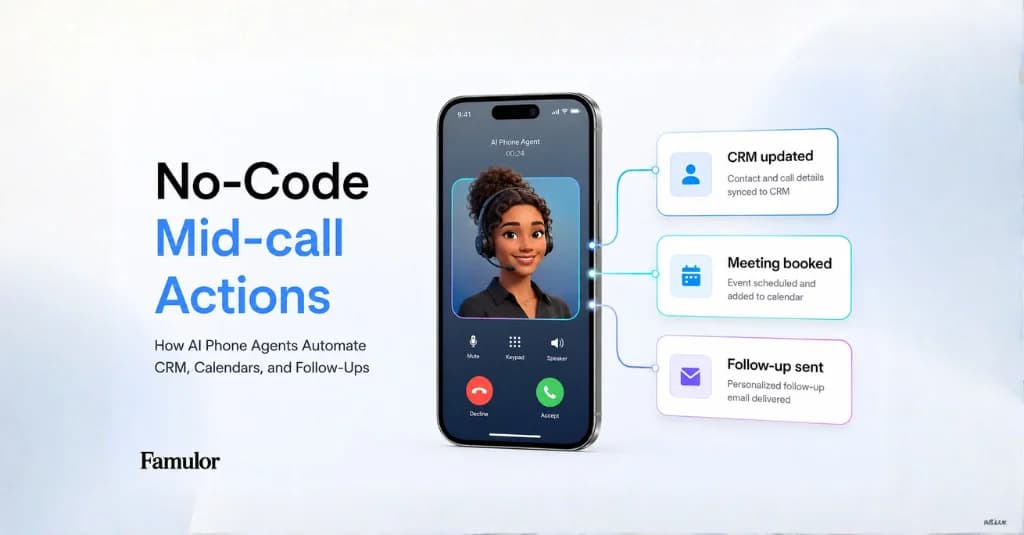
Mid-call Actions zijn het meest geschikt voor specifieke acties: beschikbaarheid van afspraken controleren, een CRM-lead aanmaken, een sms sturen, orderstatus ophalen of een interne webhook triggeren. De huidige documentatie benadrukt dat beschrijvingen, parameters en synchrone antwoorden cruciaal zijn als de actie op het juiste moment moet worden uitgevoerd.
MCP-servers zijn beter wanneer een hele toolset moet worden ontsloten. In plaats van elke actie met de hand te bouwen, verbindt een team een server, laat tools automatisch ontdekken en bepaalt welke mogelijkheden de assistent mag gebruiken. Dat is vooral nuttig voor organisaties met meerdere CRM-, kennis- of interne systemen.
Telefoon plus WhatsApp: niet elke lead hoeft in één kanaal te blijven.
Telefoongesprekken zijn sterk voor urgentie, bezwaren en complexe beslissingen. WhatsApp is sterk voor bevestigingen, documenten, korte vervolgvragen en latere reactivering. In Famulor kan een AI-assistent worden gekoppeld aan WhatsApp Business; outreach verloopt via goedgekeurde templates, terwijl bestaande gesprekken kunnen doorgaan in het juiste berichtenvenster.
Een typische werkstroom:
Een lead belt in of wordt bereikt via een outbound-campagne.
De assistent kwalificeert de behoefte, het tijdsbestek en de koopintentie.
Een Mid-call Action controleert de CRM-status of agendabeschikbaarheid.
De afspraak wordt geboekt of er wordt een deal aangemaakt.
Een WhatsApp-template bevestigt de afspraak of vraagt om ontbrekende documenten.
De WhatsApp-opstelling is gedocumenteerd in KI-WhatsApp. Voor grotere teams zijn menselijke overname en duidelijke audittrails belangrijk: automatisering moet menselijk werk ondersteunen, niet in de weg zitten.
Enterprise-checklist voor betere leadkwalificatie.
Definieer harde diskwalificatiecriteria: De assistent moet weten wanneer follow-up de moeite niet waard is.
Scheid verplichte velden van 'nice-to-have' velden: Lange vragenlijsten verlagen de conversie.
Gebruik live data alleen waar het beslissingen verbetert: Niet elk gesprek heeft toegang tot CRM, agenda en ERP nodig.
Ontwerp escalatie expliciet: VIP's, klachten, juridische vragen en intenties met een hoge waarde moeten netjes naar mensen worden gerouteerd.
Meet gesprekskwaliteit en resultaatkwaliteit afzonderlijk: Een natuurlijk gesprek is niet genoeg als het CRM-veld onjuist is.
Optimaliseer op basis van echte transcripten: Terugkerende bezwaren, afhakers en toolfouten moeten terugvloeien in prompts en acties.
Wanneer loont een AI-leadkwalificator?
De businesscase is het sterkst wanneer teams veel tijdgevoelige eerste contacten afhandelen, leads snel afkoelen of geschoolde medewerkers te veel tijd kwijt zijn aan het sorteren van initiële verzoeken. Dat geldt voor B2B-sales, bureaus, lokale diensten, recruitment, zorg, automotive, verzekeringen en e-commerce support.
De beste start is geen 'big bang'-uitrol. Kies één type lead, één duidelijk resultaat en één integratieketen. Bijvoorbeeld: kwalificeer inkomende demo-aanvragen, controleer agendabeschikbaarheid, boek een afspraak, update het CRM en stuur een WhatsApp-bevestiging. Daarna kan de werkstroom worden uitgebreid naar outbound-campagnes, meer talen of extra CRM-acties.
Conclusie
Leadkwalificatie met voice-AI wordt waardevol wanneer spraak, data en acties samenkomen. Famulor bevindt zich precies op dat snijvlak: AI-telefonie, WhatsApp, Live Voice, chat, no-code automatisering, MCP en Mid-call Actions in één platform. Voor enterprise-teams is het geen vervanging voor verkoopstrategie. Het is de operationele laag die elke interactie sneller, gestructureerder en meetbaarder maakt.
Teams die de volgende stap plannen, kunnen de economische aspecten inschatten met de ROI-calculator of de Famulor MCP Client gebruiken om assistenten, campagnes en gesprekken direct vanuit ChatGPT of Claude te analyseren.

Auteur bij Famulor