Résumer le contenu avec:




Introduction : L'automatisation téléphonique à la loupe – Menu classique (SVI) ou assistant IA intelligent ?
Soyons honnêtes : le temps que vous preniez pour lire ce guide, deux clients potentiels ont peut-être déjà appelé vos concurrents parce que votre ligne était occupée ou qu'ils sont tombés sur votre messagerie vocale. Aujourd'hui, la différence entre l'annonce « Veuillez patienter, tous nos conseillers sont en ligne » et la réponse immédiate « Bonjour, votre rendez-vous est confirmé, que puis-je faire pour vous ? » n'est plus un simple gadget technique. C'est la différence entre un prospect frustré et une nouvelle facture.
Les entreprises font face à un défi majeur. Les clients exigent une communication immédiate, fluide et conviviale, 24h/24. Quiconque s'appuie encore sur des menus tactiles interminables (SVI) érige des obstacles là où il devrait construire des ponts. Mais quand est-il réellement judicieux de passer à une solution moderne ? Êtes-vous submergé par d'autres tâches ou avez-vous désespérément besoin d'aide pour gérer vos appels ?
Ce guide complet met en lumière les différences cruciales entre les menus tactiles obsolètes et les agents vocaux IA de pointe. Nous vous montrerons comment automatiser votre communication avec des assistants vocaux IA, garantir votre disponibilité en dehors des heures d'ouverture, intégrer la prise de rendez-vous et qualifier des leads précieux. Plus important encore, nous vous expliquerons comment mesurer de manière fiable la réduction de charge de travail et l'augmentation de vos conversions.
Qu'est-ce qu'un SVI classique (Serveur Vocal Interactif) ?
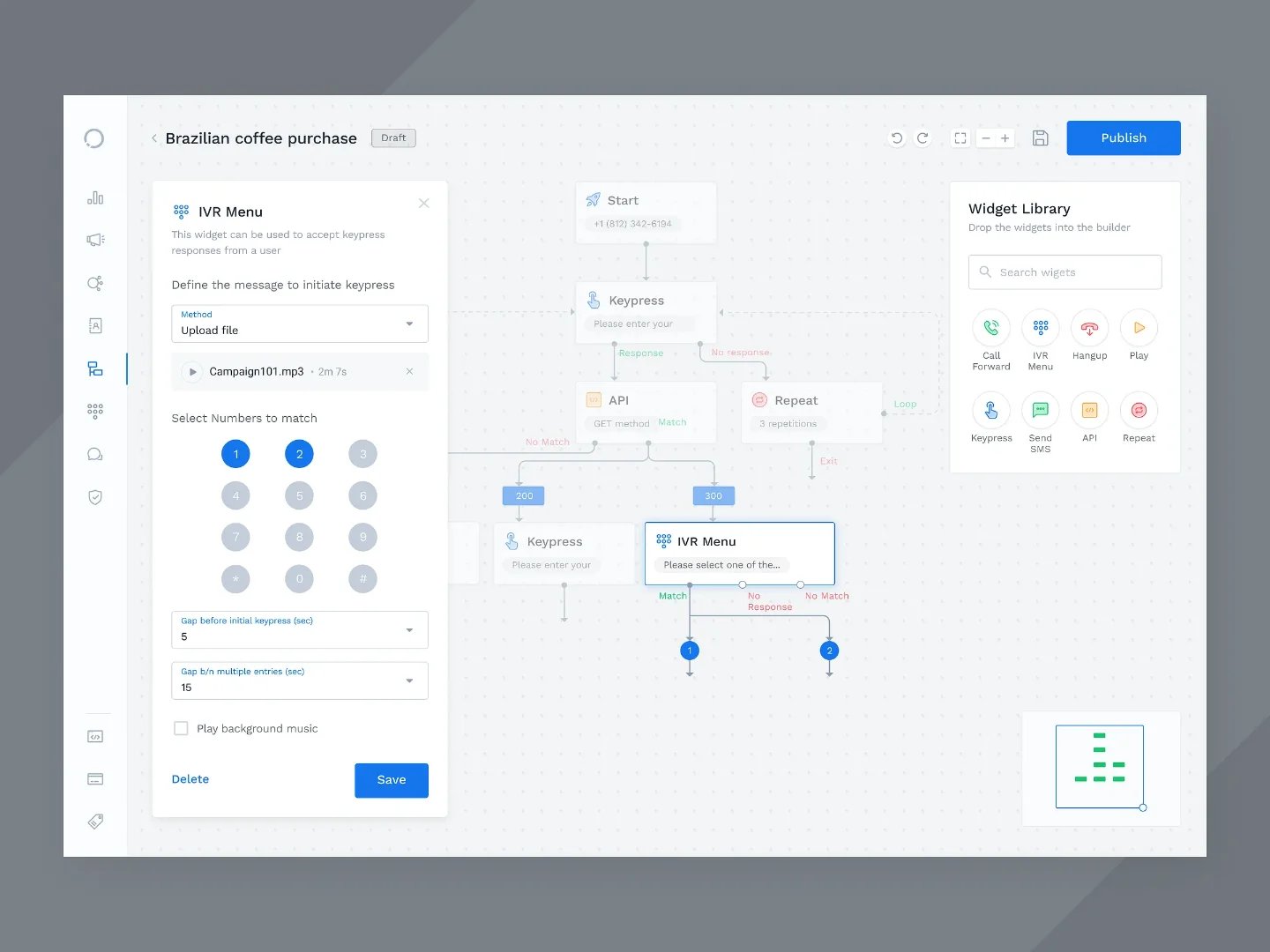
Le Serveur Vocal Interactif (SVI) est le système traditionnel que nous connaissons tous : « Pour le service commercial, tapez 1. Pour le support, tapez 2. » Cette technologie repose sur des scripts fixes préprogrammés et répond exclusivement aux entrées du clavier téléphonique (DTMF) ou à des commandes vocales très simples et prédéfinies.
Les systèmes SVI ont longtemps constitué la base de l'automatisation téléphonique, aidant les entreprises à diriger les flux d'appels basiques. Cependant, ils ne comprennent aucun contexte, manquent d'empathie et ne peuvent pas réagir dynamiquement aux problèmes réels de l'appelant. Si le problème du client ne rentre pas dans la grille rigide des options 1 à 4, il finit en attente ou raccroche par frustration.
Qu'est-ce qu'un assistant vocal IA intelligent ?
Un assistant vocal IA intelligent, tel que ceux fournis par la plateforme SaaS Famulor, utilise des modèles de langage avancés (LLM) et une reconnaissance vocale en temps réel (Speech-to-Text et Text-to-Speech). Il mène des conversations presque comme un humain. L'agent comprend le langage naturel, saisit les nuances, peut répondre à des questions intermédiaires et même déclencher des processus dans vos logiciels existants (comme vos CRM ou agendas).
Avec Famulor, les entreprises ont accès à des assistants IA dans plus de 40 langues. Grâce aux options de trunking SIP disponibles, la plateforme se connecte de manière transparente à n'importe quel fournisseur VoIP ou PBX local. Au lieu de forcer les clients à naviguer dans des menus, l'IA demande simplement : « Comment puis-je vous aider aujourd'hui ? » et gère la tâche de manière totalement autonome.
Guide de décision : quand faut-il conserver la méthode traditionnelle (SVI) ?
Malgré la supériorité évidente de l'IA, il existe des scénarios spécifiques où un menu tactile classique suffit. Utilisez une solution SVI traditionnelle si vous n'avez besoin que d'une solution de base absolue et que les conditions suivantes sont remplies :
Routage de menu simple : Vous souhaitez simplement trier grossièrement les appelants par département (ex. : ventes, support, facturation).
Annonces de statut : Vous avez uniquement besoin de messages automatisés pour des annonces, des périodes de vacances ou des horaires d'ouverture, sans interaction requise.
Enquêtes simples : Vous menez des enquêtes de satisfaction nécessitant un retour rapide au clavier (« Tapez 1 pour Très bien »).
Budget extrêmement limité : Lorsque vous ne disposez d'aucune ressource pour optimiser l'expérience client et que l'insatisfaction des appelants est tolérée.
Cependant, notez ceci : Les longs temps d'attente et le routage inefficace via des menus confus peuvent fortement frustrer les clients. Les études du secteur montrent que plus de 60 % des appelants raccrochent face à des menus SVI complexes avant même d'avoir parlé à un agent. Le temps de traitement est souvent élevé, tandis que le taux de résolution réelle reste faible.
Pourquoi passer aux assistants IA intelligents dès maintenant ? L'argument économique
Si les menus tactiles dissuadent les clients, passer à l'IA est une étape économique logique. Pourquoi maintenant ? Parce que le temps est votre ressource la plus coûteuse. Un agent IA ne travaille pas seulement comme un répondeur, mais comme un employé numérique à part entière. Les trois arguments principaux pour passer à Famulor sont :
1. Zéro friction et satisfaction client maximale
Les clients détestent appuyer sur des boutons. Ils adorent être compris. Un dialogue naturel instaure la confiance dès la première seconde. Un assistant IA de Famulor répond immédiatement à l'appel, comprend le dialecte et l'intention de l'appelant, et réagit en temps réel. Au lieu de lutter dans des menus, le client exprime sa demande avec ses propres mots. Cela réduit considérablement le taux d'abandon et augmente le taux de résolution au premier contact (FCR) de 25 % (avec un SVI) à plus de 65 %.
2. ROI immédiat (Retour sur investissement)
Beaucoup d'entreprises hésitent à adopter de nouvelles technologies par peur des coûts élevés. La réalité de la téléphonie par IA est que l'économie réalisée sur un seul nouveau client par mois couvre généralement les coûts de l'IA plusieurs fois. Tout le reste est un pur profit pour votre entreprise. Comme Famulor intègre plus de 300 outils (similaires à Zapier ou Make.com) via sa plateforme no-code interne, vous économisez également sur les frais de développement coûteux. Les leads sont instantanément intégrés dans votre CRM sans qu'un employé n'ait à saisir manuellement les données.
3. Liberté pour votre équipe
Laissez vos experts faire ce qu'ils font de mieux : fournir des conseils complexes, négocier et construire de vraies relations. Le reste ? L'IA s'en occupe, parfaitement, 24h/24 et sans pause. Lorsque votre équipe n'est pas constamment interrompue par des questions standards répétitives (« Êtes-vous ouverts aujourd'hui ? », « Où est mon colis ? »), la productivité augmente de manière notable.
Les 3 cas d'usage les plus importants pour l'automatisation téléphonique par IA
Les capacités d'une plateforme d'agent vocal IA moderne vont bien au-delà de la simple réponse aux appels. Voici les trois domaines d'application les plus précieux où les entreprises obtiennent des succès immédiats et mesurables.
1. En dehors des heures d'ouverture : répondre quand vous êtes fermé
La journée de travail se termine à 17h, mais pas les problèmes des clients. Avec les systèmes traditionnels, quiconque appelle en dehors des heures d'ouverture tombe sur une messagerie vocale, qui n'est souvent jamais écoutée ou sur laquelle le client ne laisse même pas de message. Un agent IA change ce paradigme. Il répond à un appel à 22h avec la même courtoisie qu'à 9h. Il peut filtrer les urgences, planifier des rappels pour le lendemain matin ou répondre directement aux questions fréquentes. Cela vous permet de commencer la journée de travail suivante avec une liste claire de demandes qualifiées au lieu d'un répondeur chaotique.
2. Prise de rendez-vous : planifier et confirmer
Rien n'est plus chronophage que de comparer des agendas par téléphone. « Est-ce que mardi à 14h vous convient ? Non ? Que diriez-vous de mercredi matin ? » Famulor s'intègre directement aux agendas numériques (Google Calendar, Outlook, Cal.com, etc.). L'agent IA croise les créneaux disponibles en quelques millisecondes et peut réserver et confirmer des rendez-vous de manière autonome. Le client reçoit ensuite automatiquement une confirmation par SMS ou e-mail. Pas de double réservation, pas de malentendu.
3. Leads : qualifier et router les prospects
Lorsqu'un nouveau client potentiel appelle, la vitesse est essentielle. Un agent IA peut servir de première ligne de défense. Il capture le nom de l'appelant, l'entreprise, l'intérêt spécifique et le budget disponible. Grâce à des questions de suivi intelligentes, l'IA détermine s'il s'agit d'un lead qualifié. Si c'est le cas, l'IA peut router le lead vers le commercial approprié ou injecter les données directement dans le système CRM. Ce processus de qualification et de routage des prospects prometteurs augmente considérablement les taux de conversion.
Comparaison : SVI classique vs Assistant IA Famulor
Pour clarifier les différences technologiques et commerciales, la matrice de décision suivante montre pourquoi les entreprises modernes s'appuient de plus en plus sur l'IA.
Critère | Menu tactile classique (SVI) | Assistant IA Famulor |
|---|---|---|
Expérience client (CX) | Rigide, frustrante, impersonnelle | Naturelle, empathique, contextuelle |
Méthode d'entrée | Clavier (DTMF) ou mots-clés simples | Langage naturel fluide (40 langues) |
Taux de résolution (FCR) | Faible (souvent transféré à un humain) | Élevé (résout les demandes de routine) |
Intégrations & Workflows | Complexe, nécessite des ressources IT | Plus de 300 outils intégrés (CRM, Agendas) |
Configuration | Configuration technique des arbres de routage | Plateforme No-Code/Low-Code simple |
Infrastructure téléphonique | Souvent liée à des fournisseurs spécifiques | Trunking SIP flexible avec tout fournisseur VoIP |
Mise en œuvre : étape par étape vers votre propre assistant IA
L'idée de laisser l'intelligence artificielle gérer vos lignes téléphoniques peut sembler complexe au premier abord. Cependant, avec une plateforme moderne comme Famulor, le processus est conçu pour que même les utilisateurs non techniques puissent être opérationnels en très peu de temps. Voici comment créer un agent vocal IA sans programmation :
Étape 1 : Définition des objectifs et des cas d'usage
Analysez vos données d'appels actuelles. Pourquoi les clients appellent-ils le plus ? L'accent est-il mis sur la prise de rendez-vous, les questions de support ou les vérifications de statut ? Commencez par vous concentrer sur le cas d'usage qui consomme le plus de temps à votre équipe.
Étape 2 : Connexion téléphonique via Trunking SIP
Famulor s'intègre facilement à votre infrastructure existante. En utilisant le trunking SIP, vous connectez la plateforme IA à votre fournisseur VoIP ou PBX local. Vous n'avez pas besoin d'acheter de nouveaux numéros (sauf si vous le souhaitez) et pouvez conserver votre numéro principal ou définir l'agent IA comme numéro de basculement.
Étape 3 : Création des scripts et de la base de connaissances
L'agent IA a besoin de garde-fous. Vous téléchargez une base de connaissances sur Famulor (ex. : PDF, FAQ, contenu du site web) dans laquelle l'agent puise ses réponses. De plus, vous définissez le ton (professionnel, décontracté, sans dialecte spécifique) et la personnalité de l'agent. Vous déterminez quelles informations l'agent doit absolument collecter (ex. : numéro client ou date de naissance).
Étape 4 : Connexion des automatisations et des outils
Utilisez la plateforme d'automatisation no-code interne de Famulor pour déclencher des actions. Une fois que l'agent qualifie un lead, vous connectez le système pour créer directement un enregistrement dans Salesforce, HubSpot ou Pipedrive. La logique fonctionne de manière similaire à Zapier ou n8n, mais est nativement intégrée à l'IA téléphonique.
Étape 5 : Tester, mesurer et optimiser
Avant la mise en service, testez minutieusement l'agent avec des appels internes. Essayez de piéger l'IA. Une fois que le système fonctionne sans accroc, lancez-le. Important : mesurez ensuite le soulagement (réduction des temps d'attente) et les conversions (rendez-vous réservés). L'IA apprend continuellement des transcriptions d'appels.
Bonnes pratiques : les Do's & Don'ts de l'automatisation téléphonique par IA
Pour libérer tout le potentiel, il y a quelques règles d'or à suivre avec Famulor.
Les Do's
Créez de la transparence : Communiquez ouvertement sur le fait que l'appelant parle avec un assistant IA. Un honnête « Bonjour, je suis l'assistant numérique de [Entreprise] » favorise la compréhension et définit les bonnes attentes.
Prévoyez des solutions de repli significatives : Assurez-vous que l'IA puisse transférer l'appel à un employé humain à tout moment si la demande devient trop complexe ou si le client le demande explicitement.
Maintenance continue : Examinez les journaux d'appels chaque semaine. Identifiez les modèles où l'IA était incertaine et ajoutez ces informations à la base de connaissances.
Les Don'ts
Trop de tâches à la fois : Ne surchargez pas votre agent IA au début. Commencez avec un objectif clair (ex. : prise de rendez-vous) et étendez les fonctions au support ou aux appels sortants plus tard.
Intégrations manquantes : Un agent vocal sans connexion à votre CRM ou agenda n'est qu'un répondeur glorifié. Utilisez des webhooks et des API pour que l'IA accomplisse un vrai travail.
Menus tactiles cachés : N'essayez pas de forcer une IA vocale moderne dans un vieux concept de SVI (« Tapez 1 pour les ventes »). Laissez l'IA poser de vraies questions ouvertes.
Exemples par secteur : qui en bénéficie le plus ?
Les agents vocaux IA ne sont plus une solution de niche. Une grande variété d'industries obtient des résultats impressionnants avec des plateformes comme Famulor.
Santé & Cabinets dentaires
Les cabinets médicaux souffrent énormément des appels constants alors que des patients attendent sur place. Un réceptionniste IA soulage considérablement les cabinets dentaires. L'agent gère les annulations, reprogramme les rendez-vous, fournit des informations sur les horaires ou répond aux questions d'itinéraire. Les assistants médicaux peuvent se concentrer à nouveau sur les patients en clinique, tandis que le volume d'appels diminue jusqu'à 70 %.
Artisans & Services
Lorsqu'un plombier est sur un chantier, il ne peut pas répondre au téléphone. Un répondeur, cependant, fait fuir les clients en cas d'urgence (ex. : rupture de canalisation). L'IA de Famulor prend l'appel, qualifie l'urgence, capture l'adresse et envoie immédiatement un SMS à l'artisan avec toutes les données d'urgence sur son mobile.
E-commerce & Boutiques en ligne
Les clients appellent pour s'enquérir du statut de leurs commandes (« Où est mon colis ? »). En intégrant l'IA au système de boutique (comme Shopify ou WooCommerce), l'agent vocal peut récupérer les statuts de suivi en quelques millisecondes sur la base du numéro de commande et informer le client en langage naturel, sans qu'un agent de support humain n'ait à intervenir.
Estimez votre ROI en automatisant vos appels
Voyez combien vous pourriez économiser chaque mois grâce aux voice agents IA.
Résultat ROI
ROI 0%
Sans carte bancaire
Quiconque force encore ses clients à appuyer sur des chiffres sur un clavier ignore le standard technologique de notre époque. Le passage du SVI classique aux assistants vocaux IA intelligents est une étape nécessaire pour rester compétitif. Cela augmente la satisfaction client, garantit la disponibilité en dehors des heures d'ouverture, gère la prise de rendez-vous et qualifie les leads de manière totalement automatique.
Famulor fournit la plateforme parfaite pour cela. En tant que solution de premier choix pour les agents vocaux IA, Famulor combine 40 langues, une évolutivité de haut niveau, des connexions trunking SIP natives et une plateforme d'automatisation no-code intégrée avec plus de 300 outils. Au lieu de supporter des coûts de développement élevés, vous construisez des workflows qui offrent instantanément une réduction mesurable de la charge de travail et des conversions.
Saisissez l'opportunité de révolutionner votre communication d'entreprise. Commencez avec Famulor dès aujourd'hui et transformez le « Veuillez patienter » en de vrais dialogues clients à forte valeur ajoutée.
FAQ : Questions fréquentes sur l'automatisation téléphonique par IA
Quelle est la différence principale entre un SVI et un assistant vocal IA ?
Un système SVI réagit de manière rigide aux entrées clavier ou à des mots-clés simples et route les appelants via des arbres de menus. Un assistant vocal IA (comme Famulor) comprend le langage naturel fluide, saisit le contexte, répond dynamiquement et peut exécuter de manière autonome des tâches complexes comme des réservations ou des entrées CRM.
Les agents IA peuvent-ils vraiment prendre des rendez-vous sans faire d'erreurs ?
Oui. Grâce à l'intégration API directe de la plateforme IA dans les systèmes d'agenda (comme Google Workspace ou Office 365), l'agent vérifie les temps disponibles en temps réel. Les réservations ne sont effectuées que si le créneau est réellement disponible. Une confirmation automatique est envoyée immédiatement.
Que se passe-t-il si l'IA ne comprend pas la question d'un client ?
Les systèmes IA professionnels comme Famulor disposent de mécanismes de repli. Si l'agent ne peut pas résoudre le problème, il transfère l'appel de manière transparente, avec la transcription, à un employé humain ou propose qu'un employé rappelle dès que possible.
Combien de temps faut-il pour configurer un agent vocal IA ?
Grâce aux plateformes no-code, les cas d'usage de base (comme la disponibilité en dehors des heures d'ouverture ou la capture simple de leads) peuvent souvent être configurés, testés et mis en ligne en quelques heures ou quelques jours. Aucune compétence en programmation n'est requise.
Un assistant vocal IA est-il conforme au RGPD ?
Oui, à condition de choisir un fournisseur qui respecte les normes européennes de protection des données. Avec Famulor, les données sont traitées de manière sécurisée et les clients peuvent être informés de manière transparente de l'utilisation de l'IA et de l'enregistrement des appels (si souhaité) via une annonce préliminaire avant le début de la conversation.

Rédacteur chez Famulor