Summarize Content With:




AI Appointment Setter: What It Is and Why Sales Teams Switch
An AI appointment setter is a voice agent that calls your leads, qualifies them in a short conversation and books the meeting straight into your calendar. It does the first-touch work that a sales development rep (SDR) usually does: dial, introduce, ask two or three questions, handle the first objection, offer slots. The difference is that it never gets tired after the 80th dial and it calls back at the time the lead prefers.
This guide shows how an AI appointment setter works in practice, how it compares with an in-house SDR and an outsourced appointment-setting agency, what the setup looks like in Famulor and which rules you need to follow for outbound calls in Europe. It is written for founders, sales leaders and agencies who want more booked meetings without growing the headcount.
How an AI Appointment Setter Works Step by Step
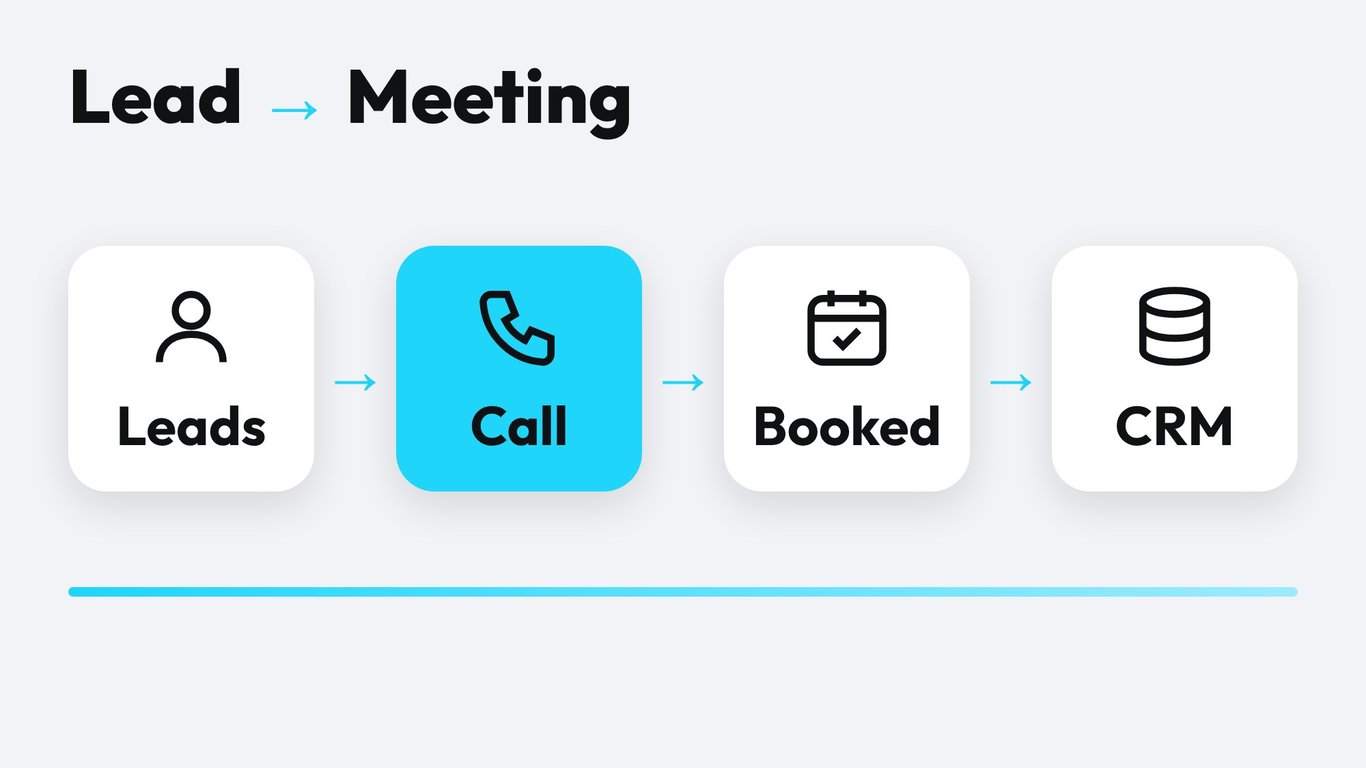
Under the hood, an AI appointment setter combines four building blocks: speech recognition, a language model that follows your script and rules, a natural voice and a set of tools that can read and write to your calendar and CRM. In Famulor these blocks are configured once in an assistant and then attached to a campaign.
- Lead list in. You import contacts or sync them from your CRM. Each lead carries the variables the agent needs, such as first name, company and the reason for the call.
- Outbound call. The campaign dials within the calling window you set, respects retry rules and skips numbers on your suppression list.
- Short intro and permission. The agent states who is calling, that it is an AI assistant and why. It asks if now is a good moment.
- Qualification. Two to four questions decide if the lead fits: role, need, timeframe, team size. Answers are stored as structured fields.
- Booking. The agent reads free slots from the connected calendar, offers two options and confirms the pick. See the booking feature for supported calendars.
- Handoff and follow-up. Hot leads can be transferred to a human on the spot. Everyone else gets a confirmation by SMS or email and an entry in the CRM.
The whole chain runs through a campaign, so you can start with 50 leads, read the transcripts and only then scale to thousands.
AI Appointment Setter vs. SDR vs. Agency
There is no single right answer. The table compares the three common ways to fill a sales calendar by the criteria that matter in practice.
| Criterion | AI appointment setter | In-house SDR | Outsourced agency |
|---|---|---|---|
| Cost model | Per minute of conversation | Salary, tools, management time | Monthly retainer or per booked meeting |
| Ramp-up time | Days: script, voice, calendar | Weeks to months: hiring and training | Weeks: briefing and onboarding |
| Capacity | Many parallel calls, no ceiling per day | Limited by working hours | Limited by agency staffing |
| Consistency | Same script and tone on every call | Varies by person and day | Varies by agent assigned |
| Complex objections | Handles common ones, hands off the rest | Strong with experience | Depends on the team |
| Data ownership | Transcripts and fields in your own account | In your CRM if reps log it | Often in the agency's tools |
Many teams end up with a hybrid: the AI appointment setter covers first contact and re-activation, while experienced reps run the discovery calls it books. That keeps human time on the conversations where it earns the most.
What an AI Appointment Setter Costs
Seat-based sales tools charge you whether the rep dials or not. A voice agent bills for conversation minutes. In Famulor, minutes are included in the plans, for example 100 minutes with the Plus plan at €27 per month billed yearly. Extra minutes cost €0.12, and pay-as-you-go runs at €0.15 per minute. Current numbers are always on the pricing page.
To estimate a campaign, multiply three numbers: leads you dial, the share that picks up, and the average talk time. A call that ends after the greeting costs seconds. A call that books a meeting usually takes two to four minutes. You pay mostly for the conversations that produce meetings.
The calculator below turns your own numbers into a monthly cost and a payback estimate. Use the value of one booked meeting from your pipeline, not an industry average.
Estimate your ROI from automating calls
See how much your business could save by switching to AI-powered voice agents.
ROI Result
ROI 0%
No credit card required
Setting It Up in Famulor
You do not need code. The no-code builder covers the full flow. A realistic first setup takes an afternoon.
- Define one offer. One call, one outcome: "15-minute demo", "free site visit", "consultation". Agents perform best when the goal is a single clear ask.
- Write the call flow. Opening, permission check, two to four qualifying questions, slot offer, confirmation. Keep sentences short. Spoken language is shorter than email.
- Pick a voice and language. Test two or three voices on real sentences from your script. Check names, company terms and numbers.
- Connect the calendar. Link Cal.com, Calendly or another supported calendar so the agent only offers real free slots. Rescheduling and cancelling work the same way, as described in our Cal.com guide.
- Connect the CRM. Write the outcome, the answers and a link to the transcript back to the contact record. Check the integrations for your system.
- Run a pilot. Launch 50 to 100 leads, listen to the recordings, fix the script, then widen the audience.
If you already use another platform, the migration pages for Retell, Vapi and Synthflow show how to bring existing assistants across.
A Call Script That Books Meetings
Good scripts for an AI appointment setter look like good SDR scripts: short, specific and respectful of the lead's time. Here is a skeleton for a B2B demo call.
"Hello Ms. Keller, this is the AI assistant of Northwind Software. I am calling because you downloaded our guide on route planning last week. Do you have two minutes?"
If the answer is yes, move to a single qualifying question that links to the reason for the call.
"How many vehicles does your team plan each day at the moment?"
Then offer the next step with two concrete options, never an open question like "when would suit you?".
"A colleague can show you the planner in 15 minutes. Would Tuesday at 10:00 or Wednesday at 14:30 work better?"
Prepare answers for the five objections you hear most: "not interested", "send me an email", "I have no time", "we already have a provider", "who gave you my number". Write each answer in one or two sentences and end with a soft next step. When an objection falls outside what the script covers, the agent should offer a callback or a warm transfer instead of improvising.
Rules for Outbound Calls in Europe
Outbound AI calls follow the same telemarketing rules as human calls, plus a few additions. This is a practical overview, not legal advice, so have your counsel review the final setup.
- Disclose the AI. The EU AI Act expects people to know when they talk to an AI system. Say it in the first sentence.
- Honor opt-outs immediately. When someone says stop, the agent confirms, ends the call and adds the number to a suppression list.
- Respect calling windows. Set campaign hours per country and time zone, and avoid public holidays.
- Handle recordings and data carefully. Inform the lead about recording, define retention periods and use a provider with a data processing agreement. Our GDPR guide lists the checkpoints.
Metrics That Show If It Works
Track the funnel from dial to deal, not just the number of calls. Five numbers give you a clear picture.
- Pickup rate: share of dials that reach a person. It depends on list quality and calling time.
- Qualification rate: share of conversations that meet your criteria.
- Booking rate: share of qualified leads that accept a slot.
- Show rate: share of booked meetings that actually happen. Reminders by SMS or email raise it.
- Meeting-to-deal rate: the number that decides if the campaign pays. Compare it with meetings from other sources.
Read 20 transcripts every week during the first month. Patterns show up fast: a question that confuses people, a slot offer that comes too late, an objection with no answer. Fix one thing at a time and compare the numbers, an approach we describe in the A/B testing guide for voice agents.
Where an AI Appointment Setter Fits Best
The pattern works wherever the offer is clear and the next step is a calendar slot.
- B2B software and services: demo requests, trial follow-ups and webinar attendees.
- Real estate: viewing requests from portals, answered within minutes. We covered this in our guide to voice agents for real estate.
- Home services and trades: quotes, site visits and maintenance appointments.
- Healthcare and wellness: recall campaigns for check-ups and treatments.
- Automotive: test drives and service bookings.
- Agencies: run appointment setting for several clients under your own brand with the white-label option.
Speed matters as much as script quality. A lead who filled in a form five minutes ago is far more likely to answer than one you call two days later. We looked at that effect in contact form vs. AI voice agent and speed to lead.
Common Mistakes and How to Avoid Them
- Too many questions. Every extra question lowers the booking rate. Qualify with the minimum and let the human ask the rest in the meeting.
- Vague asks. "Shall we talk sometime?" gets a polite no. Offer two concrete slots.
- No fallback. Define what happens when the lead asks something outside the script: callback, transfer or an email with the answer.
- Dirty data. Wrong names or numbers waste minutes and hurt trust. Clean the list before you upload it.
- No follow-up. A booked meeting without a confirmation message has a high no-show risk. Send the confirmation right after the call.
Conclusion: Start Small, Measure, Scale
An AI appointment setter turns first-touch calling into a process you can measure and scale. Start with one offer, one list and one calendar. Review the transcripts, improve the script and expand once the booking and show rates look right. Famulor gives you the voice agent, the campaign engine and the calendar and CRM connections in one place, so the first pilot can run this week.
Ready to see it on your own leads? Open the campaign overview or try the demo below.
Try our AI Assistant
Experience how natural our AI phone assistant sounds.
Enter your details and receive a call from our AI agent within seconds.
Agent is trained to discuss Famulor services and book appointments.

Demo AI agent
Famulor representative
FAQ
What is an AI appointment setter?
It is a voice agent that calls or answers leads, asks a few qualifying questions and books a meeting in your calendar. It replaces the manual first-touch calling of an SDR, not the sales conversation itself.
Can an AI appointment setter make outbound calls?
Yes. With a campaign you upload a lead list, set calling hours and retry rules, and the agent dials the numbers. Inbound calls and web-form callbacks work with the same assistant.
Is it legal to use an AI calling bot for cold calls?
The same telemarketing rules apply as for human callers. In Germany, consumer calls need explicit prior consent, and business calls need a presumed interest. You must also disclose the AI and honor opt-outs. Ask your legal counsel to review your use case.
How much does an AI appointment setter cost?
Costs follow conversation minutes. Famulor starts at €0.05 per minute, with pay-as-you-go at €0.15 per minute and plans that include minutes. Use the ROI calculator with your own meeting value.
Which calendars and CRMs can it connect to?
Famulor connects to common calendars such as Cal.com and Calendly and to CRMs through native integrations, webhooks and the API. The integrations page lists the current options.
Will leads know they are talking to an AI?
They should. Disclose it in the first sentence. Clear disclosure builds trust and meets the transparency expectations of the EU AI Act.
What happens when a lead wants to speak to a person?
The agent can transfer the call to a colleague during working hours or book a callback. You define the rule per campaign.
How long does it take to go live?
A first pilot with a script, a voice, a calendar connection and 50 to 100 leads can run within a day or two. Plan another one to two weeks to tune the script on real transcripts.

Writer at Famulor