 4.8
4.8Navigate IVR.
Collect secure data in-call.
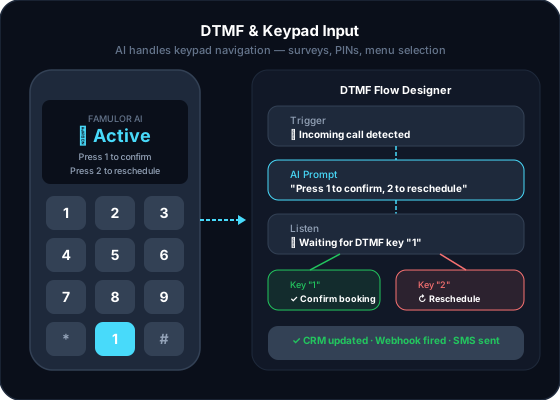
Your AI agent presses keypad tones for IVR menus and lets callers enter numbers, PINs, or codes via keypad: securely and without manual follow-up.
- GDPR compliant
- EU hosted
- Live in 1 week
Powered by
















- Anthropic
- OpenAI
- ElevenLabs
- Deepgram
- Cartesia
- Twilio
- Gladia
- Soniox
- xAI Grok
- AWS
- Microsoft Azure
- Cloudflare
- Google Gemini
What the agent does here
The parts of this feature teams use first on a live call.
Outbound IVR navigation
The agent sends 0–9, *, # and A–D in any IVR. Fixed or chosen live, from tools and flows.
Secure keypad input
Callers type or say PINs and customer numbers. Leading zeros stay, the value lands in a variable.
Exact length or stop key
Exactly 1 to 32 digits, or callers finish with # or *. Incomplete entries follow your retry path.
Numbers that matter
IVR drop-offs
0
secure input
100%
input timeout
5–120 s
digits per entry
32
Customer story
“Our agent now automatically navigates through target IVR systems and collects customer numbers securely via keypad. Conversion rate doubled.”
What ships with this feature
Each part of this feature, ready to run together from day one.
Outbound IVR navigation
The agent sends 0–9, *, # and A–D in any IVR. Fixed or chosen live, from tools and flows.
Secure keypad input
Callers type or say PINs and customer numbers. Leading zeros stay, the value lands in a variable.
Exact length or stop key
Exactly 1 to 32 digits, or callers finish with # or *. Incomplete entries follow your retry path.
Reach extensions on transfer
In a warm transfer, up to 32 tones and pauses dial an extension before the briefing starts.
Variables & CRM integration
Values are stored as variables and written to the CRM via webhook.
Privacy-compliant
You can hide sensitive input from transcripts. Processing in the EU.
Live in a few steps
No lengthy setup: most teams are live the same week.
- 01
Configure DTMF behavior
Under Assistant → Tools, add DTMF Input to send tones or Collect Keypad Input to collect digits.
- 02
Set it in the prompt or flow
Tell the agent in the prompt when to wait for input, or use a Collect node with keypad or spoken digits in the Flow Builder.
- 03
Test and go live
Test the flow in the built-in test mode, then enable it for live campaigns or inbound scenarios.
Live Demo
Sounds unreal? Try it now with a free test call
Curious how our AI agents work?
Get a hands-on experience by trying a free demo call. Fill in your details, and our AI representative will call you instantly.
Agent is trained to discuss Famulor services and book appointments.

Demo AI agent
Famulor representative
More from the platform
Other building blocks teams usually pair with this one.
Questions before you go live
DTMF (Dual-Tone Multi-Frequency) are the tones made when you press phone keys. Many phone menus (IVR) need those tones to navigate. Famulor sends them so your agent can get through.
Overcome IVR barriers and collect data securely?
Enable DTMF & keypad input in your Famulor plan: free to try.
No credit card required · GDPR compliant · first agent live in under a week