Summarize Content With:




A warm transfer can be configured correctly and still fail because the recipient is busy, misses the ring, or sends the call to voicemail. Famulor's September 23, 2026 update adds a narrowly defined remedy: a warm-transfer tool can automatically call the same teammate again for selected retryable outcomes. The original caller stays connected, and the configured fallback takes over when the attempt limit is exhausted. This is not a promise that a transfer will succeed. It is a controlled retry mechanism for cases where another attempt is reasonable.
This guide explains how to configure the feature, which outcomes trigger another attempt, when retries stop, and how to test the complete path before launch. It is based on the Famulor changelog dated September 23, 2026 and the current built-in tools and phone-transfer documentation.
Key takeaways
- Retry if unanswered is enabled per warm-transfer tool and is off by default. Existing tools keep their previous behavior until you switch it on.
- Famulor can retry after no answer, a busy line, temporary unavailability, or detected voicemail. A successful connection, explicit decline, permanent error, or caller departure stops retries.
- Retry delay accepts 5 to 120 seconds. Maximum attempts accepts 0 to 100 and includes the first call; 0 continues while the caller remains connected, subject to existing call-duration and credit limits.
- A fallback is still essential. It runs when attempts are exhausted or the failure is not retryable.
What automatic warm-transfer retries solve
A warm transfer differs from a cold transfer because the AI assistant contacts the recipient first, provides context, and connects the waiting caller only after the recipient approves. Famulor's phone-transfer documentation explicitly separates permission to hear the briefing from permission to connect the caller. The recipient therefore knows why the call is being transferred before both sides are joined.
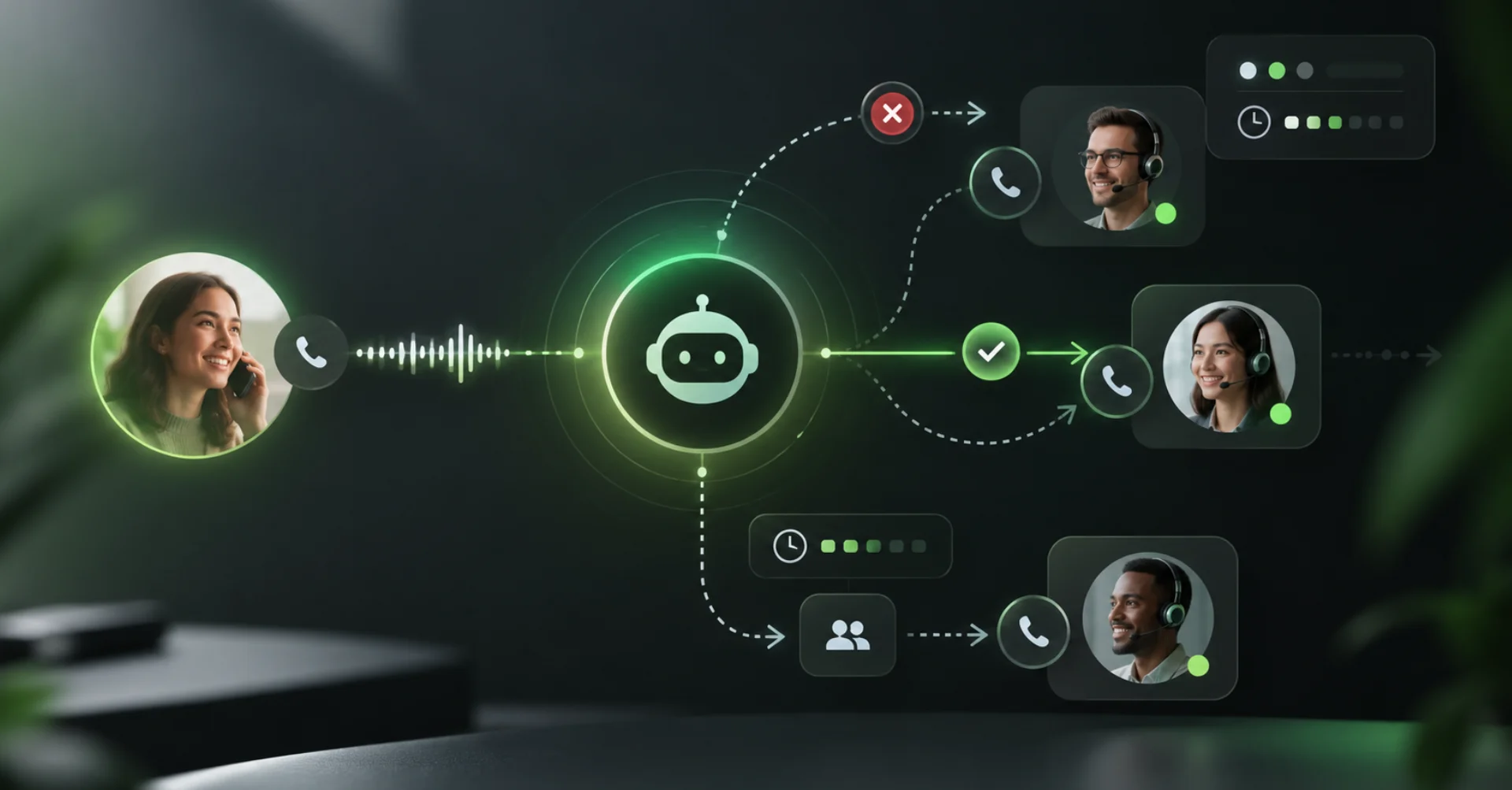
Automatic retries address a smaller problem inside that sequence: the selected teammate remains the correct destination but is temporarily unavailable. Instead of leaving the transfer path after the first unsuccessful attempt, the assistant can wait for a configured interval and call that same teammate again. The original call remains active while this happens.
This pattern is most relevant to on-call teams, 24/7 support, and small operations where there is no equivalent second recipient. It is not a substitute for load balancing or department routing because the documented behavior retries the same teammate.
For the broader sequence of hold, briefing, approval, and returning information to the caller, read the existing guide to warm-transfer outcomes and consultation notes. This article focuses only on the new retry segment between a failed attempt and the fallback. For a wider comparison of handoff types, see the guide to transferring an AI voice-agent call to a human.
Four decisions to make before setup
Clarify these points before enabling the switch:
- Recipient: Is the same teammate still the right destination on the next attempt? If not, use different routing or a fallback path.
- Waiting time: How long can a caller reasonably stay connected before a callback or another option becomes better?
- Attempt limit: How many calls fit the urgency, expected availability, and telephony cost of this workflow?
- Fallback: What should happen if nobody answers—continue the conversation, capture a callback, end the call, or cold-transfer to an alternate number?
These decisions are interdependent. A short delay combined with many attempts can still produce a long hold. Setting the limit to 0 is supported, but does not make endless retries a good customer experience. Famulor states that existing call-duration and credit limits continue to apply.
How to configure automatic warm-transfer retries
1. Open the correct warm-transfer tool
Open the warm-transfer tool that calls the intended teammate. Review the destination, outbound workspace number, hold music, hold message, briefing, and ringing timeout. Famulor documents a warm-transfer ringing timeout from 5 to 120 seconds, with 30 seconds as the default.
Checkpoint: The recipient already receives a useful briefing and is connected only after giving separate approval. Avoid changing the recipient, briefing, and retry behavior in the same test if you want to identify what caused a result.
2. Enable Retry if unanswered
Turn on Retry if unanswered for that tool. Because the option is tool-specific, one emergency handoff can retry while a standard departmental transfer goes straight to its fallback after one attempt.
According to the built-in tools documentation, these outcomes behave as follows:
| Attempt outcome | Retry? | Operational meaning |
|---|---|---|
| No answer | Yes | Ringing ends without pickup |
| Busy | Yes | The recipient line is occupied |
| Temporarily unavailable | Yes | A temporary telephony condition occurred |
| Detected voicemail | Yes | Famulor detected voicemail |
| Explicit decline | No | The recipient declined the transfer |
| Permanent error | No | Another attempt would not resolve the failure |
| Successful connection | No | The warm-transfer sequence continues |
| Caller leaves | No | There is no waiting caller to connect |
The distinction matters. Famulor exposes provider-neutral failure codes such as no_answer, busy, declined, and destination_forbidden, plus whether retrying makes sense. A failed transfer should not automatically be treated as retryable.
3. Set retry delay and maximum attempts
Set Retry delay between 5 and 120 seconds. Then choose Maximum attempts between 0 and 100. The initial call counts toward this number. A value of 3 therefore means no more than three calls in total, not three retries after the first call.
A value of 0 keeps trying while the caller remains connected. It does not override call-duration or credit limits. For many production workflows, a finite number is easier to explain, test, and pair with a clear fallback.
Checkpoint: Write down the expected maximum wait. It includes ringing periods and the delays between attempts; call setup can add time. Do not promise an exact handoff time unless you have measured it in your own telephony environment.
4. Configure the fallback
The fallback runs after all attempts are exhausted or after a non-retryable failure. Famulor documents three broad options: let the assistant continue and offer alternatives, say goodbye and end the call, or cold-transfer to a fallback number without a briefing.
A useful fallback does not expose an internal error code when the caller only needs a next step. Offer a callback, capture a message, provide another channel, or route to a number that is actually staffed. Also decide which details may be passed to the next recipient.
5. Verify the assigned tool in Flows
In Flow Builder, retry delay and attempt count are not maintained as separate warm-transfer-node settings. The current documentation says the node uses its assigned warm-transfer tool. Change retry behavior on that tool, then test the entire flow path.
Practical example: property-management emergency line
A resident calls at night about a suspected water leak. The AI assistant collects the address, callback number, and a concise description, then starts a warm transfer to the on-call technician according to the property manager's escalation rules.
A realistic sequence could be:
- The assistant tells the resident that it is contacting the on-call service and plays the configured hold message.
- The first attempt reaches voicemail. Because Retry if unanswered is on, the fallback does not run yet.
- After the configured delay, Famulor calls the same on-call technician again while the resident stays connected.
- If the technician answers, they hear the configured briefing. The resident is connected only after the technician explicitly approves.
- If every configured attempt fails, the assistant follows the fallback, confirms the captured details, and explains the next defined step.
This example illustrates a workflow; it does not imply guaranteed availability or response times. The property manager must define what qualifies as an emergency, what information may be collected, and what commitments the assistant is allowed to make.
Constraints and privacy considerations
Retries create additional contact opportunities, but they do not solve every handoff problem.
- No recipient rotation: The same recipient is called again. Rotating rosters or multi-team escalation require additional routing or fallback design.
- No success guarantee: Busy, voicemail, or no answer can recur.
- The caller must remain connected: Retries stop when the caller leaves.
- Existing limits remain: Call duration, credits, and the configured maximum still apply.
- Consent and recording are separate: If calls are recorded or persistent customer data is stored, configure the required notices and consent independently. Famulor's consent and transcript-privacy documentation explicitly distinguishes consent to recording from consent to store a customer profile.
Share only the information the recipient needs in the briefing. If a failed warm-transfer consultation should become available to the assistant, Famulor uses a separate consultation-note sharing setting. That control is not part of automatic retries.
If you have not yet created the transfer inside a phone assistant, start with the no-code AI voice agent overview, then model only the escalation path you need.
Test matrix before launch
Do not test only the happy path. A reliable acceptance test covers at least these six cases:
| Test | Expected result |
|---|---|
| Recipient answers and approves after the briefing | Connection succeeds; no retry |
| Recipient does not answer | Next attempt starts after the configured delay |
| Recipient line is busy | Retry occurs while attempts remain |
| Recipient explicitly declines | No retry; configured fallback runs |
| Voicemail is detected | Retry occurs after the delay |
| Caller hangs up while waiting | Retries stop |
Add a test that exhausts the maximum. Confirm that the fallback message is understandable, does not make an unsupported promise, and leads to a working next action. Then inspect the call detail and failed tool runs in History. Famulor documents transfer failure status and retryability in the tool result and transfer events.
Frequently asked questions
Does Famulor automatically call a different teammate?
No. The documented feature calls the same recipient again. An alternate number can be a fallback; team rotation must be designed separately.
Does the first call count toward Maximum attempts?
Yes. The first attempt is included. A maximum of 3 means no more than three calls in total.
What does a maximum of 0 mean?
Famulor continues while the caller remains connected. Existing call-duration and credit limits still apply. Use 0 only when that holding pattern makes operational and economic sense.
Does this work in Flow Builder?
Yes. A warm-transfer node uses its assigned warm-transfer tool, and the retry settings live on that tool.
Conclusion: retry with a clear stopping rule
Automatic retries make a warm transfer more resilient when the correct recipient is only temporarily unavailable. Quality does not come from maximizing attempts; it comes from combining a suitable delay, a deliberate limit, clear hold communication, and a working fallback.
Start with one narrowly defined transfer path. Test success, no answer, busy, voicemail, explicit decline, caller departure, and exhausted attempts. Only move the retry logic into production once every path produces a clear and useful outcome.
About the author
Sarah Müller writes about Famulor product capabilities, Voice AI workflows, and responsible implementation in real service operations.

Writer at Famulor