Summarize Content With:




Human in the Loop vs Human on the Loop: How to Supervise a Voice Agent
Every team that puts an AI voice agent on the phone hits the same question within the first week: who watches the agent, and when does a person step in? The vocabulary comes from automation research. Human in the loop means a person approves or performs a step before it counts. Human on the loop means the agent acts alone while a person supervises, can listen in, and can take over. This guide explains the difference for phone calls, shows which calls belong in which model, and gives you a setup you can run in Famulor this week.
We published a conceptual comparison of the three oversight levels earlier. You can read it in Human-in-the-Loop vs On-the-Loop vs Out-of-the-Loop. This article is the practical sequel: which model for which call, which triggers hand over to a person, and how much staff time each model costs.
The three oversight models in plain words
Think of a dental practice with four treatment chairs. The front desk gets calls all day. Three different setups are possible, and each one puts the human in a different place.
| Model | What the human does | What the AI does | Typical phone example |
|---|---|---|---|
| Human in the loop | Approves or completes the critical step | Prepares, drafts, collects data | Agent collects a refund request, staff confirms before money moves |
| Human on the loop | Supervises, listens in, takes over when needed | Handles the whole call alone | Agent books a check-up while a team lead watches the live view |
| Human out of the loop | Reviews results afterwards | Handles the whole call alone | Agent answers opening hours questions around the clock |
The important point: these are not three product tiers. They are three settings you apply per call type. A single agent can answer opening hours fully alone, book appointments under light supervision, and pass every refund request to a person.
Which calls need a human in the loop
Put a person in the loop when the cost of a wrong action is higher than the cost of a short delay. Four groups of calls usually qualify.
- Money moves. Refunds, payment arrangements, cancellations with fees. The agent collects the facts, a person approves.
- Health or safety is involved. Symptom descriptions, medication questions, emergencies. The agent recognises the risk and hands over immediately.
- Legal weight. Contract changes, formal complaints, data deletion requests. A wrong sentence can create an obligation.
- High-value relationships. A key account calls about a delayed delivery. The agent identifies the account and warm-transfers to the account manager.
In all four cases the agent still does most of the work. It greets the caller, verifies the identity, collects the facts, and writes a short summary. The human only makes the final decision. That keeps handling time short without giving up control.
When human on the loop is enough
Routine calls with clear rules and low risk do not need approval for every step. Think of appointment booking, opening hours, delivery status, directions, and first-level lead qualification. Here the agent works alone and a person supervises the system, not each call.
Supervision on the loop has three parts:
- Live view. A team lead sees running calls and can listen in when something looks off.
- Sampling. A share of finished calls is scored and reviewed, with extra attention on the lowest scores.
- Alerts. Specific words, repeated misunderstandings, or an upset tone trigger a flag.
With Live Monitoring in Famulor a supervisor can listen in, whisper guidance that only the agent or a colleague hears, and take over the call. That is the on-the-loop role in practice: present, but not in the way.
Escalation triggers that actually work
Most failed handovers are not technical. They happen because nobody defined when the agent should give up. Write the triggers down before go-live. A short list beats a long one.
- Explicit request. The caller asks for a person. Always honour this on the first request.
- Topic list. Words and intents from your high-risk list: refund, lawyer, injury, cancel contract, complaint.
- Repeated failure. The agent did not understand the same question twice, or the caller corrected it twice.
- Emotion. Clear frustration, shouting, or distress.
- Missing authority. The caller needs a decision the agent is not allowed to make.
- Tool failure. The calendar or CRM did not respond and the agent cannot finish the task.
Test each trigger with real phrasing from your own callers. A trigger that fires on "I would like to cancel my appointment" is wrong if cancelling an appointment is a routine task. A trigger that misses "this is the third time I call" is wrong in the other direction.
What a good handover carries
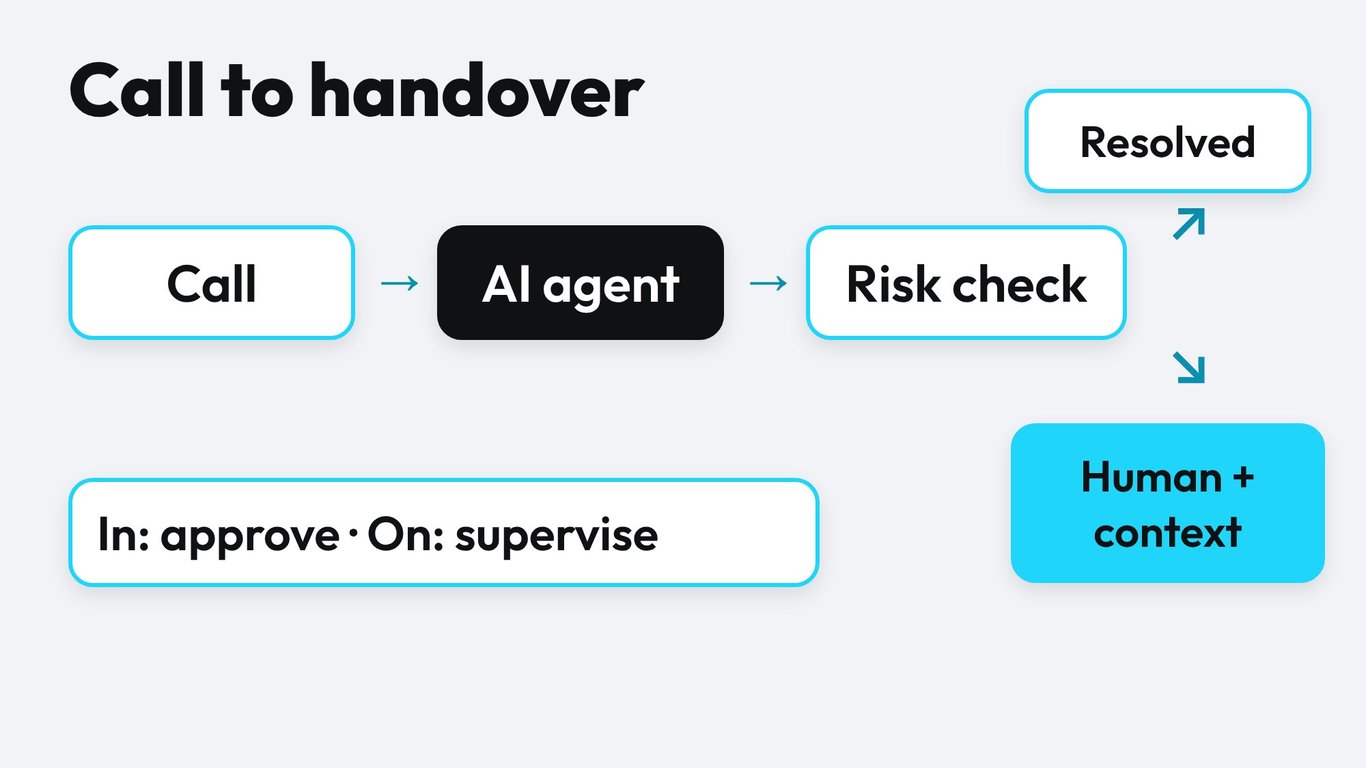
The fastest way to destroy trust is to make a caller repeat everything after a transfer. A handover has two jobs: reach a person who is actually available, and give that person the context before they say hello.
A warm transfer does this. The agent first calls the target, briefs the person with a short summary, and only then connects the caller. Famulor supports warm transfers with consultation notes and automatic retries when the first colleague does not pick up. We explain the setup in AI Voice Agent Call Transfer to a Human.
A useful briefing note fits into four lines:
- Who is calling, and which account or booking it relates to.
- What the caller wants, in one sentence.
- What the agent already did or verified.
- Why the call was escalated, and what decision is needed.
Also plan for the case that nobody answers. A good fallback offers a callback slot, writes a ticket with the same four lines, and tells the caller honestly when to expect a response. A call that ends with a promise and a time is better than a call that rings out.
Routing by call type: a simple decision matrix
Use two questions per call type. How costly is a wrong outcome? How clear are the rules? Low cost and clear rules mean the agent can work alone. High cost or unclear rules mean a human joins the loop.
| Call type | Cost of a mistake | Rules | Recommended model |
|---|---|---|---|
| Opening hours, directions | Low | Clear | Out of the loop, sampled reviews |
| Appointment booking | Low to medium | Clear | On the loop |
| Lead qualification | Medium | Mostly clear | On the loop |
| Refund or payment plan | High | Case by case | In the loop |
| Symptoms, safety | Very high | Strict protocol | In the loop, immediate handover |
| Formal complaint | High | Unclear | In the loop |
Review the matrix every quarter. When call transcripts show that the agent handles a type reliably, you can move it one step toward the loop's edge. When a type causes complaints, move it back.
What each model costs in staff time
Oversight is not free, so it helps to put numbers on it. The following is our own illustrative calculation, not a benchmark. Assume 1000 calls per month with an average length of 3 minutes.
- Humans answer everything: 1000 calls x 3 minutes = 3000 staff minutes.
- Human in the loop for every call: a person confirms each outcome and needs about 1 minute per call, so 1000 staff minutes.
- Human on the loop: 10 percent of calls are sampled at 3 minutes each (300 minutes), and 5 percent are handed over at 4 minutes each (200 minutes), so 500 staff minutes.
- Out of the loop: no live staff time, only occasional spot checks.
The chart shows the trade-off: moving from "approve every call" to "supervise and sample" cuts staff time by half in this example, while a risk-based mix keeps the high-stakes calls in the loop. Your own numbers will differ, so change the assumptions to match your volume.
On the platform side, Famulor starts at €0.05 per minute, and the live monitoring and quality tools are part of the workspace. You can see the plans on the pricing page. Use the calculator below to compare your current call handling with an AI-first setup.
Estimate your ROI from automating calls
See how much your business could save by switching to AI-powered voice agents.
ROI Result
ROI 0%
No credit card required
Test before you let the agent loose
Do not discover your escalation gaps with real callers. Simulations in Famulor let you run scripted callers against a new version of the agent before you publish it. Build a small set of test calls that cover the hard cases:
- A caller who asks for a person in the first sentence.
- A caller who mumbles and gets misunderstood twice.
- A caller who mentions a topic from your high-risk list in passing.
- A caller who accepts the handover, but the target does not answer.
Run the set after every prompt change. If a trigger stops firing, you see it before a customer does.
Score calls instead of listening to all of them
Nobody can listen to every call, and nobody should. Call QA in Famulor scores calls against a rubric you define, for example: Did the agent verify identity? Did it stay inside its authority? Was the handover briefing complete? You then review the lowest-scoring calls and a small random sample.
This turns supervision into a routine of about an hour per week for a small team instead of a constant background worry. Feed what you learn back into the prompt and the trigger list, and the handover rate usually settles on its own.
Compliance: what regulators expect
Human oversight is also a legal topic. Two points matter for phone agents in Europe.
- Transparency. The EU AI Act expects that people are told when they interact with an AI system. Let the agent say so at the start of the call.
- Automated decisions. Under the GDPR, people have rights when a decision with legal or similarly significant effect is made solely by automated means. For those decisions, keep a human in the loop.
High-risk uses may carry stricter oversight duties under the AI Act. This article is not legal advice, so involve your data protection officer for anything that touches credit, employment, insurance, or health. Our page on GDPR and AI voice agents covers the data side.
Set it up in Famulor in five steps
- List your call types and rate each by cost of a mistake and clarity of rules, using the matrix above.
- Define triggers and write the handover target for each: a person, a team, or a callback queue.
- Configure warm transfer with a briefing note and a fallback if nobody answers.
- Simulate the hard cases and fix what fails.
- Go live with Live Monitoring and QA scoring, then review weekly and adjust.
If you run an inbound line, start with Inbound Calls. If you operate a larger service desk, see the AI call center page for team setups.
Conclusion
Human in the loop and human on the loop are not rivals. Use the first where a mistake is expensive, use the second where calls are routine, and let sampling and scoring replace the impossible task of hearing everything. Famulor is built for exactly this mix: the agent handles the conversation, a person keeps the decisions that matter, and the handover never makes the caller start over. Pick one call type this week, define its triggers, simulate it, and go live under supervision.
Try our AI Assistant
Experience how natural our AI phone assistant sounds.
Enter your details and receive a call from our AI agent within seconds.
Agent is trained to discuss Famulor services and book appointments.

Demo AI agent
Famulor representative
FAQ
What is the difference between human in the loop and human on the loop?
In the loop, a person approves or performs a step before it takes effect. On the loop, the AI acts alone and a person supervises, can listen in, and can take over at any time.
Which calls should always involve a human?
Calls where money moves, health or safety is at risk, or a statement creates a legal obligation. Formal complaints and key accounts also belong here.
Can an AI voice agent hand over a call to a person?
Yes. A warm transfer lets the agent brief a colleague first and then connect the caller, so nobody has to repeat the story.
How do I know when the agent should escalate?
Define triggers up front: an explicit request for a person, high-risk topics, repeated misunderstandings, clear frustration, missing authority, or a failing tool. Test each trigger with real phrases.
Do I have to review every call?
No. Score calls against a rubric and review the lowest scores plus a small random sample. That gives you control without reading every transcript.
What happens if nobody answers the transfer?
Plan a fallback: retry another colleague, offer a callback slot, and create a ticket with the same briefing note. Tell the caller honestly when to expect a response.
Does the EU AI Act require human oversight for phone agents?
It requires transparency about AI interaction, and stricter oversight for high-risk uses. Ask your data protection officer how your use case is classified.
Can I change the oversight level later?
Yes. Review call types every quarter. Move reliable types toward more autonomy and pull problem types back into the loop.

Writer at Famulor