Resumir contenido con:




Un webhook de finalización de conversación convierte un chat de WhatsApp o web terminado en un evento de negocio procesable. En lugar de copiar transcripciones manualmente, una empresa puede enviar resultados estructurados directamente a un CRM, un servicio de asistencia, un almacén de datos o una herramienta de automatización. La cuestión crítica no es solo si el webhook se envía. En producción, el flujo debe mantenerse fiable ante tiempos de espera, eventos duplicados, archivos adjuntos multimedia y conversaciones que se prolongan durante varios días.
Una vez finalizada una conversación de chat, Famulor puede entregar la transcripción completa, las variables extraídas, las variables de entrada, los datos del cliente y del remitente, así como las marcas de tiempo. Los eventos de WhatsApp también pueden incluir imágenes, audio, vídeo y documentos como archivos adjuntos. Este plan muestra cómo convertir esa carga útil en una integración de nivel empresarial.
Qué cubre el webhook de finalización de conversación
El webhook está diseñado para el trabajo asíncrono tras una conversación. Los resultados típicos incluyen la creación de un lead, la actualización de un ticket, el archivo de un resumen o el inicio de un flujo de trabajo de seguimiento. Es diferente de una acción durante la llamada: las acciones durante la llamada acceden a los sistemas durante una interacción en directo; el webhook de finalización de conversación transfiere el resultado una vez que la conversación de WhatsApp o del widget web ha concluido.
| Área de datos | Campos clave | Propósito típico |
|---|---|---|
| Identidad | conversation_id, assistant_id, type | Correlación, enrutamiento y deduplicación |
| Resultado | extracted_variables, input_variables | Campos de CRM, cualificación y decisiones de flujo de trabajo |
| Historial | transcript, formatted_transcript | Trazabilidad, control de calidad y contexto de soporte |
| Tiempo | timestamp, timestamp_unix, created_at, ended_at | Orden, medición de SLA y duración |
| Multimedia | attachments con tipo, URL y nombre de archivo | Procesamiento de documentos o imágenes |
| Canal | customer_phone, customer_name, sender | Coincidencia de contactos y lógica adaptada al canal |
La arquitectura de destino fiable: confirmar rápido, procesar después
Un endpoint de webhook debe realizar el menor trabajo síncrono posible. Recibe el evento, valida la estructura básica, almacena la carga útil sin cambios y coloca un trabajo en una cola. Las actualizaciones del CRM, el análisis de archivos multimedia, las notificaciones y las transformaciones de mayor envergadura ocurren después. Esto permite que el endpoint devuelva una respuesta 2xx rápidamente y evita reintentos innecesarios.
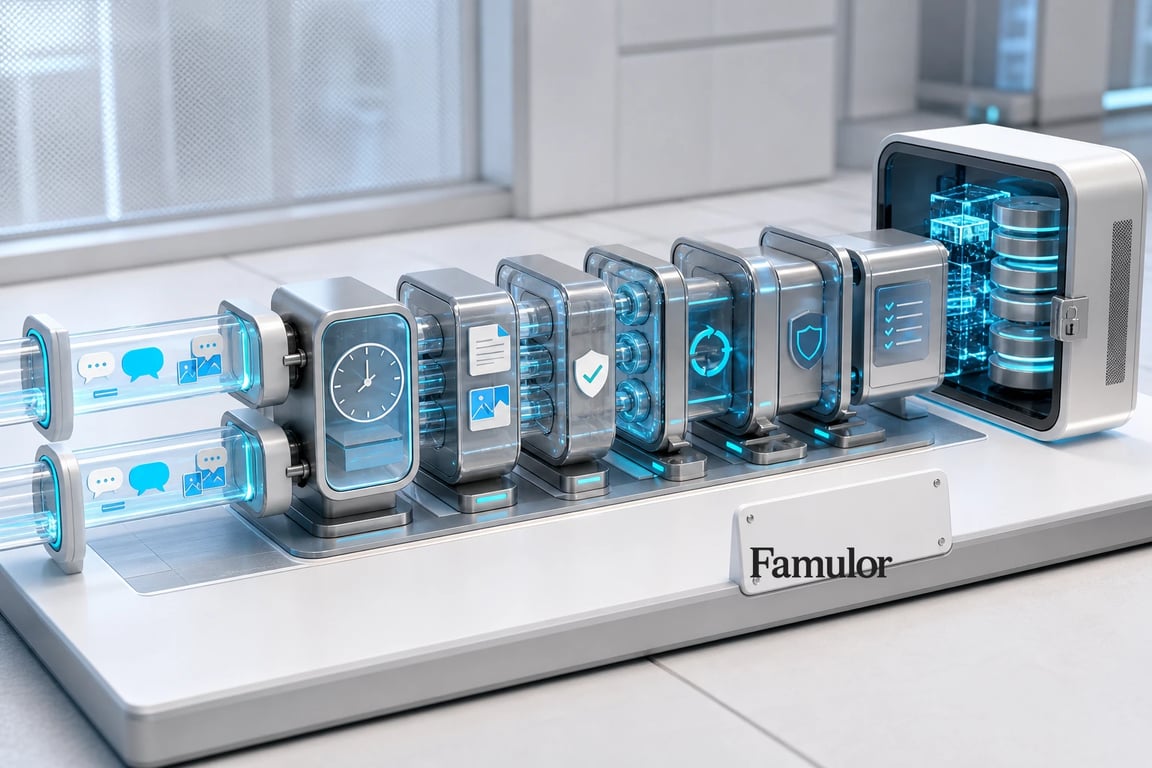
- Ingesta del evento: Limita el tamaño de la carga útil, analiza el JSON y valida los campos obligatorios como
conversation_idystatus. - Almacenamiento sin cambios: Guarda la carga útil original con la hora de recepción y un estado de entrega interno. Esto crea una fuente auditable para futuras reejecuciones.
- Deduplicación: Para los eventos de finalización de conversación,
conversation_ides una clave de negocio útil. La base de datos no debería registrar la misma finalización dos veces como un caso nuevo. - Procesamiento asíncrono: Un trabajador realiza el mapeo de campos, las actualizaciones en el CRM, la creación de tickets, el análisis y las notificaciones.
- Registro del resultado: Captura el sistema de destino, el resultado de la API, el número de intentos y la clase de error. Esto convierte un "webhook enviado" en un proceso medible.
Los reintentos son una red de seguridad, no lógica de procesamiento
Si el endpoint configurado falla o no devuelve un estado 2xx, Famulor reintenta la entrega después de 30, 60 y 120 segundos. Tras tres reintentos fallidos, la entrega se marca como fallida. Este programa absorbe incidentes breves de red y de plataforma, pero no sustituye a una cola o a la idempotencia en el sistema de destino.
La regla fundamental es sencilla: la reentrega no debe activar la misma acción de negocio dos veces. Una actualización (upsert) en el CRM es más segura que una operación de creación ciega. Para las acciones posteriores, una tabla de idempotencia dedicada puede almacenar conversation_id + action_name. El trabajador puede entonces determinar si ya ha creado un ticket, enviado un correo electrónico o actualizado un trato.
Reejecución y pistas de auditoría para las operaciones diarias
Famulor registra el resultado de la entrega del webhook, incluyendo su estado y respuesta. Los equipos pueden reenviar el webhook para una conversación individual, mientras que las vistas de lista permiten la reevaluación y reentrega masiva. Esto resulta valioso cuando un CRM no estaba disponible temporalmente o se ha corregido un mapeo de campos.
Un proceso de reejecución controlado necesita tres reglas:
- La reejecución es idempotente: El destino actualiza el mismo registro en lugar de crear duplicados.
- El original y la transformación permanecen separados: La carga útil original es inmutable; los datos transformados reciben una versión.
- Cada intento es visible: Registra la hora, el iniciador, la versión de transformación y el resultado.
La referencia completa de campos y el comportamiento de reintento están documentados en la documentación del webhook de finalización de conversación de Famulor.
¿Qué sistemas debe conectar Voice AI?
Selecciona tus herramientas y recibe una ruta de integración.
Famulor
Voice AI
Integraciones seleccionadas: 4
Procesamiento seguro de archivos adjuntos multimedia
Las conversaciones de WhatsApp pueden incluir imágenes, audio, vídeo y documentos. El webhook expone una matriz attachments con un tipo, una URL y un nombre de archivo. No trates estas URLs como archivos internos de confianza. Un flujo de trabajo multimedia sólido descarga el contenido en el lado del servidor, aplica límites de tamaño y tipo, escanea los archivos y los conserva solo para el propósito comercial declarado.
- Valida el tipo de contenido real, no solo la extensión del nombre de archivo.
- Establece límites de tiempo para la descarga y el procesamiento.
- Separa los datos personales por rol y cliente (tenant).
- Registra la retención, eliminación y acceso.
- Mueve los fallos de análisis a una cola de mensajes fallidos (dead-letter queue) sin perder el evento original.
Para los mensajes de WhatsApp salientes, el webhook de confirmación de lectura añade estados como sent, delivered, read y failed. Este webhook está firmado con HMAC-SHA256. Verifica la firma sobre el cuerpo de la solicitud intacto y deduplica las actualizaciones de estado por ID de mensaje y estado.
Convierte eventos técnicos en métricas operativas significativas
Un proyecto de webhook no está listo para producción hasta que su estado es visible. Un panel de operaciones útil puede comenzar con un conjunto básico de métricas:
- Porcentaje de eventos aceptados en el primer intento
- Tiempo de extremo a extremo desde el final de la conversación hasta una actualización exitosa en el destino
- Cantidad y antigüedad de los trabajos pendientes o fallidos
- Tasa de reejecución y clase de error más común
- Porcentaje de eventos con archivos adjuntos y tasa de fallos en el procesamiento multimedia
- Tasa de campos obligatorios faltantes en el mapeo del CRM
Estas métricas revelan más que problemas de infraestructura. Un aumento repentino en los campos de cualificación faltantes puede indicar que un prompt o un flujo de conversación ha cambiado. Por tanto, la observabilidad de los webhooks conecta las operaciones de la plataforma con la calidad de la IA conversacional.
Lista de verificación de implementación
- Habilita el webhook de finalización de conversación para el asistente y configura un endpoint HTTPS.
- Define el esquema de destino para el CRM, el servicio de asistencia o el almacén de datos.
- Crea un almacén de eventos sin procesar y una clave de idempotencia única.
- Define el comportamiento de la cola, el trabajador, el reintento y la cola de mensajes fallidos.
- Asegura la ruta de los archivos multimedia con reglas de tipo de contenido, tamaño, malware y retención.
- Prueba escenarios de WhatsApp, widget web, chats de varios días, intervención humana y archivos adjuntos.
- Simula una entrega fallida y demuestra que la reejecución no crea duplicados.
- Documenta las alertas y la responsabilidad de los eventos bloqueados.
Los equipos sin una arquitectura de automatización pueden empezar con la Plataforma de Automatización de Famulor o integrarse a través de la API y su propia cola. Para flujos de trabajo específicos de WhatsApp, Famulor WhatsApp AI proporciona la capa de canal.
Preguntas frecuentes
¿En qué se diferencia un webhook de finalización de conversación de un webhook de post-llamada?
El webhook de finalización de conversación cubre las conversaciones de chat en WhatsApp y el widget web. Las llamadas telefónicas utilizan el webhook de post-llamada. Ambos pueden iniciar flujos de trabajo posteriores, pero sus cargas útiles y metadatos de canal difieren.
¿Puede el mismo evento llegar más de una vez?
Sí. La reentrega es una posibilidad normal con los webhooks, especialmente tras un tiempo de espera o una respuesta distinta a 2xx. Por tanto, el receptor debe hacer que cada paso del procesamiento sea idempotente.
¿Qué ID se debe utilizar para la deduplicación?
Para la finalización de una conversación de chat, conversation_id es la clave de negocio central. Para acciones individuales posteriores, combina el ID de conversación con un nombre de acción.
¿Debería el manejador HTTP actualizar el CRM directamente?
Eso puede funcionar para una prueba pequeña, pero una cola es más fiable en producción. El manejador puede confirmar rápidamente mientras un trabajador actualiza los sistemas externos con un manejo de errores independiente.
¿Cuál es la mejor forma de empezar?
Comienza con un destino y un resultado claro, como "actualizar un lead cualificado en el CRM". Añade análisis multimedia, notificaciones y automatizaciones adicionales solo después de que esa ruta sea observable y segura ante reejecuciones.

Autor en Famulor