Inhoud samenvatten met:




Update: Famulor AI Prompt Editor V2 – Promptoptimalisatie zonder dat je een expert hoeft te zijn
Het creëren van krachtige AI-assistenten was voorheen vaak voorbehouden aan specialisten. Complexe prompt engineering, talloze testrondes en diepgaande technische kennis waren nodig om een AI-agent de gewenste vaardigheden mee te geven. Die drempel behoort nu tot het verleden. Met de nieuwe Famulor AI Prompt Editor V2 democratiseren we de ontwikkeling van voice- en chatbots. Vanaf nu heb je geen enkele kennis van prompt engineering meer nodig. In plaats daarvan chat je simpelweg met een intelligente AI die de perfecte assistent voor je bouwt en optimaliseert.
Deze update is meer dan zomaar een nieuwe functie; het is een paradigmaverschuiving. We bieden je een set tools die het proces van AI-ontwikkeling vanaf de basis herdefinieert, aangevoerd door onze eigen, toonaangevende 'Thinking Function'.
De oude wereld van prompt engineering versus de nieuwe Famulor-aanpak
Tot nu toe was het schrijven van een systeem-prompt voor een AI-agent vaak als navigeren door een doolhof. Je moest de exacte structuur, de juiste commando's en de precieze toon vinden om de bot betrouwbaar te laten functioneren. Fouten leidden tot inconsistente antwoorden, misverstanden in klantgesprekken of het volledig falen van taken. Dit proces was tijdrovend, kostbaar en frustrerend voor niet-experts.
De Famulor AI Prompt Editor V2 draait dit proces om. In plaats van commando's in een leeg veld te typen, ga je een dialoog aan met onze editor-AI. Beschrijf simpelweg wat je assistent moet doen:
- "Maak een AI-assistent voor mijn makelaarskantoor die telefoontjes aanneemt, basisvragen over woningen beantwoordt en bezichtigingsafspraken inplant."
- "Ik heb een chatbot nodig voor mijn webshop die de status van bestellingen controleert en helpt bij retourzendingen."
- "Optimaliseer mijn bestaande prompt zodat deze vriendelijker klinkt en proactief naar het e-mailadres van de klant vraagt."
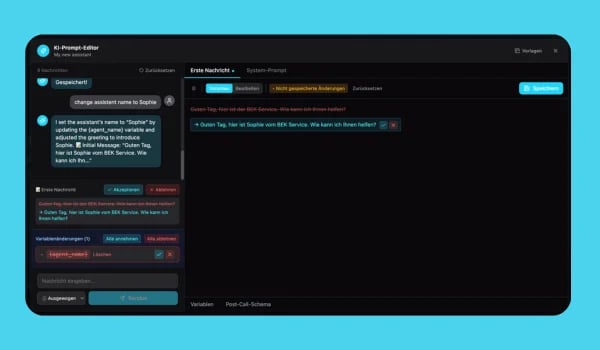
De AI stelt intelligente vervolgvragen, doet suggesties en genereert in real-time een geoptimaliseerde systeem-prompt. Je controleert de wijzigingen en past ze met één klik toe. Zo eenvoudig is het. Ontdek hoe deze aanpak de creatie van AI-agents revolutioneert in onze gids voor no-code automatisering.
Een nadere blik op de exclusieve V2-functies van Famulor
De kern van deze update bestaat uit drie belangrijke innovaties die Famulor naar de voorhoede van de industrie katapulteren: de 'Thinking Function', de conversationele editor en de volledig vernieuwde Flow Builder.
De 'Famulor Thinking Function': Wanneer AI pauzeert om briljanter te zijn
Dit is een eigen innovatie die alleen bij Famulor beschikbaar is. Standaard AI-modellen zijn vaak geoptimaliseerd voor maximale snelheid. Ze reageren razendsnel, maar bij complexe verzoeken lijdt de kwaliteit daaronder. Onze nieuwe Thinking Function geeft de AI-agent extra 'denktijd'. Dit betekent dat de AI een moment langer de tijd neemt om het verzoek van de gebruiker volledig te analyseren, de context te begrijpen en tot de best mogelijke reactie of actie te komen.
De voordelen zijn direct merkbaar:
- Verbeterde antwoordkwaliteit: In plaats van oppervlakkige of licht onjuiste antwoorden krijg je precieze, weloverwogen en contextbewuste reacties. Je AI-assistent kan nu vol vertrouwen omgaan met gelaagde verzoeken.
- Geoptimaliseerde redenering: Complexe problemen, zoals het afwegen van verschillende afspraakopties rekening houdend met de beschikbaarheid in de agenda, worden betrouwbaarder opgelost.
- Slimmere promptverwerking: De editor-AI begrijpt je instructies beter en vertaalt deze naar een robuustere en effectievere systeem-prompt.
Deze unieke technologie zorgt ervoor dat je AI-agents niet alleen snel handelen, maar vooral intelligent en menselijk overkomen.
Intelligente chat, geen complexe commando's: AI-assistenten bouwen via dialoog
De nieuwe editor is veel meer dan alleen een tekstvak. Het is je partner bij het creëren van de perfecte AI-agent. In plaats van documentatie door te spitten, gebruik je eenvoudige taal. Vertel de editor-AI wat je wilt bereiken en het zware werk wordt voor je gedaan. Je kunt prompts vanaf nul maken, bestaande prompts optimaliseren of simpelweg inspiratie opdoen.
Een typische workflow ziet er als volgt uit:
- Doel definiëren: Je voert een simpele instructie in, bijvoorbeeld: "Maak een assistent voor telefonische tafelreserveringen in mijn restaurant."
- AI-dialoog: De editor-AI stelt verduidelijkende vragen: "Welke informatie moet worden verzameld? Naam, aantal personen, tijd, telefoonnummer? Moet er gevraagd worden naar allergieën?"
- Suggestie ontvangen: Op basis van je antwoorden maakt de AI een complete, professionele systeem-prompt.
- Wijzigingen controleren: Je ziet de suggestie en kunt verdere aanpassingen doen door simpelweg door te chatten: "Voeg toe dat de assistent aan het einde de parkeermogelijkheden moet noemen."
- Implementeren: Met één klik is de nieuwe prompt actief en is je AI-assistent klaar voor gebruik.
Deze interactieve aanpak versnelt de ontwikkelingstijd aanzienlijk en maakt het voor iedereen toegankelijk. We legden de basis hiervoor met onze eerste Prompt Editor voor AI-agents en hebben dit nu geperfectioneerd.
Famulor Flow Builder: Nieuw ontwerp & verbeterde functies
Een briljante prompt is slechts het halve werk. De ware kracht van een AI-agent ligt in het vermogen om acties uit te voeren en te integreren in je bedrijfsprocessen. Dat is precies waar onze vernieuwde Flow Builder om de hoek komt kijken.
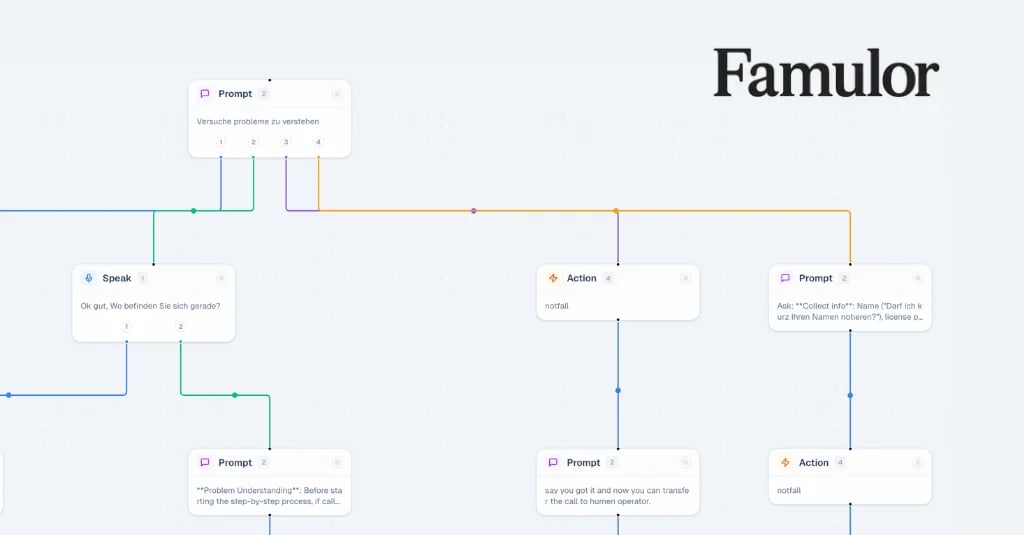
De Flow Builder is bijgewerkt met een fris, intuïtiever ontwerp en nieuwe functies die je nog meer controle geven over je automatiseringsworkflows. Met drag-and-drop kun je je AI-agent koppelen aan meer dan 300 tools, zoals je CRM, agenda of helpdesksysteem. De nieuwe Flow Builder werkt naadloos samen met de AI Prompt Editor. Terwijl de prompt het 'brein' van je agent is dat de dialoog aanstuurt, is de Flow Builder het 'zenuwstelsel' dat acties activeert, zoals het toevoegen van een afspraak aan Calendly of het aanmaken van een ticket in Zendesk. Je leert hoe je dergelijke intelligente dialogen ontwerpt in ons artikel over de Famulor Flow Builder voor Voice Agents.
Stabiliteit en betrouwbaarheid als fundament
Naast deze baanbrekende innovaties hebben we ook onder de motorkap gewerkt. Deze update bevat talloze bugfixes en stabiliteitsverbeteringen. Ons eigen platform draait soepeler en betrouwbaarder dan ooit, waardoor je je volledig kunt concentreren op het creëren van uitstekende klantervaringen, of dat nu telefonisch is of via onze nieuwe Famulor AI Live Chat Agents.
Conclusie: De toekomst van AI-ontwikkeling is conversationeel
Met de AI Prompt Editor V2 en de exclusieve 'Thinking Function' zet Famulor een nieuwe industriestandaard. We halen de complexiteit uit het AI-ontwikkelingsproces en maken het toegankelijk, snel en creatief. Je hoeft geen expert meer te zijn om een AI-assistent van topniveau te bouwen die echte taken uitvoert en je bedrijf vooruithelpt.
De focus verschuift van technisch sleutelen naar strategisch ontwerp. In plaats van te worstelen met commandosyntaxis, kun je je concentreren op wat echt telt: het ontwerpen van een intelligente, behulpzame en merk-eigen dialoog. Ga vandaag nog aan de slag en ervaar hoe eenvoudig het kan zijn om je eigen AI te creëren.
FAQ – Veelgestelde vragen
Wat is de Famulor AI Prompt Editor V2?
De Famulor AI Prompt Editor V2 is een intelligente tool waarmee je systeem-prompts voor AI-voice- en chatassistenten kunt maken en optimaliseren via een eenvoudige dialoog met een AI. Je hebt geen voorkennis van prompt engineering nodig; beschrijf simpelweg wat de assistent moet doen.
Wat maakt de 'Famulor Thinking Function' zo bijzonder?
De 'Famulor Thinking Function' is een eigen technologie die de AI meer tijd geeft om verzoeken te analyseren en te verwerken. Deze extra 'denktijd' leidt tot aanzienlijk preciezere, doordachtere en contextbewuste antwoorden, vooral in complexe dialogen.
Heb ik programmeer- of promptvaardigheden nodig om de editor te gebruiken?
Nee, helemaal niet. De editor is zo ontworpen dat iedereen hem kan gebruiken. Je communiceert met de editor-AI in natuurlijke taal, alsof je met een menselijke collega praat. De AI vertaalt je wensen automatisch naar een perfect geformatteerde systeem-prompt.
Hoe werkt de vernieuwde Flow Builder samen met de nieuwe Prompt Editor?
De AI Prompt Editor bepaalt *wat* de AI-assistent zegt en begrijpt. De Flow Builder bepaalt *wat* de assistent doet. Nadat je een intelligente dialoog hebt ontworpen in de editor, gebruik je de Flow Builder om deze dialoog via drag-and-drop te koppelen aan acties, zoals: "Wanneer de klant een afspraak boekt, maak dan een item aan in onze Google Agenda."
Kan ik de assistenten die met de editor zijn gemaakt gebruiken voor telefoongesprekken en websitechats?
Ja. De agents die met de Famulor AI Prompt Editor zijn gemaakt, zijn omnichannel-ready. Je kunt dezelfde intelligente assistent gebruiken om zowel je telefoongesprekken als de live chat op je website te automatiseren, wat zorgt voor een consistente klantervaring.

Auteur bij Famulor