Resumir contenido con:




Captura de emails mediante agentes de voz con IA: guía completa para obtener datos precisos y optimizar procesos
En el dinámico mundo empresarial actual, la captura precisa de los datos de los clientes en todos los canales es fundamental para el éxito. Durante las interacciones telefónicas, registrar correctamente las direcciones de email puede suponer un desafío particular. Los malentendidos al deletrear nombres o las diferencias de pronunciación pueden derivar en errores de datos, pérdida de clientes potenciales y un esfuerzo manual innecesario. Aquí es donde los agentes de voz basados en IA entran en juego, revolucionando el proceso. Famulor ofrece una plataforma avanzada que permite a las empresas capturar direcciones de email mediante IA de voz no solo de forma eficiente, sino con una precisión extrema.
Esta guía exhaustiva explora por qué es tan importante la captura precisa de emails mediante IA de voz, destaca los errores más comunes y explica cómo puedes implementar las mejores prácticas con los agentes de voz de Famulor para mejorar significativamente la calidad de tus datos y las interacciones con tus clientes.
Por qué es esencial la captura precisa de emails mediante IA de voz
Una dirección de email suele ser la clave para continuar la comunicación con los clientes, ya sea para enviar presupuestos, confirmaciones, boletines informativos o información de soporte. Una captura incorrecta puede tener consecuencias de gran alcance:
- Pérdida de leads: Si los clientes potenciales no pueden enviar su dirección de email correctamente, se pierden contactos valiosos antes incluso de que comience la relación comercial.
- Procesos ineficientes: El procesamiento manual posterior de direcciones de email incorrectas consume tiempo y recursos que estarían mejor invertidos en tareas de valor añadido.
- Mala experiencia del cliente (CX): Nada es más frustrante para un cliente que no recibir la información prometida porque su dirección de email se registró incorrectamente. Esto daña la confianza y la reputación de la empresa.
- Riesgos de privacidad de datos: En el peor de los casos, las direcciones de email asignadas incorrectamente pueden provocar brechas de privacidad si información sensible cae en manos equivocadas.
Los enfoques tradicionales con agentes humanos en centros de llamadas son propensos a errores y costosos. Los agentes de voz con IA ofrecen una solución escalable y consistente, pero solo si la implementación tiene en cuenta los desafíos específicos del reconocimiento de voz.
Desafíos de la captura de emails mediante IA de voz
El lenguaje humano es complejo. Incluso para los agentes humanos, registrar una dirección de email sin errores suele ser difícil, ya que contiene una combinación de letras, números y caracteres especiales que pueden confundirse fácilmente a nivel fonético. Los sistemas de IA se enfrentan a obstáculos similares, a veces incluso mayores:
- Homófonos: Letras como la "B" y la "D" o la "M" y la "N" suelen sonar muy parecidas y pueden confundirse fácilmente.
- Acentos y dialectos: Los hablantes con diferentes acentos o dialectos pueden afectar significativamente a la tasa de reconocimiento.
- Ruido de fondo: El ruido ambiental dificulta la captura limpia de la dirección de email pronunciada.
- Caracteres especiales: Reconocer e interpretar correctamente caracteres especiales como puntos, guiones o guiones bajos ("-", "_", ".") es otro obstáculo.
- Velocidad al hablar: Hablar demasiado rápido o demasiado lento puede complicar la transcripción de la IA.
Famulor como solución: cómo capturar emails con precisión mediante IA de voz
Famulor se desarrolló para superar estos desafíos y garantizar una captura de emails lo más libre de errores posible. Al combinar prompts inteligentes, modelos de lenguaje avanzados y funciones interactivas, puedes aumentar drásticamente la precisión.
Mejores prácticas para la captura de emails con la IA de voz de Famulor
- Solicita siempre el deletreo letra a letra: Este es el método más básico y eficaz. Indica claramente al usuario cómo deletrear su dirección de email, idealmente con ejemplos del alfabeto fonético.
Plantilla de prompt de ejemplo para agentes de Famulor:
"Please spell your email address, letter by letter. For example: J for John, A for Apple, M for Mary, I for Ida, L for Lincoln, O for Oliver, R for Richard, then the dot, then D for David, E for Edward. I repeat: J.A.M.I.L.O.R.dot.D.E. Is that correct?"El Editor de Prompts de Famulor te permite configurar y optimizar fácilmente estas instrucciones detalladas. Usa el Flow Builder para definir la solicitud de deletreo como un paso independiente en el flujo de la conversación.
- Repetición y confirmación inmediata: Una vez que el agente de voz captura la dirección de email, debe leerla inmediatamente al usuario para solicitar su confirmación.
Ejemplo:
"I understood {email}. Is that correct? Please say Yes or No."Los agentes de Famulor en modo Speech-to-Speech pueden hacer que este proceso sea especialmente natural y fluido, mejorando la experiencia del usuario. Lee más sobre cómo utiliza Famulor este modo en nuestra entrada de blog sobre modelos de IA Speech-to-Speech.
- Repetición educada ante errores: Si el cliente confirma que la dirección de email es incorrecta, el agente de voz debe pedirle educadamente que la deletree de nuevo.
Ejemplo:
"I apologize, it seems there was an error. Could you please spell your email address again, letter by letter?" - Validación Regex + comprobación por API: A nivel técnico, la dirección de email capturada debe validarse inmediatamente.
- Regex básico: Una expresión regular sencilla como
^[a-zA-Z0-9._%+-]+@[a-zA-Z0-9.-]+\\.[a-zA-Z]{2,}$puede detectar errores sintácticos. La plataforma de automatización no-code interna de Famulor te permite integrar dichas comprobaciones de regex directamente en el flujo de trabajo. - Verificación por API: Para obtener el máximo nivel de seguridad y evitar errores tipográficos, es esencial integrar un servicio de verificación de email como ZeroBounce. Famulor admite más de 300 integraciones, incluidas las de validación de email. Lee más sobre nuestras integraciones en nuestra página de integraciones.
- Regex básico: Una expresión regular sencilla como
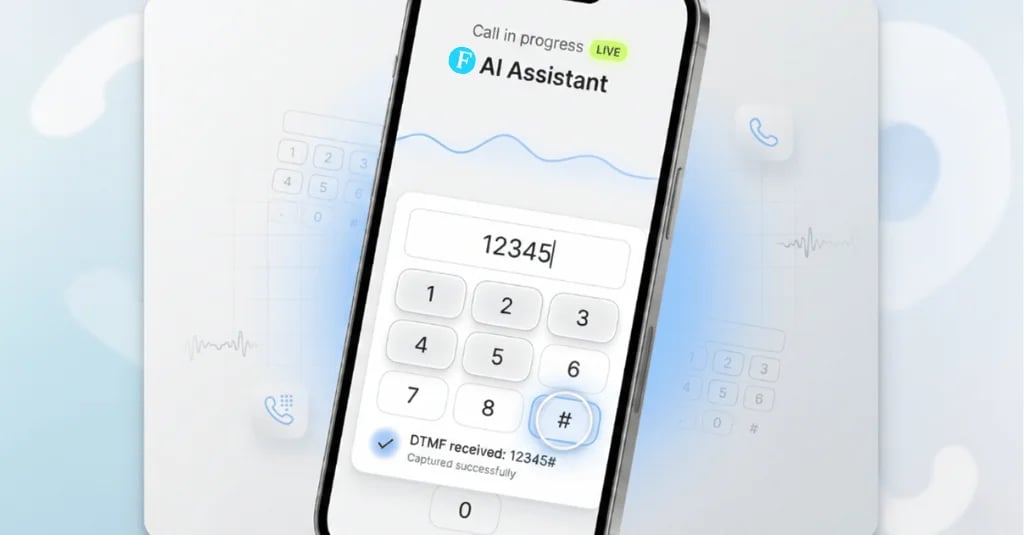
- Fallback DTMF para una precisión del 100%: En caso de dificultades persistentes o para datos sensibles, la entrada por teclado (DTMF) es una excelente opción de respaldo.
Ejemplo:
"If it remains difficult, you can also type your email address letter by letter on your phone keypad and then press the pound key (#)."La función DTMF de Famulor permite esta entrada paralela mediante voz y teclado, lo que aumenta significativamente la precisión para datos críticos como emails, PIN o números de cuenta, finalizando automáticamente tras unos segundos.
- Fallbacks mediante SMS/formulario web: Si no es posible realizar una captura precisa ni siquiera con DTMF, se debe ofrecer al usuario un método alternativo, como recibir un enlace a un formulario web por SMS.
Ejemplo:
"It seems we're having trouble understanding your email address. Should I send you a link via SMS where you can enter your details?"La plataforma Famulor admite integraciones de SMS fluidas, asegurando también el proceso de captura de leads a través de este canal. Lee más sobre estrategias de comunicación inteligente en nuestro artículo Automatización de WhatsApp: una guía práctica para flujos de trabajo que dan resultados.
- Monitorización y adaptación continua: Registra los intentos fallidos en la captura de emails. Analiza estos datos para identificar las fuentes de error comunes y mejora continuamente tus prompts y reglas de validación. El panel de control y el historial de llamadas de Famulor proporcionan registros y KPI en tiempo real que respaldan esta optimización.
Pasos de implementación en Famulor para una captura de emails fiable
Configurar una captura de emails precisa con Famulor es sencillo gracias a su plataforma no-code fácil de usar:
- Crea un agente: Ve a "Agentes" y crea un nuevo agente de voz. Elige un motor de voz optimizado para una pronunciación natural y clara (por ejemplo, el modo Dualplex para voces premium).
- Configura el flujo: Usa el Flow Builder visual para diseñar el flujo de la conversación. Añade un bloque de "Prompt" para la solicitud de deletreo, seguido de un bloque de "Captura" para la dirección de email.
- Establece la validación: Implementa la validación Regex dentro del bloque de "Captura". Para una verificación avanzada, puedes configurar una integración de API con un servicio de verificación de email usando un bloque de "Acción".
- Define los fallbacks: Añade lógica en el flujo que active la función DTMF o envíe un enlace por SMS si la captura del email no tiene éxito (por ejemplo, tras dos intentos).
- Prueba y optimiza: Realiza pruebas exhaustivas y revisa el historial de llamadas en el panel de control de Famulor. Ajusta los prompts y la lógica según sea necesario para maximizar la tasa de captura.
Ejemplos prácticos: sectores que se benefician de la captura precisa de emails
La captura precisa de emails mediante un agente de voz con IA es inestimable en muchos sectores:
- E-commerce: Emails de confirmación automatizados, notificaciones de envío o campañas de marketing dirigidas tras un pedido telefónico. Para más información, consulta nuestro whitepaper: Voz y chatbots en el comercio electrónico.
- Salud: Confirmaciones de citas, información sobre tratamientos o medicamentos y recordatorios para citas de seguimiento.
- Inmobiliaria: Envío de dossieres, detalles sobre citas para visitas o seguimiento de consultas de clientes potenciales.
- Servicios financieros: Envío de documentos contractuales, confirmaciones de transacciones o detalles sobre productos de inversión. La seguridad de los datos es crítica aquí, como se destaca en nuestro artículo sobre Clonación de voz con IA en el sector financiero.
- Oficios y servicios: Confirmaciones de pedidos, envío de facturas o información de servicio. Hay más casos de uso interesantes para profesionales en esta entrada de blog.
Conclusión: captura de emails impecable mediante IA de voz con Famulor
La captura precisa de direcciones de email mediante agentes de voz con IA ya no es una utopía; es una realidad alcanzable con las herramientas y estrategias adecuadas. Famulor proporciona una plataforma potente, flexible y fácil de usar que permite a las empresas automatizar este paso crítico en el diálogo con el cliente mientras maximizan la precisión.
Al implementar mejores prácticas como deletrear los emails, la confirmación inmediata, la validación Regex, la verificación por API y opciones de fallback inteligentes como DTMF o enlaces por SMS, no solo puedes mejorar la calidad de tus datos, sino también aumentar la eficiencia de los procesos y mejorar la satisfacción del cliente.
¿Estás listo para llevar tu captura de emails mediante IA de voz al siguiente nivel y asegurar leads valiosos? Entonces prueba la plataforma Famulor hoy mismo y experimenta los beneficios de la IA de voz inteligente para tu negocio.
¡Descubre Famulor ahora y empieza gratis!
Preguntas frecuentes: captura de emails mediante agentes de voz con IA
¿Cómo puede un agente de voz con IA capturar emails con precisión?
Un agente de voz con IA puede capturar emails con precisión solicitando activamente al interlocutor que deletree la dirección (por ejemplo, "A de Apple"), repitiendo inmediatamente la entrada y solicitando confirmación. La validación adicional mediante expresiones regulares y servicios de API externos aumenta la precisión.
¿Cuál es el mejor prompt para solicitar una dirección de email usando IA de voz?
Un prompt eficaz es claro, instructivo e incluye ejemplos: "Por favor, deletree su dirección de email, letra a letra. Por ejemplo: M de Madrid, A de Apple, X de Xilófono. ¿Es correcto?"
¿Qué papel desempeña el DTMF en la captura de emails mediante IA de voz?
El DTMF (Dual-Tone Multi-Frequency), que consiste en introducir datos mediante el teclado del teléfono, sirve como una opción de respaldo fiable. Si el reconocimiento de voz tiene dificultades, el usuario puede escribir su dirección de email usando el teclado, lo que mejora drásticamente la precisión para datos complejos o sensibles.
¿Cómo mejora Famulor la precisión en la captura de emails?
Famulor mejora la precisión a través de su Flow Builder visual diseñado para flujos de conversación claros, el uso de motores de voz multimodales para un mejor reconocimiento del habla, validación Regex y API integrada, y la función DTMF como alternativa segura a la entrada de voz.
¿Es la captura de emails mediante un agente de voz con IA conforme al RGPD?
Sí, con la implementación correcta, la captura de emails puede ser conforme al RGPD. Famulor prioriza la privacidad de los datos y ofrece funciones como alojamiento en la UE y políticas de retención cero para garantizar el cumplimiento del RGPD. Sin embargo, siempre se recomienda revisar los requisitos legales específicos e informar de forma transparente a los usuarios sobre el tratamiento de sus datos.
¿Qué integraciones son importantes para la verificación de emails?
Las integraciones con servicios de verificación de email como ZeroBounce son cruciales para comprobar la autenticidad y validez de las direcciones de email. Famulor ofrece más de 300 integraciones, lo que permite conexiones fluidas con dichos servicios y sistemas CRM como HubSpot o Salesforce.

Autor en Famulor