Resumir contenido con:




Un agente telefónico de IA puede resumir cortésmente una cita y, aun así, saltarse el paso fundamental: llamar al calendario. Esa distinción es crítica en un flujo de trabajo operativo. Una respuesta hablada adecuada no es lo mismo que una acción ejecutada.
Famulor introdujo Force tool call el 2 de septiembre de 2026. Esta opción se aplica a los nodos de herramientas (Tool nodes) en el Flow Builder y hace que el asistente invoque la herramienta seleccionada en lugar de pasar por alto el paso requerido (registro de cambios de Famulor, consultado el 3 de septiembre de 2026). Esta guía explica cuándo usarla, cómo preservar una ruta de fallo fiable y por qué forzar una invocación no garantiza que se haya creado un registro en el sistema de destino.
Puntos clave
- Force tool call hace que la invocación de un nodo de herramienta seleccionado sea obligatoria.
- Garantiza el intento de invocación, no el éxito de una API externa, calendario o CRM.
- Fuerza las acciones de escritura solo después de que se hayan validado las entradas requeridas y el interlocutor haya confirmado claramente la decisión.
- Cada nodo de herramienta obligatorio necesita una ruta de fallo y alternativa honesta.
- Prueba los flujos de trabajo del calendario en el navegador y mediante una llamada telefónica real cuando el contexto del número de quien llama sea relevante.
El problema: la conversación avanza pero la acción no se ejecuta
En un diálogo abierto, un asistente puede avanzar verbalmente al siguiente punto aunque no se haya producido una llamada a una herramienta crítica para el negocio. Esto puede ser inofensivo para una consulta opcional, pero crea un vacío serio cuando el paso que falta es una comprobación de disponibilidad o un intento de reserva.
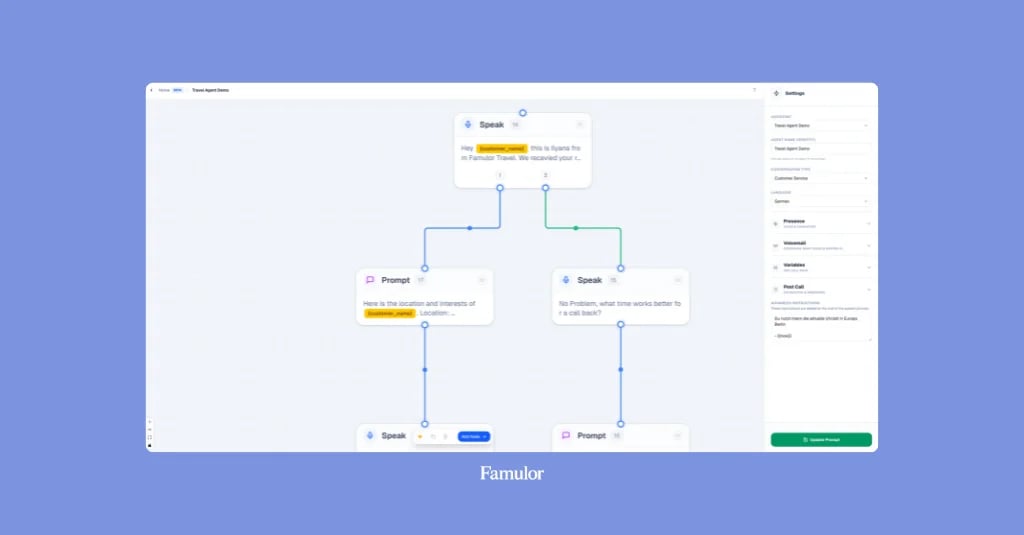
El Famulor Flow Builder representa estos procesos como un gráfico: los nodos realizan el trabajo, mientras que los bordes definen los posibles pasos siguientes. Un nodo de herramienta ejecuta una API reutilizable o una herramienta integrada y devuelve su resultado al asistente (resumen del Flow Builder, consultado el 3 de septiembre de 2026). Force tool call cierra una brecha estrecha en este punto. Una vez que el proceso llega a ese nodo de herramienta, el asistente no debe saltarse su invocación.
Este ajuste no sustituye a un flujo bien diseñado ni a descripciones precisas de las herramientas. La guía de Famulor sobre acciones sin código durante la llamada cubre la capa de integración; este artículo se centra en la invocación obligatoria de un nodo de herramienta.
Qué cambia Force tool call y qué no
La nueva opción controla la ejecución de un nodo de herramienta. El mismo registro de cambios indica que las salvaguardas integradas evitan que una llamada quede atrapada tras intentos fallidos repetidos: después de unos pocos fallos, el asistente continúa la conversación en lugar de entrar en un bucle infinito. No se documenta un número exacto de intentos, intervalo o algoritmo de retroceso, por lo que un diseño de producción no debería depender de una cifra supuesta.
El límite es importante: Force tool call garantiza el intento de invocación, no el éxito posterior. Las credenciales pueden ser inválidas, un parámetro puede faltar, el servicio puede no responder o la cita solicitada puede estar ya ocupada. Confirma el éxito solo después de obtener un resultado positivo adecuado.
No confundas este ajuste con otros mecanismos del Flow Builder:
- Un nodo de condición (Condition node) fuerza una elección inmediata entre sus bordes de salida.
- Un nodo de herramienta (Tool node) ejecuta una acción concreta y devuelve un resultado.
- Un servidor MCP se asigna a todo un asistente; la referencia del nodo actual no lo presenta como una acción de flujo determinista única que este interruptor pueda forzar (referencia de nodos, consultado el 3 de septiembre de 2026).
Cuándo tiene sentido una invocación obligatoria
Force tool call encaja en pasos sin los cuales el proceso no puede producir su resultado, como comprobar la disponibilidad antes de ofrecer horarios o intentar una reserva tras una confirmación explícita.
| Paso del proceso | ¿Forzarlo? | Razón y límite |
|---|---|---|
| Comprobar disponibilidad antes de ofrecer un hueco | Sí | El asistente no debe afirmar que hay un horario libre sin una consulta actual. |
| Reservar tras la confirmación clara del interlocutor | Sí | El intento es obligatorio; confirma el éxito solo tras un resultado positivo. |
| Añadir una nota opcional al CRM | Normalmente no | La conversación a menudo puede proceder sin esta acción complementaria. |
| Pre-reservar una cita no confirmada | No | La escritura sería prematura y podría crear datos no deseados. |
| Acción destructiva o de gran impacto | Solo tras una comprobación previa | Forzar no sustituye a la autorización, validación o consentimiento. |
Fuerza solo el paso que el proceso necesita ahora. Una acción de escritura pertenece después de la recopilación de datos y la confirmación.
Configúralo en cinco pasos controlados
1. Selecciona el nodo de herramienta
Abre el flujo relevante y añade o selecciona un nodo de herramienta. Debe representar exactamente la acción obligatoria. La referencia de nodos de Famulor los define como ejecuciones de API reutilizables o herramientas integradas.
2. Asigna la herramienta prevista
Revisa su nombre, descripción, solicitud, credenciales y esquema de parámetros. La documentación también enumera el tiempo de espera, el anuncio, la ejecución asíncrona y el tiempo de relleno. Forzar no puede reparar una URL incorrecta, permisos insuficientes o parámetros poco claros.
3. Mapea las entradas requeridas
Asegúrate de que cada valor requerido esté disponible. Para nombres hablados, direcciones de correo electrónico o números de teléfono, la referencia del nodo describe nodos de recopilación (Collect nodes) validados en lugar de depender solo de la captura de avisos de forma libre.
4. Habilita Force tool call
Activa Force tool call para el nodo de herramienta seleccionado. No confíes en una ruta de clics supuesta en futuras interfaces; el control documentado es el interruptor nombrado en el nodo.
5. Conecta la continuación y la ruta de fallo
Define qué sigue al éxito, a una respuesta vacía y a un error. Si la herramienta deja de estar disponible, su nodo sigue la ruta configurada y registra el problema en los detalles de la llamada. La alternativa debe producir una respuesta veraz.
Ejemplo de cita dental: desde la solicitud hasta la reserva verificada
Considera una consulta dental que gestiona citas rutinarias y de revisión por teléfono. El asistente puede ofrecer horarios y reservar una cita confirmada. El dolor, la urgencia, el consejo clínico o la incertidumbre pertenecen al equipo de la consulta.
Una secuencia fiable tiene este aspecto:
- El interlocutor solicita una cita y da una preferencia horaria general.
- El flujo captura solo los datos de reserva. La información de salud innecesaria no debe llegar a la herramienta de calendario.
- Un nodo de herramienta obligatorio invoca
check_availabilityantes de que el asistente ofrezca horarios libres. Famulor documenta esta herramienta de calendario como una consulta de disponibilidad de solo lectura (Calendario y reserva, consultado el 3 de septiembre de 2026). - El asistente presenta opciones y espera una selección clara.
- Solo entonces el flujo llega al nodo de reserva, donde
book_appointmentpuede ser obligatorio. Es una acción de escritura; llama a la cita reservada solo después de una respuesta positiva. - Si el hueco estaba ocupado, ofrece otro horario verificado. Ante un tiempo de espera agotado o un fallo técnico, no inventes una reserva; ofrece en su lugar una devolución de llamada del equipo.
Esto separa la lectura, la decisión y la escritura. El caso de uso de reserva de citas de Famulor ofrece el contexto más amplio; el flujo debe codificar los puntos de decisión de la consulta.
Rutas de fallo, privacidad y comprobaciones de telefonía
Una invocación obligatoria sigue dependiendo de los permisos y reglas del sistema de destino. Utiliza credenciales con el alcance adecuado, transmite solo los campos requeridos y evita notas sensibles innecesarias. Force tool call no es una garantía de privacidad o cumplimiento. Controla el intento; no amplía la autorización ni justifica la recopilación de más datos.
Escribe respuestas de fallo veraces. "No he podido introducir la cita en este momento" refleja un error; "Su cita está reservada" requiere el éxito de la herramienta. Famulor también recomienda realizar pruebas en el navegador y revisar las transiciones de nodos, las llamadas a herramientas y los resultados en los detalles de la llamada (mejores prácticas del Flow Builder, consultado el 3 de septiembre de 2026).
Según la misma documentación del calendario, una llamada web (Web Call) no tiene número de teléfono del interlocutor, por lo que la búsqueda o notificación basada en números puede comportarse de forma diferente. Ejecuta también Test → Call cuando ese contexto sea importante.
Lista de verificación para la puesta en marcha
Conclusión: la acción obligatoria necesita una alternativa deliberada
Force tool call cierra la brecha entre una respuesta hablada correcta y una invocación del sistema requerida. Es particularmente útil cuando un flujo perdería su objetivo sin una consulta de disponibilidad, un intento de reserva u otra acción obligatoria.
Los sistemas externos aún pueden fallar. Habilita el ajuste después de la validación y la confirmación explícita, evalúa la respuesta de la herramienta y da a cada error una salida honesta. Eso hace que una invocación obligatoria sea fiable sin confundir la ejecución técnica con un resultado exitoso para el cliente.
Sobre la autora: Sarah Müller escribe sobre IA de voz y automatización impulsada por productos en Famulor. Las afirmaciones sobre productos y los hechos cambiantes en este artículo se verificaron con la documentación oficial de Famulor el 3 de septiembre de 2026.

Autor en Famulor