Inhoud samenvatten met:




Een beller voegt een detail toe terwijl je AI-assistent al antwoord geeft: “Donderdag komt uit. Maar pas na 15.00 uur.” Een goed gesprek houdt rekening met dat detail en gaat verder. Dat is waar Full Duplex (Beta) in Famulor voor is ontworpen: de assistent kan tegelijkertijd luisteren en spreken, en past het lopende antwoord aan op nieuwe informatie.
De update voegt een nieuwe gespreksmodus toe aan Realtime. Je kiest zelf waar je deze inzet. Bestaande assistenten behouden hun engines en instellingen. Deze gids vergelijkt Full Duplex met Pipeline, Half Cascade en standaard Realtime, legt de relevante modelbenchmarks uit en laat zien hoe je de opties voor je eigen bellers evalueert.
Product- en broninformatie gecontroleerd op 13 september 2026. Onderstaande cijfers zijn afkomstig uit gepubliceerde evaluaties van aanbieders en externe benchmarks. Zakelijke dialogen zijn illustratieve voorbeelden.
Beluister een Full Duplex-gesprek
Deze Famulor-demo toont een werkgerelateerd gesprek met vervolgvragen en informatieopzoekingen, inclusief taken en productupdates. Het illustreert de flow tussen dialoog en retrieval. Het is geen benchmark voor het succes van inkomende klantgesprekken. Het gesprek is in het Duits.
Famulor-demo: vervolgvragen en informatieopzoekingen in een gesprek. YouTube
Vier gespreksroutes, naast elkaar gezet
Pipeline, Half Cascade en Realtime beschrijven verschillende manieren om spraak om te zetten in een antwoord. In Famulor is Full Duplex een variant van de Realtime-engine. Door vier gespreksroutes te vergelijken, worden de praktische keuzes inzichtelijker.
Gespreksroute | Verwerking | Stem | Typische prioriteit |
|---|---|---|---|
Pipeline | Audio → STT → tekstmodel → TTS | Aparte TTS-stem | Gestructureerde workflows en onafhankelijke componentselectie |
Half Cascade | Audio → Realtime-model → tekst → TTS | Aparte TTS-stem | Audio-input met een onafhankelijke output-stem |
Standaard Realtime | Audio → native spraakmodel → audio | Native modelstem | Directe speech-to-speech gesprekken |
Realtime: Full Duplex (Beta) | Ontvang en produceer audio, inclusief gelijktijdig | Compatibele native gespreksstem | Dialogen met toevoegingen en dynamische beurtwisseling |
Pipeline: Een spraakherkenningsdienst zet audio om in tekst. Een taalmodel verwerkt de tekst en een aparte tekst-naar-spraakdienst spreekt het antwoord uit. Je kunt herkenning, redenering en stem afzonderlijk kiezen. Streaming kan deze architectuur responsief maken; de naam alleen bepaalt geen vaste responstijd.
Half Cascade: Een Realtime-model verwerkt inkomende audio en produceert antwoordtekst. Een aparte TTS-dienst spreekt die tekst uit. Dit combineert directe audio-input met een onafhankelijk gekozen output-stem. Het voegt niet de aparte upstream STT-fase toe die in een klassieke pipeline zit.
Standaard Realtime: Het model verwerkt en genereert audio native. Luisteren, antwoordgeneratie en stem zijn nauwer met elkaar verbonden. Pauzeafhandeling en onderbrekingsgedrag hangen af van het specifieke model en de configuratie.
Realtime met Full Duplex: Inkomende en uitgaande spraak kunnen samen worden verwerkt als onderdeel van de lopende dialoog. De assistent kan een toevoeging horen terwijl hij spreekt. Deze modus gebruikt een compatibele native gespreksstem.
Afspelen onderbreken en luisteren terwijl je spreekt zijn verschillende vaardigheden
Veel spraakassistenten ondersteunen al barge-in: ze stoppen met afspelen wanneer de beller begint te praten. Dat is nuttig. Maar “ja, precies” en “nee, het andere adres” vereisen verschillende reacties. Het ene is een korte bevestiging; het andere verandert de informatie die de assistent moet gebruiken.
Full Duplex richt zich op een flexibelere uitwisseling. De assistent moet een bijdrage in context interpreteren en passend reageren. Test dit met zinnen die je bellers daadwerkelijk gebruiken: korte bevestigingen, langere toevoegingen, zelfgecorrigeerde details en spraak met achtergrondgeluid.
Wat voor de beller telt, is de hele ervaring. Begreep de assistent het? Moesten ze zichzelf herhalen? Was het resultaat correct? Een snelle eerste lettergreep beantwoordt niet al deze drie vragen.
Houd het gesprek gaande terwijl informatie wordt opgehaald
Een nuttig gesprek heeft soms een actie op de achtergrond nodig. Een agenda moet beschikbare slots retourneren, een CRM moet een contactpersoon lokaliseren of een kennisbank moet relevante informatie leveren. De assistent moet uitleggen wat hij doet en doorgaan met het daadwerkelijke resultaat.
De assistent zegt bijvoorbeeld: “Ik controleer de beschikbare afspraken.” De beller voegt toe: “Graag alleen in de middag.” Die voorkeur moet de zoekopdracht vormen. Een afspraak moet pas als geboekt worden omschreven nadat de gekoppelde agenda dit bevestigt. Natuurlijke dialoog en correcte acties moeten samenwerken.
Beschrijf bij het configureren van een actie het doel, de vereiste inputs en het verwachte resultaat. Specificeer wanneer de assistent een vervolgvraag moet stellen. Maak voor agendatools onderscheid tussen beschikbaarheid opzoeken en een definitieve boeking maken. Een vriendelijke bevestiging mag nooit in de plaats komen van een succesvol systeemantwoord.
GPT-Live en Realtime: gepubliceerde benchmarkresultaten
OpenAI introduceerde GPT-Live-1 op 10 september 2026. Deze cijfers zijn afkomstig uit de grafieken in de oorspronkelijke GPT-Live-1 aankondiging. Ze vergelijken specifieke modelconfiguraties.
Benchmark | GPT-Live-1 | GPT-Realtime-2.1 | GPT-Realtime-2 |
|---|---|---|---|
Tau3 (Voice), Pass@1 | 86,2 % | 45,7 % | 42,4 % |
Full Duplex Bench v1.5: interactiviteit | 80,1 % | 45,4 % | 47,8 % |
Full Duplex Bench v1: beurtwisselingslatentie | 0,798 s | 1,410 s | 1,630 s |
Full Duplex Bench v3: Tool Calling | 87 % | 60 % | 58 % |
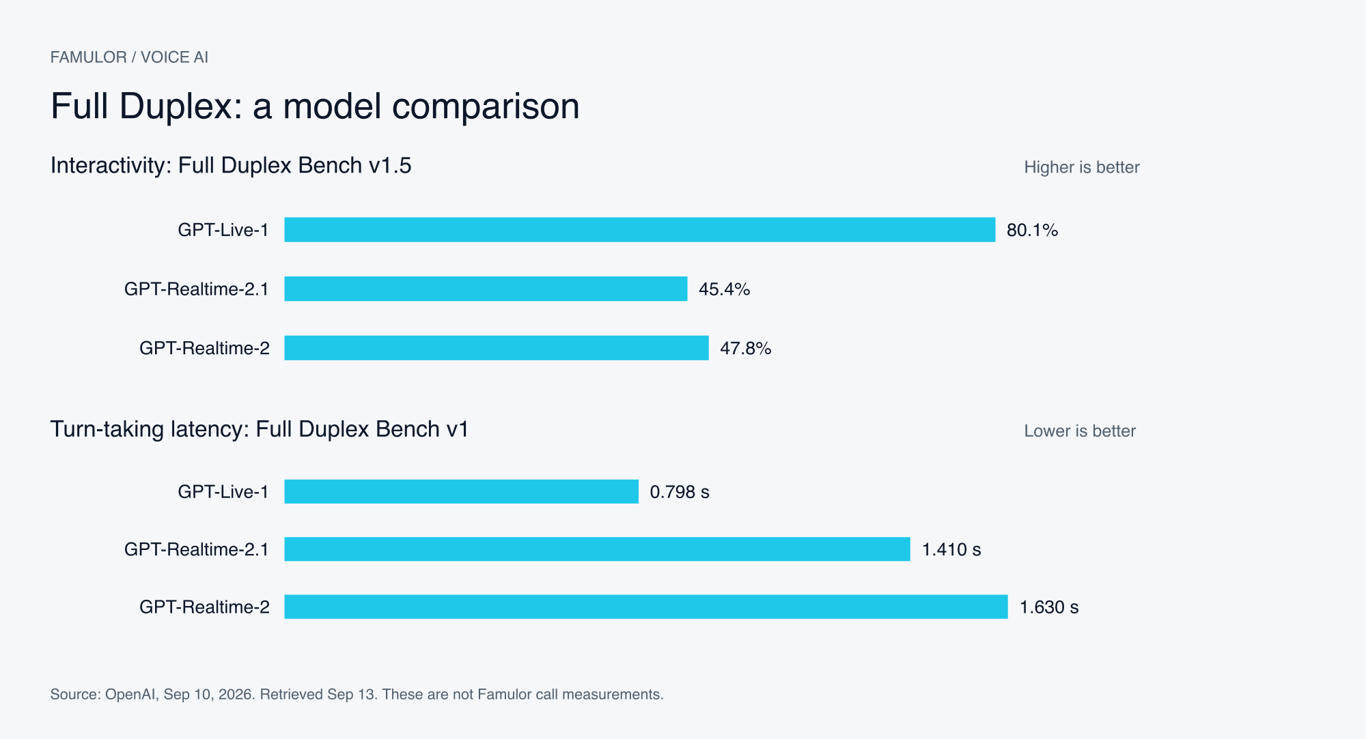
Famulor-grafiek met gepubliceerde OpenAI-resultaten. Twee afzonderlijke statistieken, geen totaalscore.
Methodologie: Tau3 (Voice) gebruikt gelijke domeinweging. De GPT-Live-configuratie gebruikt de Astra-backend op medium voor dat resultaat; de tool-calling-evaluatie gebruikt Terra op low. Dit beschrijft de gepubliceerde evaluaties, geen selecteerbare Famulor-configuraties. De rijen vertegenwoordigen verschillende tests en benchmarkversies.
Twee vragen zijn onafhankelijk van elkaar van belang: hoe goed gaat een model om met een dynamisch gesprek en hoe betrouwbaar voltooit het een taak? Interactiviteit en tool calling bieden verschillende signalen. Deze resultaten zijn noch gegarandeerde Famulor-responstijden, noch voorspellingen voor de uitkomsten van je eigen gesprekken.
Een apart marktoverzicht van native Realtime-modellen
Coval evalueert spraakmodellen met een eigen gespreksopzet. De gepubliceerde vergelijking biedt een ander perspectief op native audiomodellen. Omdat de procedure verschilt, kunnen de cijfers niet direct worden gecombineerd met de Full Duplex Bench-resultaten van OpenAI.
Model | Voice-to-voice latentie ↓ | Instructienaleving ↑ | Samples |
|---|---|---|---|
GPT Realtime 2 | 1332 ms | 50 % | 448 |
Gemini 3.1 Flash Live (Preview) | 1340 ms | 56 % | 445 |
Bron: Coval: Gemini Live en vergelijkingsmodellen, voortschrijdende 30-dagen-cijfers; laatst vermelde run 27 augustus 2026, opgehaald op 13 september. De Gemini-rij beslaat specifiek 3.1 Flash Live Preview. Het meet niet de Gemini 2.5 Native Audio-varianten die ook in Famulor staan.
Een modelrevisie kan een resultaat veranderen. Controleer de volledige modelnaam, testregio, kanaal en datum. Het vergelijken van een browsermicrofoon met een telefoongesprek kan ook verschillen introduceren die worden veroorzaakt door audiotransport in plaats van door het model.
TTS-benchmarks: hoe snel start de stem?
Pipeline en Half Cascade laten je spraakoutput afzonderlijk selecteren. Time to First Audio, of TTFA, helpt bij het beoordelen van die keuze: hoe lang duurt het vanaf het TTS-verzoek tot de eerste hoorbare output? De volgende selectie is afkomstig uit de gepubliceerde metingen van Coval.
Model | TTFA ↓ | WER ↓ |
|---|---|---|
Inworld TTS 2 | 177 ms | 4,6 % |
Eleven Flash v2.5 | 252 ms | 6,7 % |
Soniox TTS v2 | 255 ms | 4,0 % |
Cartesia Sonic 3.5 | 274 ms | 5,9 % |
Deepgram Aura 2 | 314 ms | 5,3 % |
Rime Coda | 316 ms | 5,0 % |
Fish Audio S2.1 Pro | 355 ms | 4,7 % |
Eleven v3 Conversational | 380 ms | 4,3 % |
Cartesia Sonic 3.6 | 451 ms | 5,3 % |
GPT-4o mini TTS | 1026 ms | 4,8 % |
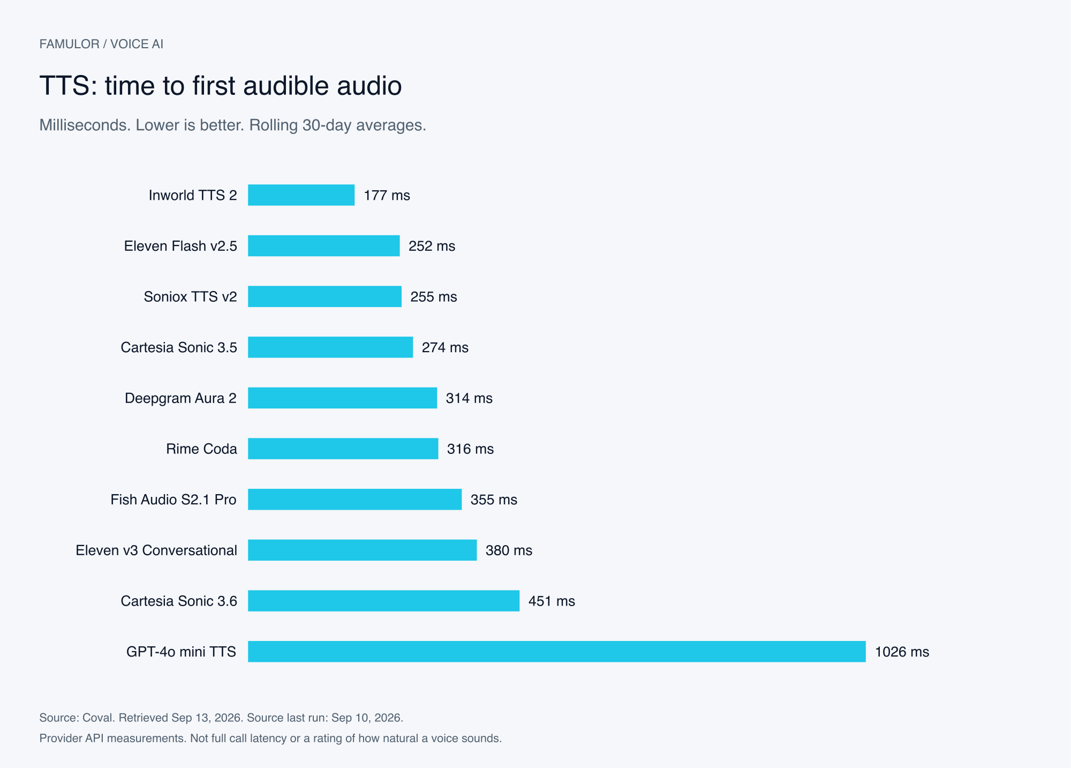
Famulor-grafiek gebaseerd op Coval TTS-metingen. De getoonde tijd beslaat het gemeten TTS-verzoek.
Bron: Coval TTS-modelvergelijking. Voortschrijdende 30-dagen-gemiddelden, opgehaald op 13 september 2026; laatst vermelde run 10 september. WER betekent woordfoutpercentage. Lager is beter voor beide kolommen. Geen van beide kolommen beoordeelt persoonlijke stemvoorkeur of hoe natuurlijk een volledig gesprek klinkt.
Coval definieert TTFA als tijd tot hoorbare output, inclusief stilte aan het begin. De TTFA-methodologie en TTS-datasetbeschrijving documenteren een vaste promptset en provider-API's in een Amerikaanse regio. Die omstandigheden verschillen van een end-to-end Famulor-gesprek.
Cijfers van aanbieders hebben ook context nodig. ElevenLabs beschrijft ongeveer 75 milliseconden model-inferentie voor Flash onder geschikte omstandigheden. De latentiedocumentatie scheidt die meting van extra netwerk- en applicatietijd. Het meet daarom iets anders dan de 252 milliseconden in de Coval-tabel.
Kies een stem met een korte luistertest op basis van je bedrijf: bedrijfsnamen, straatnamen, datums, tijden, e-mailadressen en een langere uitleg. Controleer of de output helder blijft naarmate de inhoud complexer wordt. Luister naar nummergroepering en de uitspraak van afkortingen.
Full Duplex gebruikt een andere stemkeuze. De native gespreksstem is onderdeel van de modus. Het selecteren van een snelle standalone TTS-aanbieder verandert die aanbieder niet in een Full Duplex-stem. Als een specifieke TTS-stem of merkstem essentieel is gedurende het hele gesprek, vergelijk dan ook Pipeline en Half Cascade.
Redeneringsmodel-benchmarks: taken oplossen en tools gebruiken
Een spraakassistent moet informatie verbinden, regels volgen en de juiste acties ondernemen. Tekst- en toolbenchmarks helpen bij het beoordelen van die vaardigheden. Ze meten andere vaardigheden dan spraaklatentie of stemkwaliteit.
Een vergelijking uit de Gemini 3.5 Flash-modelkaart
Model | MCP Atlas | Toolathlon |
|---|---|---|
Gemini 3.5 Flash | 83,6 % | 56,5 % |
GPT-5.5 | 75,3 % | 55,6 % |
Gemini 3 Flash | 62,0 % | 49,4 % |
Bron: Google DeepMind: Gemini 3.5 Flash Model Card. Hoger is beter. Dit zijn evaluaties van de aanbieder voor de vermelde model- en testconfiguraties, geen metingen van zakelijke telefoongesprekken.
Grote en kleine modellen op dezelfde taakbenchmark
Model | Redeneerinspanning | Resultaat ↑ |
|---|---|---|
GPT-5.4 | xhigh | 98,9 % |
GPT-5.4 mini | xhigh | 93,4 % |
GPT-5.4 nano | xhigh | 92,5 % |
GPT-5 mini | high | 74,1 % |
Bron: OpenAI: GPT-5.4 mini en nano, Tau2-Bench Telecom. Hoger is beter. De redeneerinspanning is onderdeel van elk resultaat; het is geen aanbeveling om die instelling voor elk tijdgevoelig spraakantwoord te gebruiken.
Gebruik deze cijfers om kandidaten te selecteren. Evalueer vervolgens je echte taken: het opvragen van een ontbrekend onderdeel van een adres, het onderscheiden van vergelijkbare producten of het achterhouden van een actie wanneer een vereiste input ontbreekt. Een model dat een brede benchmark aanvoert, biedt mogelijk niet de beste combinatie van snelheid, kosten en kwaliteit voor een kort ontvangstgesprek.
De responstijd van een pipeline heeft verschillende componenten: het detecteren van het einde van de spraak, transcriptie, antwoordgeneratie, eventuele toolopzoeking en spraakoutput. Sommige werkzaamheden kunnen overlappen. Het optellen van cijfers van niet-gerelateerde leaderboards levert geen betrouwbare end-to-end benchmark op.
Zes use cases voor natuurlijkere gesprekken
Deze scenario's weerspiegelen veelvoorkomende Famulor-workflows voor receptie, leadkwalificatie, afspraken boeken en support. De dialogen zijn verzonnen voorbeelden, geen gepubliceerde klantopnames.
1. Receptie: verduidelijk het verzoek midden in het gesprek
Terwijl de assistent de volgende stappen uitlegt, voegt de beller toe: “Dit gaat over onderhoud, niet over een nieuwe installatie.” De agent verwerkt de verduidelijking en vraagt om de relevante details. Het team ontvangt een correct gecategoriseerd verzoek. Full Duplex is het testen waard wanneer toevoegingen vaak voorkomen; Pipeline blijft een nuttige basislijn voor een gestructureerd intake-proces.
2. Boeken: verwerk een nieuwe tijdsbeperking
“Dinsdag zou kunnen.” Terwijl het antwoord begint, voegt de beller toe: “Wel pas na schooltijd.” De agent vraagt naar de specifieke tijd en controleert opnieuw de beschikbaarheid. Het bevestigt de afspraak na een succesvolle agenda-actie. Evalueer of gecorrigeerde voorkeuren leiden tot boekingen die daadwerkelijk aansluiten bij de behoeften van de beller.
3. Sales: pas kwalificatie aan wanneer de scope verandert
Een prospect noemt één locatie en voegt er vervolgens drie toe. Dat verandert de relevante oplossing en de vragen die daarna gesteld moeten worden. De agent moet de nieuwe details combineren en gestructureerde informatie naar het CRM sturen. Zowel gespreksverloop als datanauwkeurigheid zijn belangrijk in deze workflow.
4. Support: handel een gecorrigeerd referentienummer af
“Het ordernummer eindigt op 42. Sorry, 24.” De agent gaat door met het gecorrigeerde nummer en bevestigt gevoelige matches voordat er actie wordt ondernomen. Full Duplex kan helpen bij zelfcorrecties, terwijl de gekoppelde zoekopdracht nog steeds een ondubbelzinnige match moet retourneren of een vervolgvraag moet triggeren.
5. Buitendienst: leg extra toegangsdetails vast
Een klant beschrijft een defect en voegt toe: “Je kunt alleen via de binnenplaats naar binnen.” De agent neemt het detail op in het serviceverzoek. Duidelijke bedrijfsregels bepalen welke informatie moet worden vastgelegd en wanneer er moet worden overgedragen aan het team. De gespreksmodus ondersteunt die regels; hij definieert ze niet.
6. Merkstem: kies de juiste balans
Een bedrijf gebruikt een specifieke TTS-stem voor klantcontact. Half Cascade kan directe audio-input combineren met die aparte spraakoutput. Als frequente toevoegingen de gesprekken vormen, test dan ook Full Duplex met een native stem. Gebruik identieke inhoud en beoordeel helderheid, merkherkenning en gespreksverloop afzonderlijk.
Full Duplex instellen in Famulor
Open de relevante assistent. Selecteer in een in aanmerking komende workspace met bètafuncties ingeschakeld Realtime → Full Duplex (Beta).
Luister naar de native stemvoorbeelden. Kies een compatibele stem met vocabulaire uit je workflow. Full Duplex-voorbeelden gebruiken de daadwerkelijke gespreksstem.
Controleer begroetingen en aankondigingen. Controleer de opening, het toestemmingsbericht en tool-aankondigingen. Een geüploade begroeting behoudt zijn opgenomen stem.
Definieer acties duidelijk. Specificeer vereiste inputs, vervolgvragen en niet-succesvolle uitkomsten. Gesproken bevestigingen moeten succesvolle toolresultaten weerspiegelen.
Test via het beoogde contactkanaal. Neem onderbrekingen, korte bevestigingen, gecorrigeerde details, stilte en het einde van het gesprek op. Hergebruik de scenario's die je met je bestaande assistent uitvoert.
De update verbetert ook het opstarten met langere assistent-instructies, herkenning van geconfigureerde acties en consistente registratie van gespreksgebruik. Ophangen na het afscheid opent niet langer een onnodige nieuwe spraakverbinding.
Natuurlijke aankondigingen en vereiste bewoordingen
De compatibele native stem wordt gebruikt voor Full Duplex-gesprekken en de aankondigingen die voor die modus zijn bedoeld. Gewone aankondigingen kunnen in het gesprek worden geherformuleerd. Vereiste toestemmingsaankondigingen worden gecontroleerd en volledig afgespeeld voordat toestemming wordt geaccepteerd. Test deze flow met je daadwerkelijke bewoordingen en ingeschakelde acties.
De editor behoudt een fallback-stem en legt conflicten met outputfilters uit voordat er wordt geschakeld. Controleer de begeleiding van de editor voordat je de configuratie opslaat, zodat de nieuwe gespreksstem past bij je bestaande workflow.
Bouw een nuttige vergelijking voor je bedrijf
Een zinvolle vergelijking gebruikt dezelfde taken onder vergelijkbare omstandigheden. Begin bijvoorbeeld met 20 tot 30 representatieve dialooggevallen, herhaal elk geval en wissel de volgorde van de configuraties af. Dit is een voorgesteld startpunt voor je evaluatie, geen testserie die voor dit artikel is uitgevoerd.
Registreer de omstandigheden: taal, telefoon- of webkanaal, regio, achtergrondgeluid, stem, modelversie, prompt en gekoppelde tools.
Meet het gespreksverloop: tijd tot een hoorbaar antwoord, reacties op correcties, onnodige onderbrekingen en herhaalde vragen. Scheid mediaan gedrag van langzamere gevallen.
Controleer de uitkomst: is de juiste afspraak gemaakt? Zijn de CRM-velden accuraat? Legde de assistent een mislukte actie eerlijk uit?
Luister naar de output: beoordeel helderheid, uitspraak en merkfit. Een percentage kan deze luistertest niet vervangen.
Documenteer ook gevallen waarin een eenvoudigere opzet beter presteert. Een kort intakegesprek kan andere prioriteiten hebben dan een adviesgesprek met frequente toevoegingen. Kies de configuratie die past bij de workflow en het resultaat dat je nodig hebt.
Veelgestelde vragen
Wie kan Full Duplex (Beta) selecteren?
De optie verschijnt in in aanmerking komende workspaces met bètafuncties ingeschakeld, geschikte Realtime-toegang en een ondersteunde regio. Op het moment van schrijven worden Global- en US-workspaces ondersteund; de optie is nog niet beschikbaar voor EU-workspaces. Je editor toont de opties die beschikbaar zijn voor jouw workspace.
Zullen bestaande assistenten automatisch overschakelen?
Nee. Bestaande assistenten behouden hun engines en instellingen. Je kiest zelf welke assistenten de nieuwe modus gebruiken.
Kan ik mijn bestaande TTS-stem behouden?
Het lopende Full Duplex-gesprek gebruikt een compatibele native stem. Geüploade begroetingen behouden hun opgenomen stemmen. Als een specifieke standalone TTS-stem de hele dialoog moet uitspreken, vergelijk dan Pipeline en Half Cascade.
Is Full Duplex altijd sneller?
De gepubliceerde tests tonen voordelen voor bepaalde configuraties. De werkelijke responstijd hangt ook af van je kanaal, regio, prompt, tools en gesprek. Gebruik benchmarks om opties te selecteren en je eigen workflow om te beslissen.
Wat kost de nieuwe modus?
Controleer de huidige voorwaarden en gebruiksinformatie in je Famulor-workspace. Externe modelprijzen en benchmarktijden bieden geen betrouwbare kostenberekening voor een volledig Famulor-gesprek.
Begin met een workflow die je goed kent
Kies een assistent met een duidelijke taak: een verzoek vastleggen, een afspraak vinden of een supportvraag classificeren. Vergelijk het bestaande gespreksverloop met Full Duplex met dezelfde scenario's. Dat laat zien waar samen luisteren en spreken je bellers helpt.
De introductievideo van Famulor Full Duplex. YouTube
Open Famulor en controleer Full Duplex (Beta) in je assistent. Vind meer productupdates op het Famulor-blog.

Auteur bij Famulor