Resumir contenido con:




Un interlocutor añade un detalle mientras tu asistente de IA ya está respondiendo: “El jueves me viene bien. Pero solo después de las 3 de la tarde”. Una buena conversación tiene en cuenta ese detalle y sigue adelante. Para eso se ha diseñado Full Duplex (Beta) en Famulor: el asistente puede escuchar y hablar al mismo tiempo, adaptando su respuesta en curso a la nueva información.
La actualización añade un nuevo modo de conversación a Realtime. Tú eliges dónde utilizarlo. Los asistentes existentes mantienen sus motores y ajustes. Esta guía compara Full Duplex con Pipeline, Half Cascade y el Realtime estándar, explica los benchmarks de modelos relevantes y muestra cómo evaluar las opciones para tus propios interlocutores.
Información sobre el producto y las fuentes verificada el 13 de septiembre de 2026. Las cifras que aparecen a continuación proceden de evaluaciones de proveedores publicadas y benchmarks externos. Los diálogos empresariales son ejemplos ilustrativos.
Escucha una conversación en Full Duplex
Esta demo de Famulor presenta una conversación en el entorno laboral con preguntas de seguimiento y consultas de información, incluyendo tareas y actualizaciones de productos. Ilustra el flujo entre el diálogo y la recuperación de datos. No es un benchmark del éxito en llamadas de clientes entrantes. La conversación está en alemán.
Demo de Famulor: preguntas de seguimiento y consultas de información en una conversación. YouTube
Cuatro rutas de conversación, una al lado de la otra
Pipeline, Half Cascade y Realtime describen diferentes formas de convertir el habla en una respuesta. En Famulor, Full Duplex es una variante del motor Realtime. Comparar las cuatro rutas de conversación facilita la comprensión de las opciones prácticas.
Ruta de conversación | Procesamiento | Voz | Prioridad típica |
|---|---|---|---|
Pipeline | Audio → STT → modelo de texto → TTS | Voz TTS independiente | Flujos de trabajo estructurados y selección independiente de componentes |
Half Cascade | Audio → modelo Realtime → texto → TTS | Voz TTS independiente | Entrada de audio con una voz de salida independiente |
Realtime estándar | Audio → modelo de habla nativo → audio | Voz del modelo nativo | Conversaciones directas de voz a voz |
Realtime: Full Duplex (Beta) | Recibir y producir audio, incluso simultáneamente | Voz de conversación nativa compatible | Diálogos con añadidos y turnos de palabra dinámicos |
Pipeline: Un servicio de reconocimiento de voz convierte el audio en texto. Un modelo de lenguaje procesa el texto y un servicio de texto a voz (TTS) independiente pone voz a la respuesta. Puedes elegir el reconocimiento, el razonamiento y la voz por separado. El streaming puede hacer que esta arquitectura sea receptiva; su nombre por sí solo no determina un tiempo de respuesta fijo.
Half Cascade: Un modelo Realtime procesa el audio entrante y produce texto de respuesta. Un servicio TTS independiente pronuncia ese texto. Esto combina la entrada de audio directa con una voz de salida seleccionada de forma independiente. No añade la etapa de STT ascendente independiente que se encuentra en un pipeline clásico.
Realtime estándar: El modelo procesa y genera audio de forma nativa. La escucha, la generación de respuestas y la voz están más estrechamente conectadas. El manejo de pausas y el comportamiento ante interrupciones dependen del modelo y la configuración específicos.
Realtime con Full Duplex: El habla entrante y saliente puede procesarse conjuntamente como parte del diálogo en curso. El asistente puede escuchar una aportación mientras está hablando. Este modo utiliza una voz de conversación nativa compatible.
Interrumpir la reproducción y escuchar mientras se habla son capacidades diferentes
Muchos asistentes de voz ya admiten barge-in: detienen la reproducción cuando el interlocutor empieza a hablar. Eso es útil. Pero un “sí, exactamente” y un “no, la otra dirección” requieren reacciones diferentes. Uno es un breve reconocimiento; el otro cambia la información que el asistente debe utilizar.
Full Duplex apunta a un intercambio más flexible. El asistente necesita interpretar una contribución en contexto y responder adecuadamente. Pruébalo con frases que utilicen realmente tus interlocutores: reconocimientos breves, añadidos más largos, detalles corregidos por ellos mismos y habla con ruido de fondo.
Lo que le importa al interlocutor es la experiencia completa. ¿Entendió el asistente? ¿Tuvo que repetirse? ¿El resultado fue correcto? Una primera sílaba rápida no responde a las tres preguntas.
Mantén la conversación en marcha mientras se recupera la información
Una conversación útil a veces necesita una acción en segundo plano. Un calendario debe devolver los huecos disponibles, un CRM debe localizar un contacto o una base de conocimientos debe proporcionar la información relevante. El asistente debe explicar lo que está haciendo y continuar con el resultado real.
Por ejemplo, el asistente dice: “Voy a comprobar las citas disponibles”. El interlocutor añade: “Solo por las tardes, por favor”. Esa preferencia debería condicionar la búsqueda. Una cita solo debería describirse como reservada después de que el calendario conectado lo confirme. El diálogo natural y las acciones correctas deben trabajar juntos.
Al configurar una acción, describe su propósito, las entradas requeridas y el resultado esperado. Especifica cuándo debe hacer una pregunta de seguimiento el asistente. Para las herramientas de calendario, distingue entre consultar la disponibilidad y crear una reserva confirmada. Un reconocimiento amistoso nunca debería sustituir a una respuesta exitosa del sistema.
GPT-Live y Realtime: resultados de benchmarks publicados
OpenAI presentó GPT-Live-1 el 10 de septiembre de 2026. Estas cifras proceden de los gráficos del anuncio original de GPT-Live-1. Comparan configuraciones de modelos específicas.
Benchmark | GPT-Live-1 | GPT-Realtime-2.1 | GPT-Realtime-2 |
|---|---|---|---|
Tau3 (Voz), Pass@1 | 86,2 % | 45,7 % | 42,4 % |
Full Duplex Bench v1.5: interactividad | 80,1 % | 45,4 % | 47,8 % |
Full Duplex Bench v1: latencia de turnos de palabra | 0,798 s | 1,410 s | 1,630 s |
Full Duplex Bench v3: llamada a herramientas | 87 % | 60 % | 58 % |
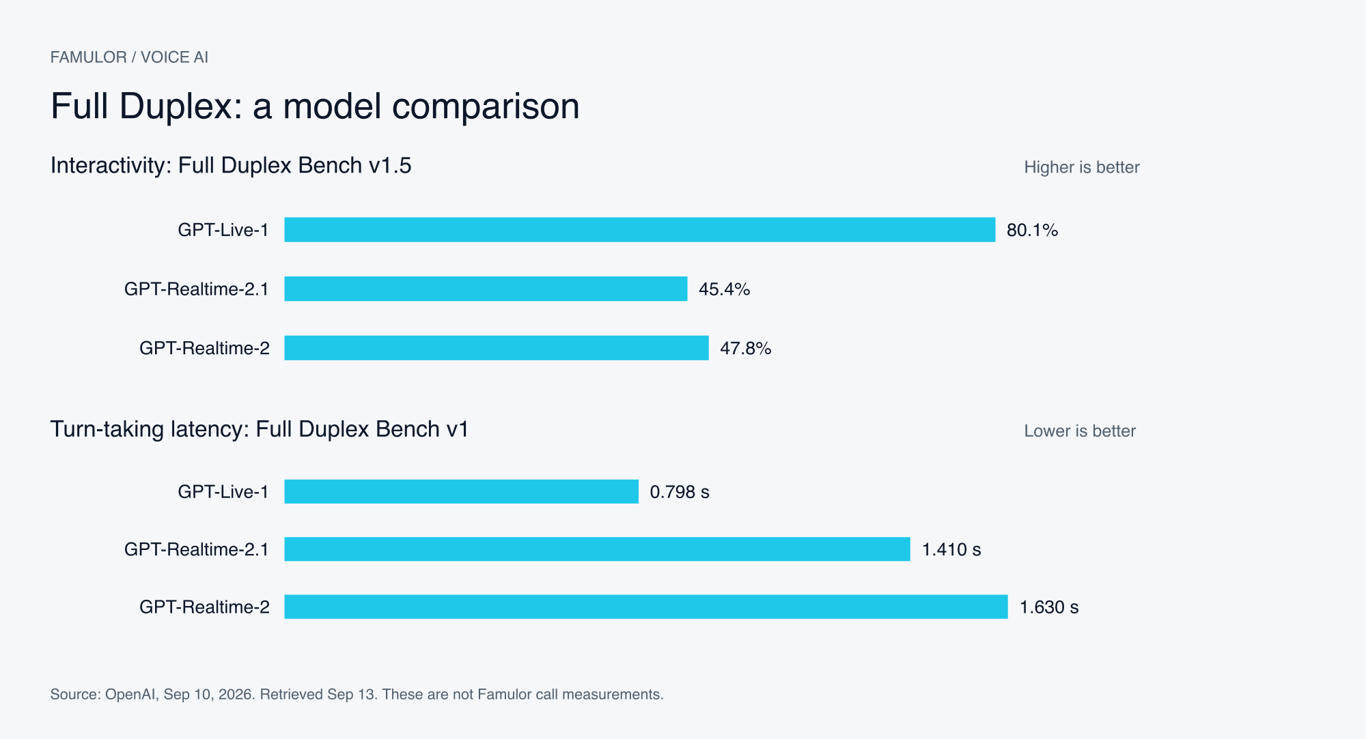
Gráfico de Famulor utilizando resultados publicados por OpenAI. Dos métricas separadas, no una puntuación global.
Metodología: Tau3 (Voz) utiliza una ponderación de dominio igualitaria. La configuración GPT-Live utiliza el backend Astra en nivel medio para ese resultado; la evaluación de llamada a herramientas utiliza Terra en nivel bajo. Estos describen las evaluaciones publicadas, no configuraciones seleccionables en Famulor. Las filas representan diferentes pruebas y versiones de benchmarks.
Dos preguntas importan de forma independiente: ¿qué tan bien maneja un modelo una conversación dinámica y qué tan fiable es al completar una tarea? La interactividad y la llamada a herramientas proporcionan señales diferentes. Estos resultados no son tiempos de respuesta garantizados en Famulor ni previsiones para los resultados de tus propias llamadas.
Una visión de mercado separada de los modelos Realtime nativos
Coval evalúa los modelos de voz utilizando su propia configuración de conversación. Su comparación publicada ofrece otra perspectiva sobre los modelos de audio nativos. Debido a que el procedimiento difiere, sus números no pueden combinarse directamente con los resultados del Full Duplex Bench de OpenAI.
Modelo | Latencia de voz a voz ↓ | Adherencia a instrucciones ↑ | Muestras |
|---|---|---|---|
GPT Realtime 2 | 1332 ms | 50 % | 448 |
Gemini 3.1 Flash Live (Preview) | 1340 ms | 56 % | 445 |
Fuente: Coval: Gemini Live y modelos de comparación, cifras móviles de 30 días; última ejecución listada el 27 de agosto de 2026, consultado el 13 de septiembre. La fila de Gemini cubre específicamente 3.1 Flash Live Preview. No mide las variantes de audio nativo de Gemini 2.5 también listadas en Famulor.
Una revisión del modelo puede cambiar un resultado. Comprueba el nombre completo del modelo, la región de prueba, el canal y la fecha. Comparar un micrófono de navegador con una llamada telefónica también puede introducir diferencias causadas por el transporte de audio en lugar de por el modelo.
Benchmarks de TTS: ¿con qué rapidez empieza la voz?
Pipeline y Half Cascade te permiten seleccionar la salida de voz por separado. El tiempo hasta el primer audio, o TTFA, ayuda a evaluar esa elección: ¿cuánto tiempo pasa desde la solicitud de TTS hasta la primera salida audible? La siguiente selección proviene de las mediciones publicadas por Coval.
Modelo | TTFA ↓ | WER ↓ |
|---|---|---|
Inworld TTS 2 | 177 ms | 4,6 % |
Eleven Flash v2.5 | 252 ms | 6,7 % |
Soniox TTS v2 | 255 ms | 4,0 % |
Cartesia Sonic 3.5 | 274 ms | 5,9 % |
Deepgram Aura 2 | 314 ms | 5,3 % |
Rime Coda | 316 ms | 5,0 % |
Fish Audio S2.1 Pro | 355 ms | 4,7 % |
Eleven v3 Conversational | 380 ms | 4,3 % |
Cartesia Sonic 3.6 | 451 ms | 5,3 % |
GPT-4o mini TTS | 1026 ms | 4,8 % |
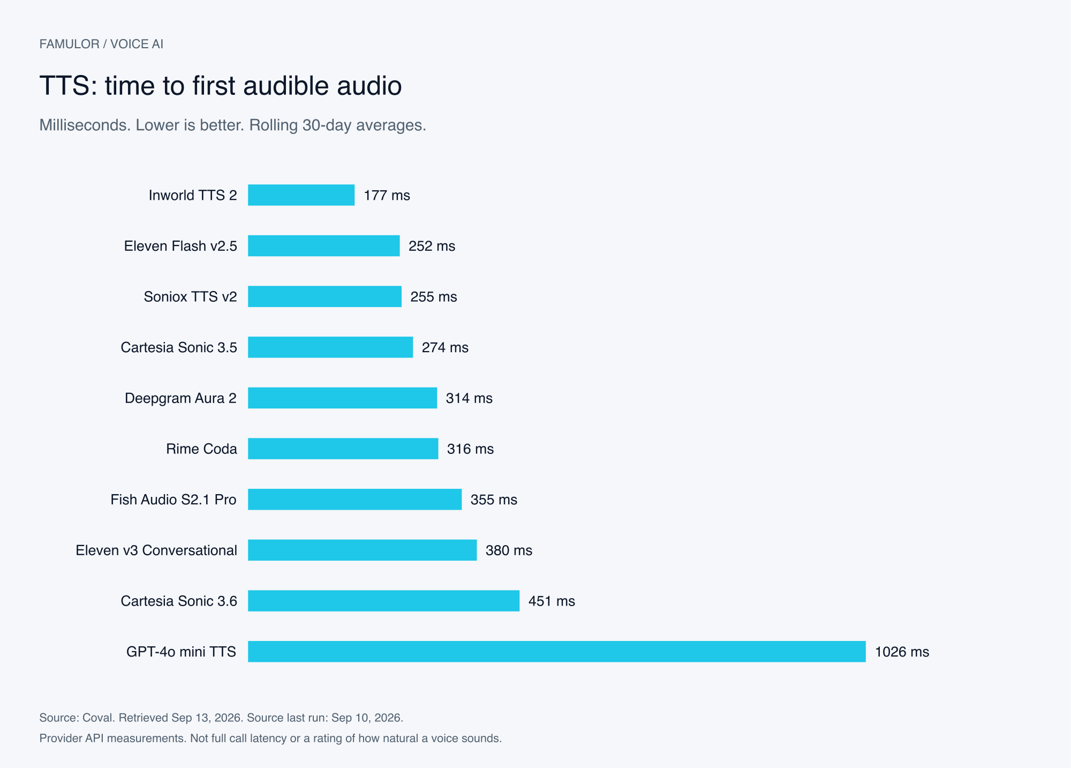
Gráfico de Famulor basado en mediciones TTS de Coval. El tiempo mostrado cubre la solicitud TTS medida.
Fuente: Comparación de modelos TTS de Coval. Promedios móviles de 30 días, consultado el 13 de septiembre de 2026; última ejecución listada el 10 de septiembre. WER significa tasa de error de palabras. Cuanto más bajo, mejor en ambas columnas. Ninguna columna califica la preferencia de voz personal o qué tan natural suena una conversación completa.
Coval define TTFA como el tiempo hasta la salida audible, incluyendo el silencio inicial. Su metodología de TTFA y la descripción del conjunto de datos TTS documentan un conjunto de prompts fijo y APIs de proveedores en una región de EE. UU. Esas condiciones difieren de una llamada de Famulor de extremo a extremo.
Las cifras de los proveedores también necesitan contexto. ElevenLabs describe aproximadamente 75 milisegundos de inferencia de modelo para Flash en condiciones adecuadas. Su documentación sobre latencia separa esa medición del tiempo adicional de red y aplicación. Por lo tanto, mide algo diferente a los 252 milisegundos en la tabla de Coval.
Elige una voz con una prueba de escucha breve basada en tu negocio: nombres de empresas, nombres de calles, fechas, horas, direcciones de correo electrónico y una explicación más larga. Comprueba si la salida se mantiene clara a medida que el contenido se vuelve más complejo. Escucha el agrupamiento de números y la pronunciación de abreviaturas.
Full Duplex utiliza una elección de voz diferente. Su voz de conversación nativa es parte del modo. Seleccionar un proveedor TTS independiente rápido no convierte a ese proveedor en una voz Full Duplex. Si una voz TTS en particular o una voz de marca es esencial durante toda la conversación, compara también Pipeline y Half Cascade.
Benchmarks de modelos de razonamiento: resolución de tareas y uso de herramientas
Un asistente de voz necesita conectar información, seguir reglas y realizar las acciones correctas. Los benchmarks de texto y herramientas ayudan a evaluar esas capacidades. Miden capacidades diferentes a la latencia de voz o la calidad de la voz.
Una comparación de la tarjeta del modelo Gemini 3.5 Flash
Modelo | MCP Atlas | Toolathlon |
|---|---|---|
Gemini 3.5 Flash | 83,6 % | 56,5 % |
GPT-5.5 | 75,3 % | 55,6 % |
Gemini 3 Flash | 62,0 % | 49,4 % |
Fuente: Google DeepMind: Tarjeta del modelo Gemini 3.5 Flash. Cuanto más alto, mejor. Estas son evaluaciones de proveedores para el modelo y las configuraciones de prueba indicadas, no mediciones de llamadas telefónicas de negocios.
Modelos grandes y pequeños en el mismo benchmark de tareas
Modelo | Esfuerzo de razonamiento | Resultado ↑ |
|---|---|---|
GPT-5.4 | xhigh | 98,9 % |
GPT-5.4 mini | xhigh | 93,4 % |
GPT-5.4 nano | xhigh | 92,5 % |
GPT-5 mini | high | 74,1 % |
Fuente: OpenAI: GPT-5.4 mini y nano, Tau2-Bench Telecom. Cuanto más alto, mejor. El esfuerzo de razonamiento es parte de cada resultado; no es una recomendación para usar esa configuración para cada respuesta de voz sensible al tiempo.
Utiliza estos números para preseleccionar candidatos. Luego evalúa tus tareas reales: solicitar una parte faltante de una dirección, distinguir productos similares o retener una acción cuando falta una entrada requerida. Un modelo que lidera un benchmark amplio puede no ofrecer la mejor combinación de velocidad, coste y calidad para un diálogo de recepción corto.
El tiempo de respuesta de Pipeline tiene varios componentes: detectar el final del habla, transcripción, generación de respuesta, cualquier consulta de herramientas y salida de voz. Parte del trabajo puede solaparse. Sumar cifras de tablas de clasificación no relacionadas no produce un benchmark fiable de extremo a extremo.
Seis casos de uso para llamadas más naturales
Estos escenarios reflejan flujos de trabajo comunes de Famulor para recepción, calificación de leads, reserva de citas y soporte. Los diálogos son ejemplos inventados, no grabaciones de clientes publicadas.
1. Recepción: aclarar la solicitud a mitad de la conversación
Mientras el asistente explica los siguientes pasos, el interlocutor añade: “Esto es sobre mantenimiento, no una instalación nueva”. El agente incorpora la aclaración y solicita los detalles relevantes. El equipo recibe una solicitud correctamente categorizada. Vale la pena probar Full Duplex cuando los añadidos son comunes; Pipeline sigue siendo una base útil para un proceso de admisión estructurado.
2. Reserva: incorporar una nueva restricción de tiempo
“El martes podría funcionar”. Mientras comienza la respuesta, el interlocutor añade: “Solo después del colegio, eso sí”. El agente solicita la hora específica y vuelve a comprobar la disponibilidad. Confirma la cita después de una acción de calendario exitosa. Evalúa si las preferencias corregidas conducen a reservas que realmente coinciden con las necesidades del interlocutor.
3. Ventas: ajustar la calificación cuando cambia el alcance
Un cliente potencial menciona una ubicación, luego añade tres más. Eso cambia la solución relevante y las preguntas a hacer a continuación. El agente debería combinar los nuevos detalles y enviar información estructurada al CRM. Tanto el flujo de conversación como la precisión de los datos importan en este flujo de trabajo.
4. Soporte: manejar un número de referencia corregido
“El pedido termina en 42. Perdón, 24”. El agente continúa con el número corregido y confirma las coincidencias sensibles antes de tomar medidas. Full Duplex puede ayudar con las autocorrecciones, mientras que la búsqueda conectada aún necesita devolver una coincidencia inequívoca o activar una pregunta de seguimiento.
5. Servicio de campo: capturar detalles de acceso adicionales
Un cliente describe una avería y añade: “Solo se puede entrar por el patio”. El agente incluye el detalle en la solicitud de servicio. Reglas de negocio claras determinan qué información capturar y cuándo pasarla al equipo. El modo de conversación admite esas reglas; no las define.
6. Voz de marca: elegir el equilibrio adecuado
Una empresa utiliza una voz TTS particular para el contacto con el cliente. Half Cascade puede combinar la entrada de audio directa con esa salida de voz separada. Si los añadidos frecuentes dan forma a las llamadas, prueba también Full Duplex con una voz nativa. Utiliza contenido idéntico y evalúa la claridad, el reconocimiento de marca y el flujo de conversación por separado.
Configura Full Duplex en Famulor
Abre el asistente relevante. En un espacio de trabajo elegible con funciones beta habilitadas, selecciona Realtime → Full Duplex (Beta).
Escucha las vistas previas de voz nativa. Elige una voz compatible utilizando vocabulario de tu flujo de trabajo. Las vistas previas de Full Duplex utilizan la voz de conversación real.
Revisa saludos y anuncios. Comprueba la apertura, el mensaje de consentimiento y los anuncios de herramientas. Un saludo subido mantiene su voz grabada.
Define las acciones claramente. Especifica las entradas requeridas, las preguntas de seguimiento y los resultados fallidos. Las confirmaciones habladas deben reflejar los resultados exitosos de las herramientas.
Prueba a través del canal de contacto previsto. Incluye interrupciones, reconocimientos breves, detalles corregidos, silencio y el final de la conversación. Reutiliza los escenarios que ejecutas con tu asistente actual.
La actualización también mejora el inicio con instrucciones de asistente más largas, el reconocimiento de acciones configuradas y el registro consistente del uso de la conversación. Colgar después de la despedida ya no abre una nueva conexión de voz innecesaria.
Anuncios naturales y redacción requerida
La voz nativa compatible se utiliza para conversaciones Full Duplex y los anuncios destinados a ese modo. Los anuncios ordinarios pueden reformularse en la conversación. Los anuncios de consentimiento requeridos se verifican y reproducen completamente antes de que se acepte el consentimiento. Prueba este flujo con tu redacción real y las acciones habilitadas.
El editor conserva una voz de respaldo y explica los conflictos con los filtros de salida antes de cambiar. Revisa la guía del editor antes de guardar la configuración para que la nueva voz de conversación se ajuste a tu flujo de trabajo existente.
Construye una comparación útil para tu negocio
Una comparación significativa utiliza las mismas tareas en condiciones similares. Por ejemplo, comienza con 20 a 30 casos de diálogo representativos, repite cada uno y alterna el orden de las configuraciones. Este es un punto de partida sugerido para tu evaluación, no una serie de pruebas realizadas para este artículo.
Registra las condiciones: idioma, canal telefónico o web, región, ruido de fondo, voz, versión del modelo, prompt y herramientas conectadas.
Mide el flujo de conversación: tiempo hasta una respuesta audible, reacciones a correcciones, interrupciones innecesarias y preguntas repetidas. Separa el comportamiento mediano de los casos más lentos.
Comprueba el resultado: ¿se creó la cita correcta? ¿Son precisos los campos del CRM? ¿Explicó el asistente una acción fallida honestamente?
Escucha la salida: evalúa la claridad, la pronunciación y el ajuste a la marca. Un porcentaje no puede reemplazar esta prueba de escucha.
Documenta también los casos en los que una configuración más simple funciona mejor. Una llamada de admisión corta puede tener prioridades diferentes a las de una conversación de asesoramiento con añadidos frecuentes. Elige la configuración que se ajuste al flujo de trabajo y al resultado que necesitas.
Preguntas frecuentes
¿Quién puede seleccionar Full Duplex (Beta)?
La opción aparece en espacios de trabajo elegibles con funciones beta habilitadas, acceso adecuado a Realtime y una región compatible. En el momento de escribir este artículo, se admiten espacios de trabajo globales y de EE. UU.; la opción aún no está disponible para espacios de trabajo de la UE. Tu editor muestra las opciones disponibles para tu espacio de trabajo.
¿Cambiarán automáticamente los asistentes existentes?
No. Los asistentes existentes conservan sus motores y ajustes. Tú eliges qué asistentes utilizan el nuevo modo.
¿Puedo mantener mi voz TTS existente?
La conversación Full Duplex en curso utiliza una voz nativa compatible. Los saludos subidos mantienen sus voces grabadas. Si una voz TTS independiente en particular debe hablar todo el diálogo, compara Pipeline y Half Cascade.
¿Es siempre más rápido Full Duplex?
Las pruebas publicadas muestran ventajas para ciertas configuraciones. El tiempo de respuesta real también depende de tu canal, región, prompt, herramientas y conversación. Utiliza benchmarks para preseleccionar opciones y tu propio flujo de trabajo para decidir.
¿Qué cuesta el nuevo modo?
Consulta los términos actuales y la información de uso en tu espacio de trabajo de Famulor. Los precios de modelos externos y los tiempos de benchmark no proporcionan un cálculo de costes fiable para una llamada completa de Famulor.
Comienza con un flujo de trabajo que conozcas bien
Elige un asistente con una tarea clara: capturar una solicitud, encontrar una cita o clasificar un problema de soporte. Compara su ruta de conversación existente con Full Duplex utilizando los mismos escenarios. Eso mostrará dónde ayuda a tus interlocutores escuchar y hablar juntos.
El vídeo de introducción de Famulor Full Duplex. YouTube
Abre Famulor y comprueba Full Duplex (Beta) en tu asistente. Encuentra más actualizaciones de productos en el blog de Famulor.

Autor en Famulor