Inhoud samenvatten met:




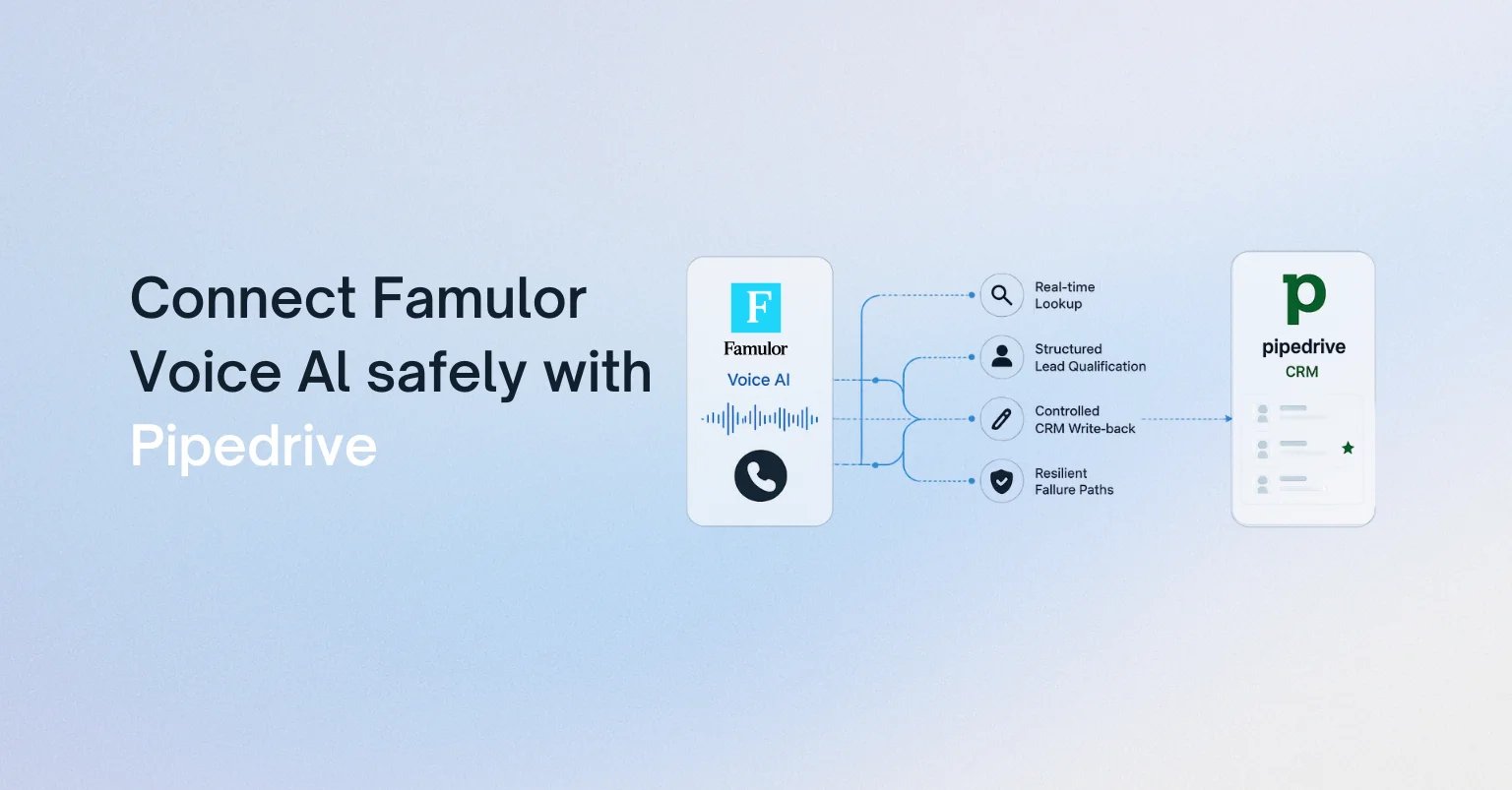
Een AI-voice-agent is pas echt waardevol voor sales als deze meer doet dan alleen praten; de agent moet de status van de pipeline begrijpen. Bij een Pipedrive-integratie betekent dit: contactpersonen identificeren vóór het gesprek, kwalificatiegegevens vastleggen in een gestructureerd format, activiteiten loggen met een audit trail en deals alleen verplaatsen wanneer aan vastgestelde criteria is voldaan.
Deze gids presenteert een productieklare architectuur voor het koppelen van Pipedrive met Famulor. De focus ligt op enterprise sales-operaties: helder eigenaarschap van gegevens, veilige schrijfrechten, veerkrachtige uitvoering en een uitrol die meetbaar is.
Wat de integratie tijdens een gesprek moet doen
Het voor de hand liggende idee—na elk gesprek een notitie opslaan—is te beperkt. Een betrouwbare Voice AI-workflow onderscheidt vier momenten:
- Vóór de dialoog: laad de persoon, organisatie, openstaande deal, eigenaar, laatste activiteit en toegestane gesprekscontext.
- Tijdens de dialoog: verzamel alleen wat het huidige proces vereist, zoals behoefte, budgetrange, tijdlijn en de volgende stap.
- Op een beslismoment: evalueer expliciete regels voordat de dealfase, waarde, status of waarschijnlijkheid wordt gewijzigd.
- Na de dialoog: leg de samenvatting, uitkomst, toestemmingsstatus en vervolgactiviteit vast; herstel mislukte real-time updates op een gecontroleerde manier.
Hiermee blijft Pipedrive het bronsysteem voor salesdata. De voice-agent is een uitvoeringslaag, geen tweede database die concurreert met het CRM.
Kies de architectuur: Mid-call Action, workflow of MCP
Famulor ondersteunt drie nuttige integratiepatronen. De juiste keuze hangt af van de kritiekheid van het proces en de governance, niet van hoe mooi de demo eruitziet.
| Patroon | Beste voor | Controlepunt |
|---|---|---|
| Directe Mid-call Action | Snelle opzoekactie van contact of deal en een gerichte update | Beperkt schema en minimale schrijfrechten |
| Automatiseringsplatform | Logica met meerdere stappen, transformaties, goedkeuringen en follow-ups | Visuele flow, foutpad en Return Response |
| Externe MCP-server | Een bredere, centraal beheerde CRM-toolset | Tool-goedkeuring, OAuth/token-scope en audit |
Voor een eerste productie-usecase is een kleine combinatie meestal ideaal: één read-only opzoekactie vóór de begroeting en één strikt afgebakende schrijfactie voor de activiteit en de volgende stap. Complexe vertakkingen horen thuis in een workflow. De Pipedrive-integratietemplate in de Famulor-documentatie toont de velden en structuur van een deal-actie.

Het datacontract: wat mag de agent lezen en schrijven?
Definieer een datacontract voordat je een prompt schrijft. Dit legt vast welk systeem eigenaar is van elk veld en wanneer een wijziging is toegestaan.
Leesvelden
- contact-ID, naam, taal en voorkeurskanaal
- organisatie, verantwoordelijke eigenaar en openstaande deals
- huidige pipeline-fase, laatste activiteit en afgesproken volgende stap
- goedgekeurde contextvelden voor personalisatie—niet standaard de volledige CRM-historie
Schrijfvelden
- gespreksuitkomst en gestructureerde activiteitsnotitie
- kwalificatiekenmerken met bron en tijdstempel
- volgende activiteit, deadline en eigenaar
- dealfase alleen wanneer aan een overgangsregel is voldaan
Een kernprincipe is dat vrije tekst een beslissing kan toelichten, maar niet de enige bron voor automatisering mag zijn. Als "budget bevestigd" een faseverandering triggert, moet de agent ook een ondubbelzinnig veld retourneren, zoals budget_confirmed=true. Dat maakt regels testbaar en voorkomt dat variaties in formulering de pipeline vervuilen.
Welke systemen moet Voice AI verbinden?
Selecteer je tools en krijg een snelle integratieroute.
Famulor
Voice AI
Geselecteerde integraties: 4
Een productieklare flow in zeven stappen
1. Identiteit robuust vaststellen
Zoek niet alleen op telefoonnummer. Normaliseer internationale formaten, overweeg alternatieve nummers en handel meerdere matches expliciet af. Als de identiteit onzeker is, vraagt de agent om een tweede kenmerk in plaats van het verkeerde record te openen.
2. Laad de minimale context
De agent heeft niet elke notitie nodig. Laad alleen wat de huidige dialoog verandert: naam, actieve deal, fase, eigenaar, laatste relevante activiteit en openstaande volgende actie. Dit vermindert latentie, privacyrisico's en promptcomplexiteit.
3. Definieer kwalificatie als een schema
Specificeer vereiste velden, toegestane waarden en exit-regels. Voor een B2B-lead kunnen dit het probleem, de urgentie, beslissingsbevoegdheid, budgetrange en gewenste vergadertijd zijn. De agent mag "onbekend" retourneren; verzonnen precisie is erger dan een expliciet gat.
4. Bewaak fase-overgangen
Een pipeline-fase is een zakelijke beslissing. Definieer machineleesbare regels: "Demo gepland" alleen na een succesvolle afspraak, "Voorstel aangevraagd" alleen na bevestigde behoefte en stakeholder, en "Verloren" nooit op basis van één negatieve zin zonder goedgekeurde reden.
5. Maak schrijfacties idempotent
Netwerk-retries mogen geen dubbele activiteiten creëren. Gebruik een uniek call-ID als idempotency-sleutel of sla dit op in een aangepast veld. Een retry werkt dan dezelfde transactie bij in plaats van een nieuwe aan te maken.
6. Handel fouten hoorbaar af, maar niet technisch
Een CRM-timeout mag geen technische taal voor de klant worden. De agent kan zeggen dat de volgende stap intern wordt bevestigd, het gesprek netjes afsluiten en de schrijfactie in een wachtrij na het gesprek plaatsen. Het salesproces blijft doorgaan, zelfs als Pipedrive tijdelijk onbereikbaar is.
7. Betrek mensen bewust
Prijsgoedkeuringen, contractuele verplichtingen, klachten of onzekere identiteiten vereisen een eigenaar. Geef de open beslispunten door met de samenvatting, zodat de medewerker niet het volledige transcript hoeft door te lezen.
Beveiliging en governance voor enterprise sales-operaties
- Least privilege: gebruik een toegewezen integratie-identiteit met alleen de benodigde CRM-rechten.
- Scheid lezen en schrijven: gebruik verschillende acties en, waar mogelijk, gescheiden inloggegevens.
- Veld-allowlist: sta geen vrije updates toe aan willekeurige objecten.
- Geheimbeheer: stel tokens nooit bloot aan de prompt, het transcript of zichtbare foutmeldingen.
- Audit trail: leg het call-ID, de actie, het doelobject, het resultaat en de foutklasse vast.
- Dataminimalisatie: laad alleen CRM-data die nodig is voor het verklaarde doel in de gesprekscontext.
Teams die een grotere toolset nodig hebben, kunnen ook een externe MCP-server in Famulor koppelen. Keur voor enterprise-uitrol elke ontdekte tool individueel goed en test schrijfacties afzonderlijk.
Testplan vóór livegang
Een goede pilot test meer dan alleen de ideale scenario's. Neem ten minste deze scenario's op:
- een bekende contactpersoon met precies één openstaande deal,
- een onbekend nummer dat een nieuwe lead moet worden,
- dubbele contacten of een gedeeld centrale-nummer,
- een ontbrekend vereist kwalificatieveld,
- een geweigerde afspraak,
- een Pipedrive-timeout tijdens het gesprek,
- een retry na een succesvolle maar vertraagde update-bevestiging,
- een geval dat menselijke goedkeuring vereist.
Nuttige metrics voor de livegang zijn onder meer de nauwkeurigheid van de opzoekmatch, voltooiing van vereiste velden, correcte fase-overgangen, het percentage dubbele records, het technische succespercentage en de tijd tot menselijke follow-up. Verhoog het volume pas als deze waarden stabiel blijven.
Probeer onze AI-assistent
Ervaar hoe natuurlijk onze AI-telefoonassistent klinkt.
Vul je gegevens in en ontvang binnen enkele seconden een oproep van onze AI-agent.
De agent is getraind om over Famulor-diensten te praten en afspraken te maken.

Demo AI-agent
Famulor medewerker
Conclusie: CRM-integratie is procesontwerp
De beste Pipedrive Voice AI-integratie is niet die met de meeste velden. Het is de integratie met het helderste contract tussen gesprek en pipeline. Begin met een read-only opzoekactie, één gecontroleerde activiteitsnotitie en één waardevolle fase-overgang. Voeg automatiseringen, agenda's, WhatsApp of andere systemen alleen toe waar het proces aantoonbaar baat bij heeft.
Famulor kan deze stappen implementeren via Mid-call Actions, visuele workflows of MCP. Het resultaat is een voice-agent die meer doet dan salesgesprekken voeren; hij houdt Pipedrive betrouwbaar up-to-date.

Auteur bij Famulor