Summarize Content With:




AI Voice Library: How to Choose the Right Voice for Your Phone Agent
Callers decide in the first two seconds whether they trust a voice. A voice that sounds too young, too stiff or too salesy loses the call before your agent has said anything useful. That is why the voice library is not a cosmetic setting. It is part of your product.
This guide shows you how to pick a voice from a large voice library without guessing. You get five criteria, a weighting you can adapt, a table that matches voices to call types, and a 30 minute test plan you can run before launch. Famulor gives you a voice library with more than 20,000 voices across several providers, so a clear method matters more than a long list.
What a voice library gives you
A voice library is a searchable catalog of text-to-speech voices. Each entry has a provider, a language, an accent, a gender or style tag and a preview. In Famulor you filter the library, preview a voice, assign it to an assistant and change it later without rebuilding the flow. The assistant keeps its prompt, tools and knowledge base.
Voices come from different providers such as ElevenLabs, Cartesia, Inworld, Google, Deepgram and others. You can browse them by provider in the library. Each provider has its own strengths: some sound warmer in long sentences, some respond faster, some cover more languages. If you want the background on how speech is generated and understood on a call, read TTS and STT explained.
Five criteria that decide the voice
Most teams choose a voice by listening to three previews and taking the nicest one. That works for a video, not for a phone line. A phone call is compressed audio, often on a mobile network, with background noise on both sides. Judge the voice under those conditions.
| Criterion | Question to ask | How to test it |
|---|---|---|
| Clarity on the phone | Is every word understood on a mobile connection? | Place a test call from a phone, not from the browser preview |
| Fit to the caller | Does age, tone and accent match who calls you? | Let two people from the target group rate the voice |
| Brand fit | Does it sound like your company on the first sentence? | Read the greeting aloud and compare it with the voice |
| Stability | Does it stay natural in numbers, names and addresses? | Use a script with phone numbers, dates and street names |
| Speed and cost | Does the reply start fast enough and stay within budget? | Measure the pause after the caller stops talking |
Clarity and stability matter more than a pleasant timbre. A beautiful voice that mispronounces your street name creates more friction than a plain voice that gets every detail right.
A weighting you can adapt
Not every criterion deserves the same weight. For a medical practice, clarity and trust carry the most weight. For an outbound sales campaign, the first seconds and the tone matter more. The chart below shows a starting weighting for an inbound receptionist. It is a suggestion from our testing approach, not a measured industry value, so change it to fit your case.
Give each voice a score from 1 to 5 per criterion, multiply by the weight and add up. The method is simple on purpose. It turns a taste discussion into a decision you can explain to your team in one minute.
Match the voice to the call type
The same voice does not fit every job. Use the table as a starting point and adjust it to your audience.
| Call type | Voice direction | What to avoid |
|---|---|---|
| Inbound reception | Calm, clear, friendly, medium pace | Over-excited tone, very fast speech |
| Appointment booking | Precise, patient, repeats dates slowly | Casual slang with exact times |
| Outbound sales | Warm, confident, natural rhythm | Radio-announcer style |
| Customer support | Steady, empathetic, low pitch variation | Cheerful tone for complaints |
| Clinics and practices | Reassuring, slower, very clear | Playful or youthful style |
| Payment reminders | Neutral, respectful, factual | Pressure in the voice |
If you run several locations or brands, give each one its own voice and assistant. Callers notice when a regional dental practice sounds like a national call center.
Languages and accents
Language support differs by provider and by voice. A voice that is excellent in English can sound flat in German or French. Check the supported languages overview for speech recognition and voice coverage, then test the exact language and accent your callers use. Austrian and Swiss callers, for example, often react to a German voice that sounds too far from their own dialect.
For multilingual lines, decide whether one voice should switch language or whether you route each language to a separate assistant. Separate assistants give you more control over tone and pronunciation in each language.
Pace, pauses and pronunciation
Two voices from the same provider can feel very different because of pace. Callers who book an appointment write down the date, so they need a slower tempo and a short pause after each detail. Callers who ask a quick question about opening hours want a short answer without filler. Set the speaking style in the assistant, not only in the voice choice, and keep sentences short. Short sentences also give the caller more natural places to interrupt.
Pronunciation deserves its own check. Brand names, doctors' surnames, street names and product codes are where synthetic voices slip. Collect the ten terms your callers use most and add them to your custom vocabulary. Then listen again. A voice that handles your ten terms cleanly is worth more than one that sounds great on generic text.
Example: a dental practice with four treatment chairs
A practice with four chairs gets calls at the busiest moments: right after opening, during lunch and shortly before closing. Callers are often in pain or in a hurry. The practice shortlists three calm, clear voices and writes a six-step script: greeting, symptom question, appointment slot, phone number read-back, insurance question and goodbye. Two staff members and one patient volunteer rate the recordings blind. The winning voice is not the warmest one but the one that reads the phone number back most clearly. That single detail removes most callbacks to confirm the number, and it is exactly the kind of detail a preview sentence never shows.
How often to retest
A voice is not a one-time decision. Plan a rhythm: one test before launch, one after the first week of real calls, and another whenever the provider, the model or the script changes. In week one, listen to ten random recordings and watch for three things: where do callers ask again because they did not understand? Where do they interrupt impatiently? Where do they hang up? These moments show whether pace, pronunciation or tone needs work. Small changes to the speaking style often help more than switching to another voice. Keep a short log of what you learned so your team does not start from zero at the next change.
Be open that the caller speaks to an AI
A natural voice does not remove the duty to be transparent. Callers should know early that they are speaking with an AI assistant. A good voice supports this: it can state the disclosure in a friendly, clear tone without sounding like a legal notice. Read EU AI Act Article 50: what your AI phone agent must say for the practical wording, and include the disclosure in your test script so you hear it in the chosen voice.
Run a 30 minute voice test
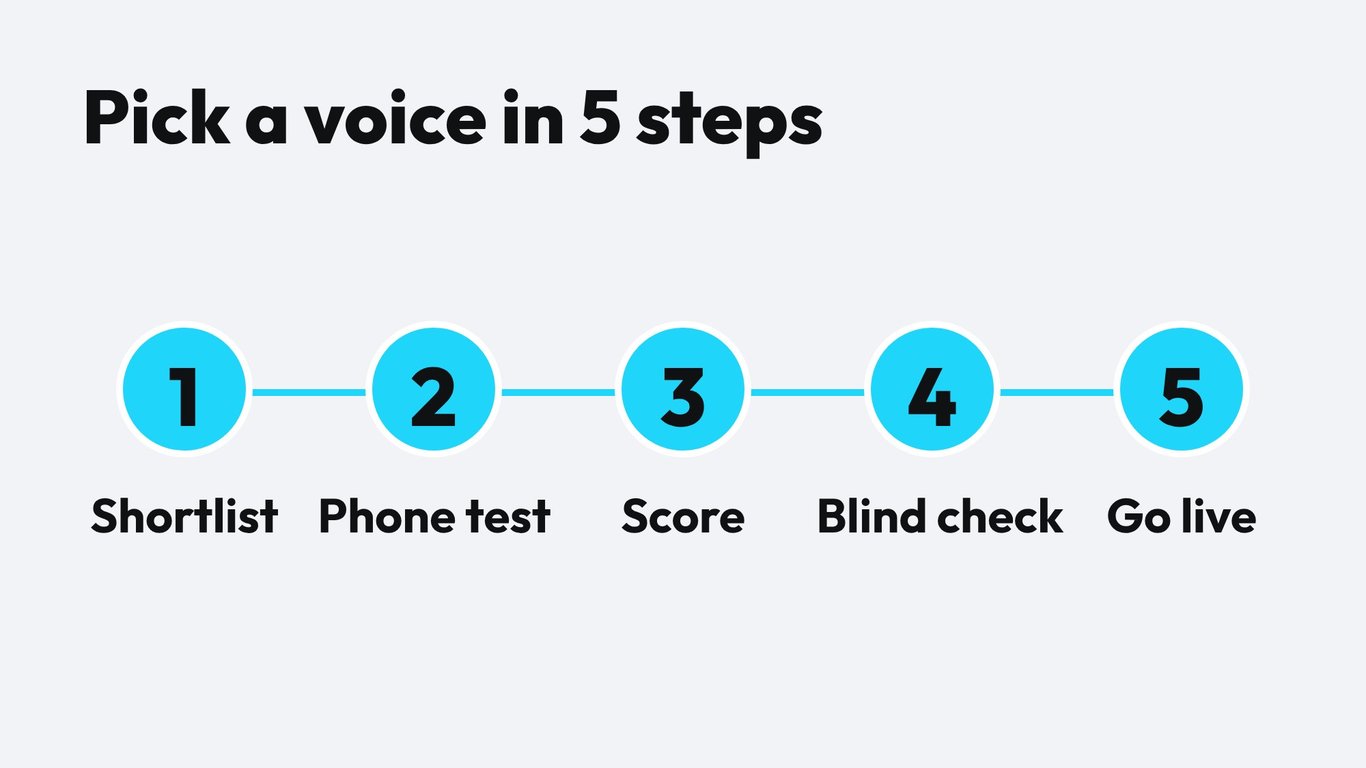
You can test a voice properly in half an hour. Prepare a script with six moments: greeting, a question about opening hours, a phone number read-back, a date and time confirmation, an interruption by the caller and a polite goodbye.
- Shortlist three to five voices from the library using language, style and provider filters.
- Assign each voice to a copy of the same assistant so only the voice changes.
- Call each assistant from a mobile phone and follow the script.
- Score each voice on the five criteria with a shared sheet.
- Let a second person who does not know the options listen to the recordings and rate them blind.
- Keep the winner and one backup voice.
To repeat the test without manual calls, use simulations. They let you run scripted conversations against a changed configuration before you publish it. For a hands-on provider comparison, our guide Cartesia vs ElevenLabs for phone agents walks through a two-provider test step by step.
Library voice or cloned voice?
A library voice is ready in a minute and sounds consistent across thousands of calls. A cloned voice gives you a recognizable brand voice, for example the founder or a known employee. Cloning needs consent, clean recordings and a quality check. Identity similarity and natural delivery are two different things, as we explain in Voice Cloning Evaluation. Start with a library voice, collect real call feedback and only then decide whether a clone is worth the effort.
What the voice means for cost
The voice is one cost line among several, together with speech recognition, the language model and telephony. Some premium voices cost more per minute than others. Famulor starts at €0.05 per minute, and pay as you go is €0.15 per minute, with the provider choice affecting the final per-minute cost. Run your own numbers before you commit to a premium voice for every call.
Estimate your ROI from automating calls
See how much your business could save by switching to AI-powered voice agents.
ROI Result
ROI 0%
No credit card required
A practical rule: use the best voice where the first impression decides the outcome, such as inbound sales calls and appointment booking, and a lighter voice for simple confirmations and reminders. You can set a different voice per assistant, so the split costs you nothing extra to configure.
Common mistakes when choosing a voice
- Choosing by preview only. The preview sentence is polished. Your real script has numbers, names and interruptions.
- Testing in a quiet room with headphones. Your callers use phones in cars and kitchens.
- Letting one person decide. Taste is personal. Use a score sheet and a second listener.
- Never retesting. Providers update models. Rerun the script after changes.
- Ignoring pronunciation. Add custom vocabulary for brand names, streets and medical terms.
Conclusion
A good voice is clear on a bad connection, stable on numbers and fitting for the person who calls. Use five criteria, a simple weighting and a half hour test, and you replace opinion with evidence. Start by shortlisting three voices in the Famulor library, run the script, and put the winner live on one line. Then compare real call results after a week.
Ready to hear the difference? Open the Famulor voice library, pick three candidates and place your first test call today.
Try our AI Assistant
Experience how natural our AI phone assistant sounds.
Enter your details and receive a call from our AI agent within seconds.
Agent is trained to discuss Famulor services and book appointments.

Demo AI agent
Famulor representative
FAQ
What is a voice library for AI phone agents?
It is a searchable catalog of text-to-speech voices with language, accent, style and a preview. You assign one voice to an assistant and can change it later without rebuilding the assistant.
How many voices does Famulor offer?
The Famulor voice library lists more than 20,000 voices across several providers. Availability depends on the language and provider you filter for.
How do I choose the best voice for my business?
Match the voice to the call type, shortlist three to five candidates, test them by phone with a real script and score them on clarity, stability, caller fit, brand fit and speed.
Should I use a male or female voice?
Neither is better in general. Test both with your callers. Clarity, pace and tone usually matter more than gender, and the right choice depends on your audience and brand.
Can I change the voice after launch?
Yes. You can switch the voice on an assistant at any time. Rerun your test script afterwards to confirm pronunciation of numbers, names and addresses.
Is a cloned voice better than a library voice?
A clone gives you a recognizable brand voice but needs consent, clean recordings and quality checks. A library voice is faster to launch and consistent, so many teams start there.
Does the voice affect response speed?
It can. Providers differ in how fast they start speaking. Measure the pause after the caller stops talking, using the same script for each candidate.
Which languages are supported?
Coverage differs by provider. Check the supported languages overview and test your exact language and accent before you launch.
How do I test voices without calling every time?
Use simulations to run scripted conversations against a changed configuration, then confirm the final choice with one real phone call.

Writer at Famulor