Summarize Content With:




TTS and STT Explained: The Two Halves of Every Voice Agent
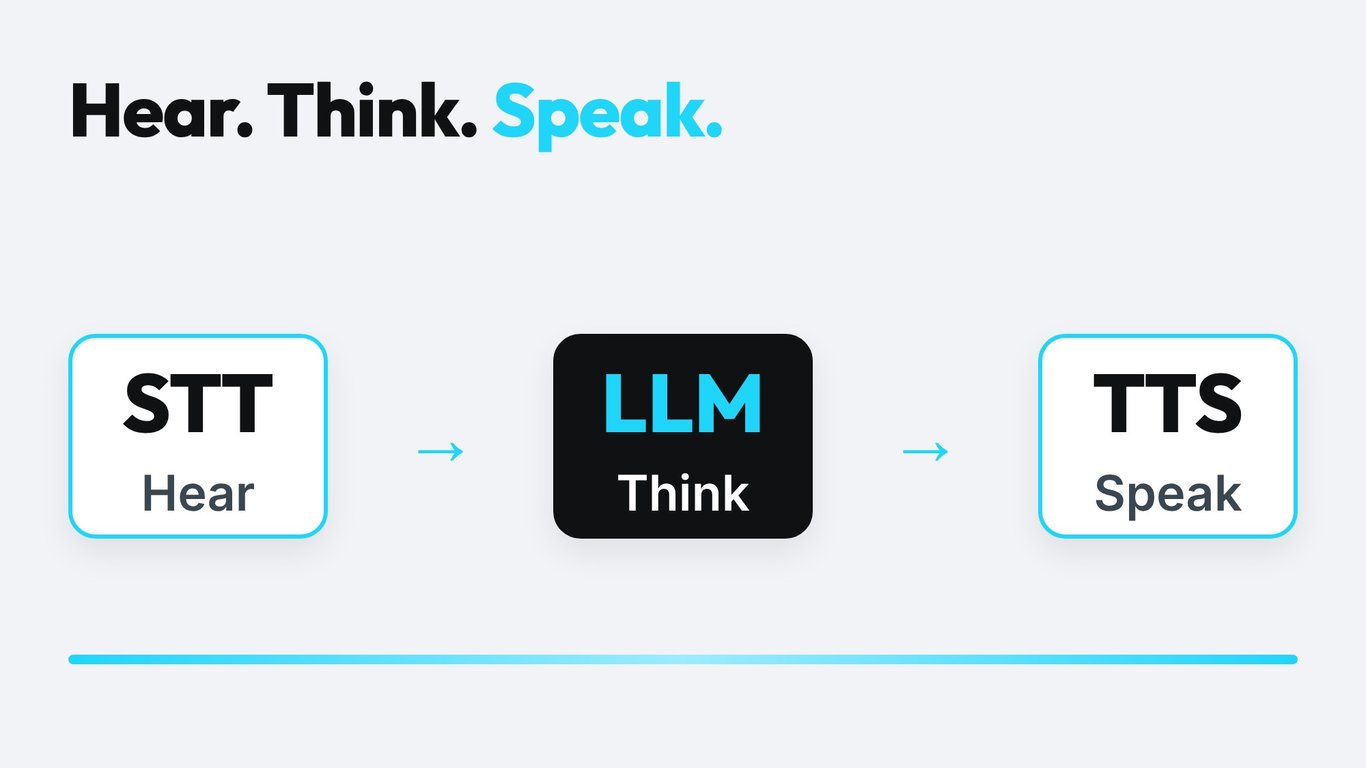
If you searched for "TTS" or "STT meaning" and landed here, the short answer is this: STT is speech-to-text (the agent listens) and TTS is text-to-speech (the agent speaks). Every AI phone agent you call is built on these two jobs, with a language model in the middle that decides what to say. This guide explains what each part does, where calls go wrong, and how to pick the right setup for your business.
What Do TTS and STT Mean?
STT (speech-to-text) is also called automatic speech recognition (ASR) or transcription. It takes an audio stream and returns words. In a voice agent it runs continuously while the caller talks and sends partial text to the next step.
TTS (text-to-speech) is speech synthesis. It takes the text the language model wrote and produces audio in a chosen voice, language and style. In a voice agent it starts speaking before the whole sentence is finished, so the caller does not wait.
The two are often confused with voice cloning, voice changers or "AI voices" in general. Those are features built on top of TTS. STT has no voice of its own: it only listens.
| Term | Full name | Input | Output | Job in a voice agent |
|---|---|---|---|---|
| STT | Speech-to-text (ASR) | Caller audio | Text | Understand what was said |
| LLM | Large language model | Text and context | Text | Decide the answer and call tools |
| TTS | Text-to-speech | Text | Audio | Say the answer in a natural voice |
| S2S | Speech-to-speech | Caller audio | Audio | Do all three in one model |
How a Phone Call Flows Through STT, LLM and TTS
Take a dental practice with four treatment chairs. A patient calls and says, "I need to move my cleaning from Tuesday to Thursday." Here is what happens in roughly one second:
- The phone network delivers audio to the agent platform.
- STT streams the audio into text while the patient is still talking.
- An endpointing check decides the patient has finished the sentence.
- The language model reads the text, checks the calendar through a tool and writes a reply.
- TTS turns the first words of the reply into audio and streams them back.
- The patient hears the answer and can interrupt at any moment, which cancels the TTS stream and returns to step 2.
Each step adds delay and each step can fail in its own way. STT can mishear a name. The model can pick the wrong slot. TTS can mispronounce a street. Knowing which part failed is the first step of fixing it. Famulor call logs show the transcript next to the agent's answer, so you can see whether the problem was hearing, thinking or speaking.
Why Phone Audio Is Harder Than a Podcast
Most speech models are demonstrated on clean studio audio. Phone calls are different. Traditional telephone lines use the G.711 codec with an 8 kHz sampling rate, which cuts off high frequencies. Consonants like "s", "f" and "th" become harder to tell apart, which is exactly where names, numbers and email addresses break. Wideband audio such as G.722 uses 16 kHz and keeps more detail, but only if both ends of the call support it.
The chart shows why a model that scores well on podcast audio can still struggle on a regular phone call: it receives a fraction of the information. When you test STT, always test it on recordings from your own phone line, with your own accents, background noise and vocabulary.
Speech-to-Text in Detail
What decides STT quality on calls
- Accent and language coverage: German dialects, Swiss German and code-switching between languages are still weak spots for many models.
- Vocabulary: product names, surnames and medical or legal terms. Many providers let you add keyword hints or custom vocabulary.
- Numbers and formats: phone numbers, IBANs, postcodes and dates. A single wrong digit makes a booking useless.
- Noise handling: cars, workshops, kitchens and speakerphones.
- Streaming behaviour: how quickly partial words appear and how stable they are.
Word error rate is not the whole story
Word error rate (WER) counts wrong, missing and extra words against a reference transcript. It is useful for comparing models, but a low WER can hide the errors that matter. Missing the word "not" or mixing up "15" and "50" counts the same as missing "the". For a voice agent, entity accuracy (names, numbers, dates) is often the better measure. We covered this in detail in our STT benchmark article.
Streaming versus batch
Batch STT waits for the full recording and returns a polished transcript. That is perfect for call summaries and compliance review. Streaming STT returns words as they are spoken, which is the only option for live conversation. Many providers offer both, with streaming usually trading a little accuracy for speed.
Endpointing and interruptions
Endpointing decides when the caller has finished talking. Too early and the agent cuts people off mid-sentence. Too late and every answer feels slow. Good agents combine silence detection with the meaning of the sentence: "My number is 0151..." is clearly not finished, even after a pause. Barge-in (letting the caller interrupt) depends on the same logic.
Text-to-Speech in Detail
What makes a TTS voice sound right
- Naturalness: rhythm, breathing and stress that match how people speak.
- Prosody control: questions that rise, short pauses before important facts, calm tone for bad news.
- Pronunciation: brand names, street names, abbreviations and mixed-language words. Pronunciation dictionaries solve most of this.
- Time to first audio: how fast the first syllable arrives after the text is sent.
- Consistency: the same voice on call 1 and call 10,000.
Voice cloning and consent
Many TTS providers offer cloning from a short sample. Only clone voices of people who have given written consent, and tell callers they are speaking with an AI. In the EU, transparency about AI interaction is part of the AI Act, and recording or processing voice data falls under GDPR. Our GDPR guide for AI voice agents covers the details.
Matching the voice to the job
A craft business that takes emergency calls needs a calm, clear voice. A hotel reception may want a warmer tone. A debt reminder needs a neutral, polite voice. Listen to samples in your own language, with your own sentences, before you decide. The Famulor voice library lets you compare voices across providers.
Latency: Where the Delay Comes From
Callers notice silence quickly. Total delay is the sum of the network, the end of the caller's turn, the model's thinking time and the first audio of the answer. Each STT and TTS provider contributes to that sum, which is why we wrote a separate guide on how fast your phone bot must reply.
Practical ways to cut delay without losing quality:
- Use streaming STT and streaming TTS, never batch, for live calls.
- Pick providers with servers close to your telephony carrier.
- Keep prompts and tool outputs short so the model answers faster.
- Use short filler phrases ("One moment, I check the calendar") while a tool runs.
- Tune endpointing instead of adding fixed pauses.
Cascaded Pipeline or Speech-to-Speech?
The classic setup chains STT, LLM and TTS. Newer speech-to-speech (S2S) models take audio in and give audio out in a single model. Both have a place. Our overview of speech-to-speech models goes deeper.
| Criterion | Cascaded (STT + LLM + TTS) | Speech-to-speech |
|---|---|---|
| Control over each step | High: swap any part | Lower: one model does everything |
| Transcript for logs and QA | Native | Needs a separate transcription |
| Voice choice | Hundreds of TTS voices | Limited to the model's voices |
| Tone and interruptions | Depends on tuning | Often more natural |
| Tool calling and rules | Mature and predictable | Improving quickly |
| Debugging a bad call | Check each step | Harder to isolate |
For regulated or high-stakes calls such as appointments, payments or claims, many teams still prefer the cascaded setup because every step is visible and replaceable. For casual, conversational use cases, S2S can feel more natural.
How to Choose STT and TTS Providers
Use a short scorecard and weigh it by your use case:
- Language and accent coverage for your real callers.
- Accuracy on entities: names, numbers, dates.
- Streaming latency for STT and time to first audio for TTS.
- Voice quality and control for TTS.
- Data handling: region, retention, training on your data, DPA.
- Price per minute or per character at your call volume.
- Reliability: uptime and fallback options.
We wrote step-by-step guides for both sides: how to choose an STT provider and how to choose a TTS provider. Famulor supports providers such as Deepgram, Soniox, ElevenLabs and Cartesia, so you can test several against the same script.
What STT and TTS Cost in a Voice Agent
A voice agent minute is made up of telephony, STT, LLM and TTS. Providers bill in different units: STT usually per audio minute or hour, TTS per character or per audio minute, LLMs per token. Comparing them is easier if you convert everything into cost per call minute for your own call pattern. Long agent answers cost more TTS than short ones, and long caller monologues cost more STT.
With Famulor, you see one price per minute instead of separate provider invoices. Pay-as-you-go starts at €0.15 per minute, and plans such as Plus include 100 minutes with extra minutes at €0.12. See the current plans on the pricing page.
Estimate your ROI from automating calls
See how much your business could save by switching to AI-powered voice agents.
ROI Result
ROI 0%
No credit card required
Three Examples: Which Setup Fits Which Job?
Appointment booking for a dental practice
Names and dates matter. Choose an STT with strong entity accuracy and custom vocabulary for treatments, plus a calm, clear TTS voice. Add a confirmation read-back: "Thursday at 10:30, correct?"
After-hours line for a plumbing company
Callers are stressed and often in noisy places. Prioritize noise-robust STT and a short, reassuring TTS voice. Keep answers brief and collect address and urgency first.
Outbound reminders for a gym
Outbound calls start with a fast greeting, so TTS time to first audio matters. STT mostly needs to catch yes, no and a few dates. A mid-priced stack is usually enough.
Setting Up STT and TTS in Famulor
- Create an assistant with the no-code voice agent builder.
- Choose the language and a voice, and listen to a sample.
- Pick the transcription model that fits your language and noise level.
- Add pronunciation hints and custom vocabulary for your brand and place names.
- Run simulated and real test calls, then read the transcripts.
- Change one setting at a time and compare the results.
Check the supported languages before you decide on a voice.
Common Mistakes
- Choosing a voice from a studio demo and never testing it on a phone line.
- Judging STT by one overall accuracy number.
- Ignoring pronunciation of the company name.
- Skipping the read-back for numbers and dates.
- Letting the agent talk in long paragraphs. Short sentences sound better and cost less TTS.
Conclusion
STT and TTS are the ears and the voice of your AI phone agent. The better they fit your callers, language and use case, the more calls the agent finishes without a human. Test both on real recordings, keep latency low with streaming, and change one thing at a time. Ready to hear the difference on your own script? Start with the live demo below, then build your first assistant in Famulor.
Try our AI Assistant
Experience how natural our AI phone assistant sounds.
Enter your details and receive a call from our AI agent within seconds.
Agent is trained to discuss Famulor services and book appointments.

Demo AI agent
Famulor representative
FAQ
What does TTS mean?
TTS stands for text-to-speech. It converts written text into spoken audio, and in a voice agent it produces the agent's spoken answers.
What does STT mean?
STT stands for speech-to-text. It converts spoken audio into written text, so the language model can understand what the caller said. It is also called ASR or transcription.
What is the difference between TTS and STT?
STT listens and TTS speaks. STT takes audio in and returns text. TTS takes text in and returns audio. A voice agent needs both, or a speech-to-speech model that covers both.
Do AI phone agents always need separate STT and TTS?
No. Cascaded agents use separate STT, LLM and TTS steps. Speech-to-speech models handle audio in and audio out in one model. Both approaches exist, and the cascaded one gives more control and transcripts.
Which matters more for call quality, STT or TTS?
Both, but in different ways. Weak STT leads to wrong answers because the agent misheard. Weak TTS leads to calls that sound robotic or hard to understand. Test both on your own calls.
Why does my voice agent mishear names and numbers?
Phone audio is narrow and noisy, and names are rare words. Use custom vocabulary, spell-back confirmations and an STT model tested on your language and accents.
How can I make the agent answer faster?
Use streaming STT and TTS, tune endpointing, keep prompts and tool results short and choose providers close to your telephony region.
Is it legal to use a cloned or synthetic voice on calls?
You need consent for any cloned voice, and callers should know they are talking to an AI. Check GDPR and the EU AI Act for your case and get legal advice for regulated industries.
Can I switch STT or TTS providers later in Famulor?
Yes. You can change the voice and transcription settings of an assistant and rerun your test calls, without rebuilding the agent.

Writer at Famulor