Résumer le contenu avec:




Assistant téléphonique par IA pour solopreneurs et petites entreprises : quand est-ce rentable ?
Un assistant téléphonique par IA est rentabilisé dès qu'il intercepte un seul appel que vous auriez manqué, ce qui, pour la plupart des petites entreprises, se produit dès la première semaine. Les données actuelles montrent que 62 % des appels adressés aux petites entreprises restent sans réponse, coûtant en moyenne plus de 26 000 $ par an en manque à gagner. La solution est étonnamment abordable : des plateformes comme Famulor débutent à 0,16 $ par minute, sans frais de mise en service, sans contrat et sans engagement minimum.
Cet article détaille les coûts réels, propose un calcul de rentabilité concret et un plan de déploiement étape par étape pour vous aider à décider si un assistant téléphonique par IA est pertinent pour votre activité dès aujourd'hui.
Le problème : chaque appel manqué est une vente perdue
Les chiffres sont sans appel. Les petites entreprises manquent 62 % de leurs appels entrants. Parmi ces appelants, 85 % ne rappellent jamais. Et 78 % des clients achètent auprès de la première entreprise qui répond, non pas la meilleure, mais la plus rapide.
Pour les entreprises de services, l'impact est encore plus sévère. Une entreprise de plomberie qui manque 10 appels par semaine, avec une valeur moyenne de prestation de 350 $, laisse échapper 182 000 $ par an. Un cabinet dentaire qui manque 15 appels par semaine, avec une valeur vie patient moyenne de 600 $, perd plus de 400 000 $ de revenus potentiels par an. Il ne s'agit pas de chiffres théoriques, mais du coût direct d'un accueil téléphonique vide.
Prenons l'exemple de Sarah Chen, avocate spécialisée en droit de l'immigration à Austin. Elle passe quatre heures par jour en consultations clients, durant lesquelles elle ne peut pas répondre au téléphone. Avant d'ajouter un assistant IA, elle manquait de 8 à 12 appels par jour. Comme 78 % des appelants se tournent vers le premier qui répond, ses concurrents récupéraient littéralement ses clients pendant qu'elle servait les siens.
Ce que fait réellement un assistant téléphonique par IA
Un assistant téléphonique par IA n'est pas un simple répondeur avec un message plus aimable. C'est une IA conversationnelle qui répond aux appels, comprend le langage naturel, réagit intelligemment et prend des mesures : prise de rendez-vous, réponse aux questions, capture d'informations sur les prospects et transfert des appels urgents vers un humain.
Les plateformes modernes comme Famulor prennent en charge plus de 40 langues, fonctionnent 24h/24, 7j/7 et 365 jours par an, et s'intègrent à vos outils existants sans nécessiter de programmation. Voici ce qu'un assistant téléphonique par IA gère typiquement pour une petite entreprise :
- Planification et modification de rendez-vous : directement dans votre calendrier, confirmé en temps réel.
- Gestion de la FAQ : horaires d'ouverture, itinéraires, tarifs, disponibilité des services.
- Qualification des appels : distinction entre nouveaux prospects et clients existants, et filtrage du spam.
- Prise de messages : notes structurées transmises par e-mail, SMS ou directement dans votre CRM.
- Transfert d'urgence : les appels urgents sont immédiatement transférés sur votre mobile.
Pour Marcus Rivera, propriétaire d'une entreprise de CVC de trois personnes à Phoenix, le flux de travail est le suivant : pendant qu'il est sur un toit pour remplacer un compresseur, son assistant IA répond à l'appel d'un propriétaire dont la climatisation est tombée en panne sous une chaleur de 43 °C. L'assistant enregistre l'adresse, confirme l'urgence, vérifie le calendrier de Marcus pour le créneau disponible le plus proche, réserve l'intervention pour le jour même et envoie un résumé par SMS à Marcus. Le propriétaire a un rendez-vous confirmé en moins de 90 secondes. Marcus n'a jamais eu besoin de poser ses outils.
Combien coûte un assistant téléphonique par IA ? Le bilan honnête
Les modèles de tarification varient considérablement sur le marché. Voici comment les principaux modèles se comparent en 2026 :
| Modèle de facturation | Fourchette de prix | Idéal pour |
|---|---|---|
| À la minute | 0,08 $–0,30 $/min | Volume d'appels irrégulier, solopreneurs |
| À l'appel | 0,50 $–1,50 $/appel | Modèles d'appels prévisibles |
| Forfait mensuel fixe | 200 $–1 000 $/mois | Volume élevé, équipes |
| Hybride (IA + humain) | 255 $–1 275 $/mois | Demandes complexes avec relais humain |
Famulor utilise un modèle à la minute à 0,16 $ — sans frais mensuels, sans frais de mise en service et sans contrat minimum. Pour un solopreneur traitant 100 appels de 2 minutes chacun par mois, le coût total est de 32 $. Comparez cela à un service de secrétariat téléphonique à distance facturé entre 550 $ et 1 500 $ par mois, ou à un réceptionniste à temps partiel à plus de 2 000 $ par mois.
Coûts cachés à surveiller chez d'autres fournisseurs :
- Frais de configuration et d'intégration — Famulor n'en facture aucun.
- Location de numéro de téléphone — Famulor propose des numéros locaux dans plus de 60 pays.
- Frais d'intégration — Les plus de 300 intégrations de Famulor sont incluses.
- Coûts des jetons de modèle linguistique — certains fournisseurs facturent séparément le traitement par IA.
Le calcul de rentabilité : quand est-ce rentable ?
Faisons le calcul pour un scénario concret. Voici David Park, conseiller financier indépendant à Chicago avec un assistant à temps partiel :
- 150 appels entrants par mois
- 40 % restent sans réponse (60 appels)
- 25 % des appels manqués sont des clients potentiels (15 par mois)
- Valeur vie moyenne d'un client : 4 800 $
- Taux de conversion au premier contact : 35 %
Sans assistant téléphonique par IA : 15 clients potentiels appellent mais tombent sur la messagerie. 85 % ne rappellent jamais, soit 12,75 prospects perdus. Avec un taux de conversion de 35 %, cela représente 4,5 nouveaux clients qu'il ne décroche jamais. Revenu annuel perdu : 4,5 clients × 4 800 $ = 21 600 $ par mois en valeur vie perdue.
Avec un assistant téléphonique par IA : L'assistant répond aux 60 appels précédemment manqués. Coût avec Famulor : 60 appels × 2 minutes × 0,16 $ = 19,20 $ par mois. Clients supplémentaires gagnés : même avec une estimation prudente de 2 par mois, cela représente 9 600 $ de valeur vie supplémentaire par mois.
ROI : 9 600 $ de revenu supplémentaire ÷ 19,20 $ de coût = 50 000 % de retour sur investissement.
Même le calcul le plus conservateur — un client supplémentaire par trimestre — génère 4 800 $ de valeur vie pour moins de 60 $ de coûts trimestriels liés à l'IA. L'investissement est rentabilisé dès la première opportunité capturée.
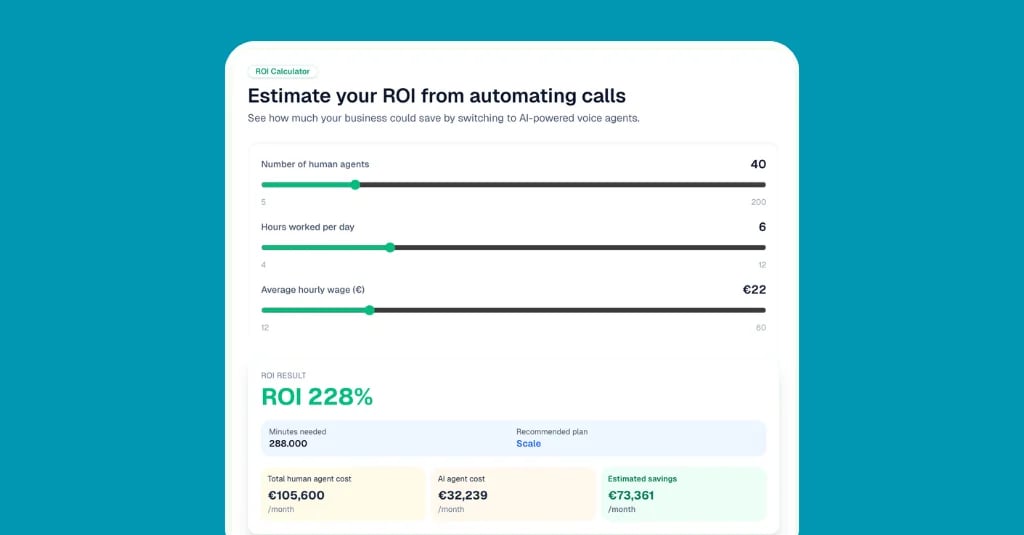
Estimez votre ROI en automatisant vos appels
Voyez combien vous pourriez économiser chaque mois grâce aux voice agents IA.
Résultat ROI
ROI 0%
Sans carte bancaire
Étape par étape : configurer votre assistant téléphonique par IA
Démarrer avec un assistant téléphonique par IA sur Famulor prend moins de 15 minutes. Voici la marche à suivre :
Étape 1 : créez votre compte et votre assistant. Inscrivez-vous sur famulor.io, nommez votre assistant et sélectionnez votre secteur d'activité. La plateforme précharge des modèles de conversation pertinents basés sur votre type d'entreprise.
Étape 2 : construisez votre base de connaissances. Téléchargez vos FAQ ou saisissez les questions et réponses les plus courantes. Soyez précis : « Nous sommes ouverts du lundi au vendredi, de 8h à 17h » est préférable à « pendant les heures de bureau habituelles ». Visez 15 à 20 paires de questions-réponses pour commencer.
Étape 3 : connectez votre calendrier. Liez Google Calendar, Cal.com, Calendly ou votre système de gestion de cabinet via la page des intégrations. Votre assistant vérifiera la disponibilité en temps réel et réservera les rendez-vous directement.
Étape 4 : configurez votre numéro de téléphone. Choisissez un numéro local ou transférez votre ligne existante via le renvoi d'appel. Famulor prend en charge le trunking SIP pour une intégration transparente avec votre système téléphonique actuel.
Étape 5 : testez et lancez-vous. Appelez votre propre assistant, testez divers scénarios — prise de rendez-vous, transfert d'urgence, questions tarifaires — et ajustez. Commencez par les appels en débordement et en dehors des heures d'ouverture, afin de capturer les appels manqués sans modifier votre routine quotidienne.
Bonnes pratiques de chefs de petites entreprises prospères
Commencez uniquement par les heures creuses. Le point d'entrée le moins risqué consiste à diriger les appels vers votre assistant IA uniquement en dehors des heures de bureau. Cela permet de capturer les appels qui finiraient autrement sur la messagerie sans perturber votre flux de travail quotidien. BrightSpark Electric à Denver a utilisé cette approche et a récupéré 8 chantiers supplémentaires par semaine, des appels qui mouraient auparavant sur la messagerie. Avec un profit moyen de 350 $ par chantier, cela représente 145 600 $ de revenus récupérés par an.
Investissez 30 minutes dans votre base de connaissances. L'échec le plus courant : un assistant générique qui répond à « Pouvez-vous passer mardi ? » par « Je suis un assistant IA et je ne peux pas vous aider avec cela ». Notez les 15 questions que vos clients posent réellement, avec exactement les réponses que vous donneriez vous-même.
Définissez des règles d'escalade claires. Tous les appels ne peuvent pas ou ne doivent pas être gérés par l'IA. Fixez des règles fermes : les urgences sont transférées immédiatement. Les demandes complexes déclenchent une réservation de rappel. Les plaintes reçoivent une dose supplémentaire d'empathie et une proposition de mise en relation avec un humain.
Examinez les transcriptions chaque semaine pendant le premier mois. Lisez 10 à 15 journaux de conversation par semaine durant vos quatre premières semaines. Vous repérerez où l'assistant hésite ou donne des réponses vagues, et vous pourrez enrichir la base de connaissances en conséquence.
Erreurs courantes et comment les éviter
Erreur 1 : essayer de tout automatiser d'un coup. Ne lancez pas votre assistant avec l'objectif de gérer 100 % des appels via l'IA. Un taux d'automatisation réaliste se situe entre 50 et 70 %, principalement pour les demandes standard comme les horaires, la disponibilité, les tarifs et la prise de rendez-vous. Le reste doit être dirigé vers un humain.
Erreur 2 : absence de relais humain. Les appelants qui se sentent piégés dans une boucle IA raccrochent, frustrés. Un assistant bien configuré reconnaît ses limites et transfère l'appel avec élégance. Famulor propose des règles de transfert configurables, par sujet, par sentiment de l'appelant ou après un nombre défini de questions sans réponse.
Erreur 3 : ignorer la qualité de la voix. Une voix robotique fait fuir les appelants dans les trois premières secondes. Les moteurs de synthèse vocale modernes sonnent de manière naturelle et professionnelle. Famulor propose plusieurs options de voix dans différentes langues : testez celle qui correspond le mieux à votre image de marque.
Erreur 4 : aucun suivi des conversations IA. L'assistant réserve un rendez-vous ou prend un message, mais personne n'y donne suite. Configurez des notifications automatiques par e-mail, SMS ou directement dans votre CRM pour que rien ne passe à travers les mailles du filet.
Exemples sectoriels : comment les petites entreprises utilisent les assistants téléphoniques par IA
Artisanat — Rivera HVAC, 3 employés, Phoenix : Équipes sur le terrain de 7h à 17h, bureau sans personnel après midi. L'assistant IA gère la réception des urgences, qualifie le problème (panne système vs maintenance de routine) et réserve les rendez-vous d'intervention. Résultat : 14 chantiers supplémentaires par mois, augmentation de 22 % du chiffre d'affaires.
Santé — Dr Amara Osei, médecine générale, Atlanta : Plus de 200 appels par semaine, 60 % sont des demandes de rendez-vous. L'assistant IA réserve directement dans le système de gestion du cabinet, répond aux questions sur les horaires et le retrait des ordonnances, et ne transfère que les urgences médicales au secrétariat. Le personnel a récupéré 15 heures par semaine pour les soins aux patients.
Juridique — Chen & Associates, 2 avocats, Austin : Les demandes des clients culminent le soir et le week-end. L'assistant IA effectue une prise de contact structurée (nom, domaine de droit, urgence, brève description du dossier) et planifie des créneaux de rappel. Le cabinet a augmenté l'acquisition de clients de 35 % sans embaucher de réceptionniste.
E-commerce — Lena K. Fashion, 1 employé, Berlin : Les clients appellent pour des retours, le suivi de livraison et les tailles. L'assistant IA gère automatiquement les questions standard et transfère les plaintes complexes par e-mail. Résultat : 70 % de temps téléphonique en moins, plus de capacité pour le développement de produits.
Assistant téléphonique par IA vs alternatives : le comparatif honnête
| Solution | Coût mensuel | Disponibilité | Évolutivité | Temps de configuration |
|---|---|---|---|---|
| Aucune solution (messagerie) | 0 $ | Aucune | — | — |
| Réceptionniste à temps partiel | 1 500 $–2 500 $ | 4–6 h/jour | Faible | 2–4 semaines |
| Service de secrétariat à distance | 200 $–500 $ | Lun–Ven, 8h–18h | Moyenne | 1–2 semaines |
| Assistant téléphonique par IA (Famulor) | À partir de 0 $ (selon usage) | 24h/24, 7j/7, 365j/an | Illimitée | 15 minutes |
L'avantage décisif d'un assistant téléphonique par IA sur toute autre alternative : il est disponible immédiatement, évolue avec votre croissance et ne facture que lorsqu'il traite réellement des appels. Pour les solopreneurs et les équipes de moins de 10 employés, le modèle à la minute de Famulor est quasiment imbattable en termes de rapport qualité-prix.
Conclusion : votre premier employé IA coûte moins cher qu'un déjeuner d'affaires
La question n'est plus de savoir si un assistant téléphonique par IA vaut l'investissement, mais combien de revenus vous perdez chaque jour sans lui. Pour les solopreneurs et les petites entreprises ayant un trafic téléphonique régulier, l'investissement est généralement rentabilisé dès la première opportunité capturée.
La meilleure façon de commencer : débutez par les appels en dehors des heures d'ouverture, investissez 30 minutes dans votre base de connaissances et testez pendant deux semaines. Si vous capturez ne serait-ce qu'un seul rendez-vous ou prospect que vous auriez manqué autrement, l'assistant s'est déjà remboursé plusieurs fois.
Lancez-vous avec Famulor dès aujourd'hui : Créez votre propre assistant téléphonique par IA en 15 minutes — aucune carte de crédit requise, aucun frais de mise en service, aucun risque. Consultez les tarifs et les plans ou contactez-nous pour une démonstration personnalisée.
Essayez notre Assistant IA
Découvrez à quel point notre assistant téléphonique IA sonne naturel.
Entrez vos coordonnées et recevez un appel de notre agent IA en quelques secondes.
L'agent est formé pour parler des services Famulor et prendre des rendez-vous.

Agent IA de démo
Représentant Famulor
FAQ
Combien d'appels par mois dois-je recevoir pour justifier un assistant téléphonique par IA ?
Un assistant téléphonique par IA est rentable dès 20 à 30 appels manqués par mois. Avec une tarification à l'usage comme celle de Famulor (0,16 $/min), votre coût mensuel reste inférieur à 10 $ — un seul client ou rendez-vous récupéré dépasse généralement ce montant à plusieurs reprises.
Un assistant téléphonique par IA peut-il réellement réserver des rendez-vous ?
Oui. Les assistants IA modernes comme Famulor se connectent directement à Google Calendar, Cal.com, Calendly et aux systèmes de gestion de cabinet. L'assistant vérifie les créneaux disponibles, propose les horaires adaptés à l'appelant et confirme la réservation, le tout entièrement automatisé et en temps réel.
Les appelants remarquent-ils qu'ils parlent à une IA ?
Les moteurs de synthèse vocale actuels sonnent de manière naturelle et professionnelle. La plupart des appelants ne distinguent pas l'IA d'un réceptionniste humain, surtout lors d'interactions standard courtes comme la prise de rendez-vous ou la gestion de FAQ.
Un assistant téléphonique par IA est-il conforme au RGPD ?
Oui, à condition que le fournisseur traite les données au sein de l'UE et propose un accord de traitement des données (DPA). Famulor exploite une infrastructure conforme au RGPD et fournit un DPA. Bonne pratique : informez les appelants au début de la conversation qu'un traitement assisté par IA est utilisé.
Que se passe-t-il lorsque l'IA ne peut pas répondre à une question ?
Un assistant bien configuré reconnaît ses limites et transfère l'appel à un humain ou réserve un rappel. Avec Famulor, vous définissez précisément quels sujets, signaux de sentiment ou seuils de questions sans réponse déclenchent une escalade.
Puis-je utiliser l'assistant IA pour des appels sortants également ?
Oui. Le module d'appels sortants de Famulor prend en charge des campagnes automatisées pour les rappels de rendez-vous, les enquêtes de satisfaction et la qualification de prospects — un moyen efficace pour les solopreneurs de maintenir le contact client sans décrocher le téléphone eux-mêmes.
Combien de temps faut-il pour configurer un assistant téléphonique par IA ?
La configuration de base sur Famulor prend environ 15 minutes : création de compte, alimentation de la base de connaissances, choix d'un numéro de téléphone et test. Les configurations plus complexes avec intégration CRM et connectivité SIP prennent une à deux heures.
Comment un assistant téléphonique par IA se compare-t-il à un service de secrétariat à distance ?
Les services de secrétariat à distance coûtent entre 200 $ et 500 $ par mois et fonctionnent généralement du lundi au vendredi, uniquement pendant les heures de bureau. Un assistant IA avec facturation à la minute coûte entre 12 $ et 50 $ par mois pour des volumes d'appels comparables, avec une disponibilité 24h/24 et 7j/7 incluse.
Cela fonctionne-t-il dans d'autres langues que l'anglais ?
Famulor prend en charge plus de 40 langues, dont l'espagnol, le mandarin, l'arabe, le français et l'allemand. L'assistant détecte automatiquement la langue de l'appelant et bascule — idéal pour les entreprises desservant des communautés multilingues.
Ai-je besoin d'un nouveau numéro de téléphone pour l'assistant IA ?
Non. Vous pouvez utiliser votre numéro existant avec le renvoi d'appel ou l'intégrer via trunking SIP dans votre système téléphonique actuel. Alternativement, Famulor propose des numéros locaux dans plus de 60 pays.

Rédacteur chez Famulor