Résumer le contenu avec:




Maîtriser le filtrage d'appels iOS : comment vos appels seront reçus à l'avenir
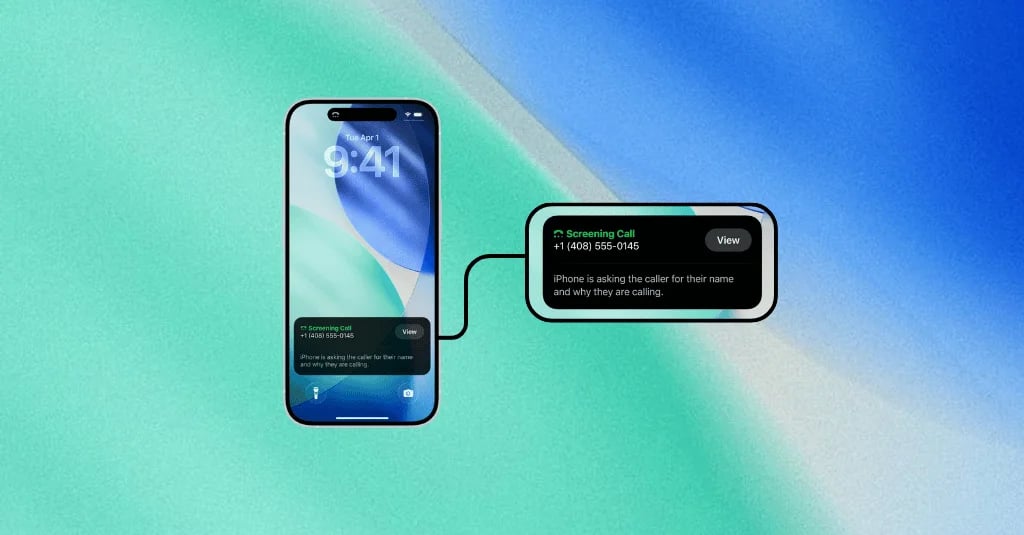
Avec l'introduction des nouvelles versions d'iOS, Apple a mis en place une fonctionnalité qui, au premier abord, peut sembler déstabilisante pour de nombreuses entreprises : le filtrage d'appels intégré au système. Les appels provenant de numéros inconnus sont automatiquement pris en charge par une voix IA qui demande le nom de l'appelant et le motif de l'appel. Avec plus de 150 millions d'utilisateurs d'iPhone rien qu'aux États-Unis, l'impact de cette fonctionnalité sur le monde des affaires est immédiat et significatif.
Si votre réussite dépend de votre capacité à joindre des clients potentiels ou existants par téléphone, cela peut ressembler à un nouvel obstacle insurmontable. Mais que se passerait-il si cet obstacle était en réalité une opportunité ? L'opportunité de se démarquer des spammeurs, de faire preuve de professionnalisme et d'élever la qualité de votre prospection à un niveau supérieur. C'est précisément là que les solutions d'IA modernes entrent en jeu, non seulement pour relever ce défi, mais pour le transformer en avantage concurrentiel.
Chez Famulor, nous avons développé une infrastructure d'appels qui répond directement au filtrage d'appels d'Apple. Grâce à un « mode de filtrage » spécial, nos agents IA s'assurent qu'il est clair dès le départ qui appelle, pourquoi l'appel est passé et à quoi le destinataire peut s'attendre. Cet article vous présente les meilleures pratiques pour maîtriser le filtrage d'appels iOS et garantir que vos appels aboutissent.
Qu'est-ce que le filtrage d'appels d'Apple et pourquoi change-t-il la donne ?
La fonctionnalité « Messagerie vocale en direct » d'Apple, ou filtrage d'appels à l'échelle du système, est bien plus qu'un simple répondeur amélioré. Lorsqu'un appel provient d'un numéro inconnu, l'utilisateur d'iPhone peut transférer l'appel vers une IA (similaire à Siri). Cette IA répond à l'appel et demande à l'appelant d'indiquer son nom, son entreprise et le motif de l'appel. Pendant que l'appelant parle, sa réponse est transcrite en temps réel sur l'écran du destinataire.
L'utilisateur d'iPhone peut donc lire en direct ce que dit l'appelant et décider ensuite d'accepter l'appel, de le refuser ou d'attendre l'enregistrement du message vocal. Pour l'appelant, cela signifie que les premières secondes de la conversation sont plus cruciales que jamais. Il ne s'agit plus d'une conversation avec une boîte vocale, mais d'un pitch en direct face à un portier numérique.
Ce changement est fondamental car il transfère tout le pouvoir au destinataire et oblige les entreprises à repenser radicalement leurs stratégies de prospection à froid et de prise de contact. Les introductions vagues, impersonnelles ou mal formulées conduiront inévitablement à ce que l'appel soit ignoré.
Les 5 premières secondes : votre nouvel elevator pitch pour l'IA
Lorsque l'IA décroche et demande le motif de votre appel, vous disposez d'un laps de temps extrêmement court pour convaincre. Ces premiers mots constituent votre nouvel elevator pitch. Si le message est flou, vous passerez pour un spammeur. S'il est trop long, il sera coupé. La formule du succès est simple : clair, précis et immédiatement pertinent. Visez une durée inférieure à cinq secondes, ce qui correspond à environ 12 à 18 mots.
L'anatomie d'une réponse de filtrage parfaite
Pour illustrer son fonctionnement, examinons une interaction typique et la réponse optimale. L'IA pose généralement trois questions, implicites ou explicites, auxquelles vous devez répondre :
Qui êtes-vous ?
Pour quelle entreprise appelez-vous ?
Quel est le motif spécifique de votre appel ?
Une réponse faible serait : « Bonjour, ici Martin, j'appelle de la part d'une entreprise partenaire pour parler d'une promotion spéciale. » Cette réponse est vague et ressemble à un appel commercial typique.
Une réponse forte et contextuelle, en revanche, utilise des informations précises que le destinataire reconnaîtra immédiatement. Voici une matrice montrant comment structurer une réponse efficace :
Question de l'IA (Exemple) Votre réponse optimale Pourquoi cela fonctionne « Veuillez indiquer votre nom. » « Bonjour, ici Dana Lehmann… » Clair, amical et humain. Crée un lien personnel. « Et le nom de votre entreprise. » « …de chez Famulor… » Renforce la confiance par la transparence et la reconnaissance de la marque. « Et le motif de votre appel. » « …concernant votre demande de démo du 10 octobre. » Fournit une raison vérifiable et immédiatement pertinente pour le destinataire. Pas de conjectures, pas de pression commerciale.
Évitez absolument les introductions vagues comme « Je voulais juste prendre contact », « je fais suite à » ou « j'ai une offre exceptionnelle pour vous ». Utilisez plutôt des détails authentiques et contextuels qui communiquent clairement l'objet de l'appel.
Meilleures pratiques : comment vos appels peuvent maîtriser le filtrage iOS
Pour maximiser votre taux de réussite sur les appels vers des iPhone, vous devez adopter une approche systématique. Ces bonnes pratiques vous aideront à affiner votre stratégie, que vous travailliez avec des agents humains ou un assistant téléphonique IA.
1. Soyez précis et contextuel
Le facteur le plus important est la pertinence. Référez-vous toujours à une interaction précédente ou à une raison compréhensible pour le client. Exemples :
« ...concernant l'offre numéro A-54321 que nous vous avons envoyée hier. »
« ...pour confirmer votre rendez-vous de service vendredi prochain à 14 heures. »
« ...en réponse à votre demande de support concernant la facture du 15 novembre. »
Ces détails signalent immédiatement au destinataire qu'il ne s'agit pas d'un appel commercial aléatoire.
2. Formulez une intention claire et concise
Allez droit au but. Votre introduction complète doit être une phrase unique et fluide, ne dépassant pas 15 à 20 secondes. Formez vos employés ou programmez votre IA pour formuler cette introduction de manière concise et naturelle. Un éditeur de prompts pour agents IA optimisé peut aider à tester et à mettre en œuvre les formulations parfaites ici.
3. Utilisez la technologie à votre avantage
Pour un seul membre de l'équipe, il peut être possible de se préparer manuellement à chaque appel. Mais avec des dizaines ou des centaines d'appels par jour, ce n'est pas scalable. C'est là que la technologie devient un avantage décisif. Une plateforme de téléphonie IA avancée est la méthode la plus efficace pour fournir systématiquement des réponses de filtrage parfaites. Lisez également notre guide sur les 10 meilleurs assistants téléphoniques IA pour les entreprises.
La solution : comment Famulor maîtrise le filtrage d'appels iOS pour vous
Famulor a été développé pour résoudre précisément ces défis modernes de la téléphonie. Notre plateforme va bien au-delà de la simple automatisation des appels et offre une infrastructure intelligente qui traite de manière proactive le filtrage iOS.
Scripts dynamiques et intégrations CRM
Le cœur de notre solution réside dans la capacité à créer des scripts dynamiques et personnalisés pour chaque appel individuel. Grâce à une intégration transparente avec vos systèmes CRM (tels que HubSpot, Salesforce, Pipedrive, etc.) via des outils comme Make.com ou n8n, notre agent IA peut accéder aux données clients pertinentes en temps réel.
Avant chaque appel, Famulor récupère des informations cruciales :
Nom du contact : Pour une adresse personnelle.
Dernière interaction : par ex. « Votre demande sur notre site web. »
Données spécifiques : Numéro d'offre, ID de ticket, rendez-vous réservé.
Avec ces données, l'agent vocal Famulor formule une introduction parfaite et contextuelle, précisément adaptée aux exigences de filtrage iOS.
Qualité constante et scalabilité
Un agent humain peut avoir une mauvaise journée, être fatigué ou oublier des informations. Un agent IA Famulor fournit toujours la même performance optimisée, 24 heures sur 24, 7 jours sur 7. Cela garantit que chaque appel fait la meilleure première impression possible. Cette cohérence est cruciale pour le succès, en particulier dans les campagnes proactives, comme décrit dans notre article sur le ROI de la prospection proactive.
Conformité et professionnalisme
En utilisant des scripts structurés et basés sur les données, vous assurez non seulement la pertinence, mais aussi le respect des directives. Chaque appel commence de manière professionnelle et transparente, ce qui renforce la confiance du client dès la première seconde.
Conclusion : faites du filtrage d'appels votre allié
Le filtrage d'appels iOS d'Apple n'est pas un obstacle, mais un filtre. Il sépare le bon grain de l'ivraie : les appelants bien préparés, pertinents et professionnels, des appelants vagues et indésirables. Au lieu de considérer cette fonctionnalité comme une menace, les entreprises devraient y voir une opportunité d'affiner leur stratégie de communication.
Avec la bonne préparation et les outils appropriés, vous pouvez vous assurer que vos appels non seulement aboutissent, mais sont également bien accueillis. Des plateformes comme Famulor en sont la clé. En automatisant intelligemment les introductions d'appels, basées sur des données CRM en temps réel, nous transformons le portier numérique d'Apple en un concierge qui ouvre la voie vers le client.
Êtes-vous prêt à sécuriser et même à améliorer votre portée téléphonique à l'ère de l'iOS ? Découvrez comment Famulor peut transformer vos processus d'appel et réservez une démo personnelle dès aujourd'hui.
Estimez votre ROI en automatisant vos appels
Voyez combien vous pourriez économiser chaque mois grâce aux voice agents IA.
Résultat ROI
ROI 0%
Sans carte bancaire
FAQ : questions fréquemment posées sur le filtrage d'appels iOS
Qu'est-ce que le filtrage d'appels iOS ?
Le filtrage d'appels iOS, également connu sous le nom de « Messagerie vocale en direct », est une fonctionnalité sur iPhone où une IA répond aux appels provenant de numéros inconnus. L'IA demande le nom et le motif de l'appel et transcrit la réponse en temps réel sur l'écran de l'utilisateur, qui décide alors s'il souhaite accepter l'appel.
Pourquoi une annonce précise est-elle si importante ?
Une annonce précise et contextuelle est cruciale car le destinataire lit en direct et décide en quelques secondes si l'appel est pertinent. Les annonces vagues ou promotionnelles sont presque toujours ignorées, car elles sont classées comme spam.
Cela ne fonctionne-t-il que pour les numéros inconnus ?
Oui, la fonctionnalité est principalement destinée aux numéros non enregistrés dans les contacts du destinataire. Pour les entreprises, cela signifie que ce sont principalement les premiers contacts ou les appels provenant de nouveaux numéros de service qui sont concernés.
Comment Famulor peut-il m'aider à passer le filtrage ?
Famulor s'intègre à votre système CRM pour créer une introduction personnalisée et pertinente pour chaque appel. L'agent IA indique le nom, l'entreprise et une raison spécifique (par exemple, un numéro d'offre ou un rendez-vous), ce qui augmente considérablement la probabilité d'aboutir.
Puis-je utiliser mes données CRM existantes avec Famulor ?
Oui, Famulor est conçu pour s'intégrer de manière transparente à vos systèmes existants. Grâce à des plateformes comme Make.com, n8n ou des connexions API directes, les données de presque n'importe quel CRM peuvent être utilisées pour rendre les appels intelligents et contextuels.

Rédacteur chez Famulor