Résumer le contenu avec:




Connecter Microsoft Teams Phone à un agent vocal IA
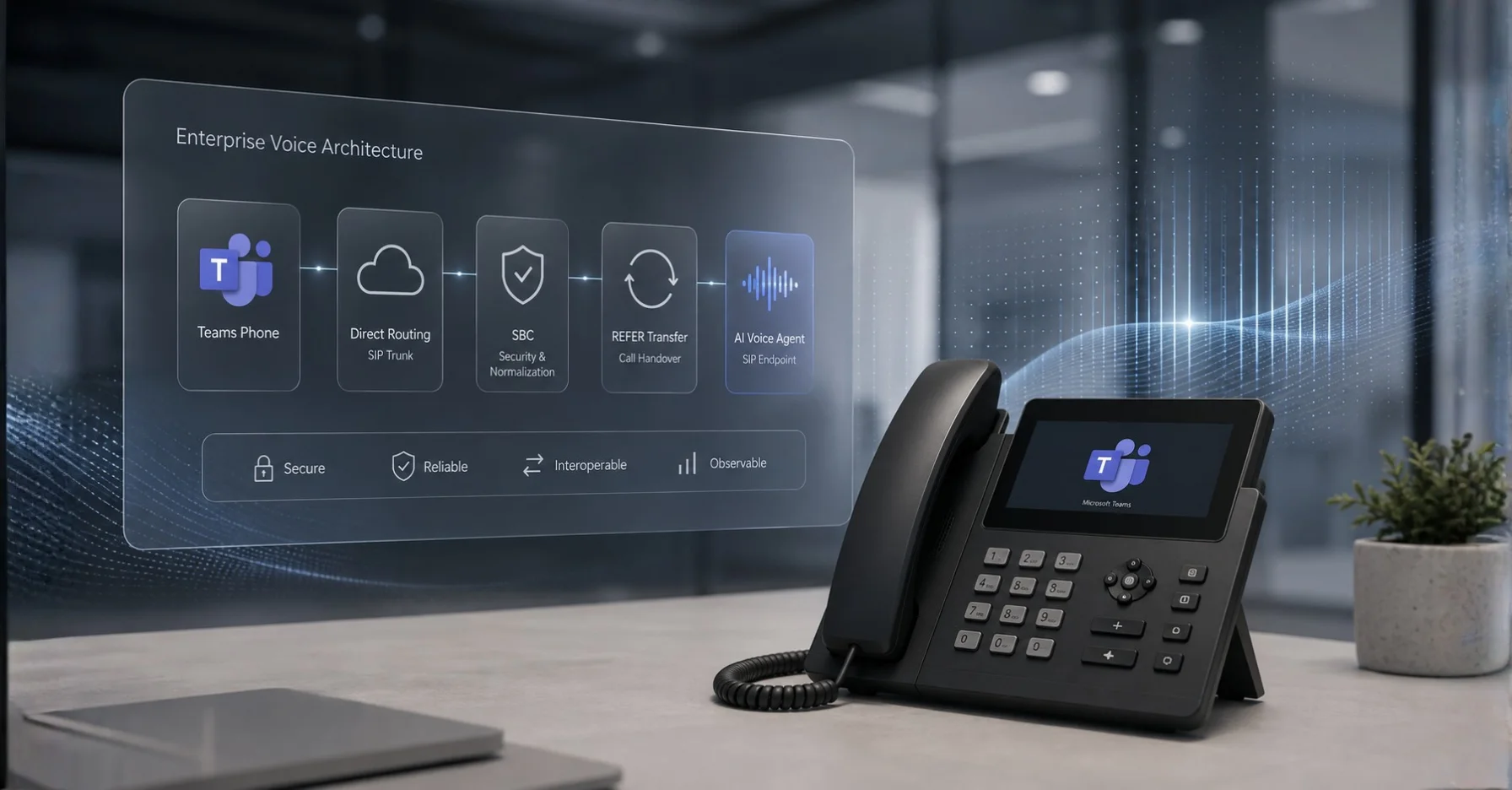
Oui, vous pouvez connecter un agent vocal IA à votre système Microsoft Teams Phone sans modifier Teams ni transférer vos numéros. La solution est le Direct Routing : l'agent IA se connecte en tant que point de terminaison SIP propre sur le même Session Border Controller (SBC) ou trunk opérateur que celui déjà utilisé par Teams. Rien ne change pour vos collaborateurs, ils continuent de travailler dans l'interface Teams habituelle.
Voici le point que la plupart des projets découvrent trop tard : il n'existe aucun plugin Teams ni aucune application Microsoft Store permettant d'intégrer un assistant téléphonique IA dans Teams. L'intégration s'opère un niveau en dessous, au sein de l'infrastructure de téléphonie. Savoir cela vous évitera des semaines d'impasses. Ce guide détaille lequel des quatre modèles PSTN de Teams fonctionne réellement, à quoi ressemble l'architecture en pratique, les trois détails SIP qui font échouer les déploiements, et comment passer en production en une semaine environ.
Pourquoi Teams Phone et les agents IA sont faits pour s'entendre
Microsoft Teams Phone est devenu le système téléphonique d'une grande partie des entreprises du mid-market. Le PBX traditionnel a disparu, les standards automatiques et les files d'attente d'appels sont gérés dans le cloud Microsoft. Cela résout efficacement la communication interne. Ce que cela ne résout pas : l'appel qui arrive à 18h40, quand la file d'attente n'a plus rien à offrir qu'une messagerie vocale.
C'est là que le fossé se creuse. Un standard automatique peut lire un menu et transférer un appel. Il ne peut pas inscrire un rendez-vous dans votre calendrier, consulter une fiche client dans votre CRM, répondre à une question sur le statut d'une livraison ou qualifier un numéro pour un rappel le lendemain matin. Un agent vocal IA le peut : il comprend le langage naturel, accède à vos systèmes et exécute des actions.
La question évidente suit : dois-je remplacer Teams ? Non. Teams reste le système téléphonique de vos collaborateurs. L'agent IA prend le relais sur des numéros définis ou des plages horaires spécifiques. Les deux partagent la même infrastructure de téléphonie.
Les quatre modèles PSTN de Teams et celui qui fonctionne
Microsoft propose quatre méthodes pour connecter Teams Phone au réseau téléphonique public. Une seule d'entre elles permet d'ajouter un agent vocal IA externe. Cette distinction est la décision la plus importante de tout le projet.
| Modèle | Fournisseur PSTN | Point de terminaison SIP propre possible | Adapté à un agent IA |
|---|---|---|---|
| Microsoft Calling Plan | Microsoft | Non | Non — système fermé |
| Operator Connect | Opérateur certifié | Non | Non — l'opérateur détient la connexion |
| Teams Phone Mobile | Opérateur mobile | Non | Non — numéros mobiles uniquement |
| Direct Routing | Tout opérateur via votre propre SBC | Oui | Oui — la seule voie viable |
La raison est structurelle. Avec Calling Plan, Operator Connect et Teams Phone Mobile, le contrôle du trunk appartient à Microsoft ou au partenaire certifié. Vous ne pouvez pas y enregistrer un point de terminaison supplémentaire. Avec le Direct Routing, vous gérez vous-même le SBC — ou utilisez un fournisseur de Direct-Routing-as-a-Service — et décidez donc quels points de terminaison sont autorisés à recevoir des appels.
Une note pratique : Microsoft prend explicitement en charge l'exécution de plusieurs modèles PSTN en parallèle au sein du même tenant. Vos 40 utilisateurs de ventes internes peuvent rester sur Operator Connect pendant que vous mettez en place un trunk Direct Routing pour la hotline de service où réside l'agent IA. Vous n'avez pas besoin de migrer tout votre parc téléphonique pour commencer.
À quoi ressemble réellement l'architecture
Il existe trois topologies claires. Celle qui convient dépend de qui doit recevoir l'appel en premier.
Option A — L'agent IA comme numéro dédié
Vous dédiez une extension ou un numéro de service à l'agent. Le SBC route ce numéro directement vers Famulor au lieu de Teams. Les appels vers tous les autres numéros continuent vers Teams sans changement. C'est l'option la moins risquée et le point d'entrée habituel : vous testez sur un numéro non critique, puis vous étendez.
Option B — L'agent IA en débordement
L'appel arrive d'abord sur Teams. Si personne ne répond dans les 20 secondes, ou si la file d'attente est vide, le SBC transfère l'appel à l'agent IA au lieu de la messagerie vocale. Cette option récupère les appels qui restent sans réponse aujourd'hui — pour la plupart des entreprises, c'est le cas économiquement significatif. Une entreprise artisanale avec six techniciens sur le terrain perd des appels entre 7h et 19h simplement parce qu'une seule personne gère le bureau.
Option C — L'agent IA comme filtre frontal
Chaque appel atteint l'agent en premier. Il établit l'intention, résout les questions standard par lui-même et ne transmet à Teams que les conversations nécessitant un humain, avec le contexte préparé. Cette option offre le plus grand soulagement et demande le plus de soin dans la configuration. Elle convient aux équipes ayant déjà validé l'agent via l'option A ou B pendant plusieurs semaines.
Les trois détails SIP qui font échouer les déploiements
La documentation de Microsoft sur le Direct Routing est précise et intransigeante. Trois exigences sont strictes, et toutes trois sont régulièrement oubliées.
1. FQDN au lieu d'une adresse IP dans l'en-tête Contact
Le proxy SIP de Microsoft inspecte l'en-tête Contact sur chaque message entrant, aussi bien OPTIONS qu'INVITE. S'il contient une adresse IP au lieu d'un nom de domaine complet (FQDN), la connexion est refusée avec 403 Forbidden. Le FQDN doit également correspondre au Common Name ou à un Subject Alternative Name sur le certificat du SBC. Les certificats wildcard sont pris en charge, mais seulement à un niveau : *.company.com correspond à sbc1.company.com, pas à sbc.dc1.company.com.
Deux autres détails de la même spécification : le Direct Routing ne prend pas en charge les URI SIPS et rejette les requêtes SIP contenant un en-tête Replaces. Quiconque migre depuis un PBX traditionnel a souvent de tels en-têtes configurés pour des raisons historiques.
2. La prise en charge de REFER détermine la qualité du transfert
Le Direct Routing implémente deux méthodes de transfert. Si votre SBC annonce REFER dans son en-tête ALLOW, le proxy SIP de Microsoft agit comme transférant et laisse le SBC gérer le transfert — c'est le comportement préféré de Microsoft. Sans REFER, le proxy termine lui-même le transfert et émet une nouvelle requête INVITE.
En pratique : si votre agent IA doit effectuer un transfert assisté vers un utilisateur Teams — en annonçant l'appelant et en transmettant le contexte plutôt qu'un transfert aveugle — vous avez besoin de REFER sur le SBC. Sans cela, les transferts fonctionnent toujours, mais moins proprement. Combinés avec le media bypass, ils ne fonctionnent pas du tout : Microsoft ne prend en charge le transfert d'appel en mode media bypass que lorsque le SBC gère REFER. Pour définir correctement le point de transfert côté métier, voir la capacité de transfert d'appel de Famulor.
3. Media bypass et taille SDP
Le media bypass raccourcit le chemin média en laissant l'audio circuler directement entre le SBC et le client Teams au lieu de traverser les processeurs média de Microsoft. Cela réduit la latence — un facteur tangible avec les agents IA, car la latence réseau et la latence du modèle s'additionnent. Le coût est l'exigence de transfert plus stricte décrite ci-dessus.
Il existe aussi un piège discret : les messages de Direct Routing peuvent dépasser 1 500 octets, généralement à cause de charges utiles SDP importantes transportant des candidats ICE. Si un trunk UDP se trouve derrière votre SBC, il peut rejeter le message. Microsoft recommande de supprimer les codecs et candidats ICE inutilisés du SDP sur le SBC avant de transférer vers le trunk UDP. Si vous hésitez encore sur le transport adapté à votre configuration, le comparatif WebRTC vs SIP pour les agents vocaux IA détaille les compromis.
Mise en œuvre étape par étape
Un calendrier réaliste pour une entreprise du mid-market s'étend sur cinq à dix jours ouvrés, répartis et non consécutifs.
- Faites l'inventaire. Établissez trois faits : quel modèle PSTN est utilisé aujourd'hui, qui exploite le SBC (vous, votre intégrateur ou un fournisseur DRaaS), et quels numéros sont sur quel trunk. Sans ces réponses, tout ce qui suit n'est que conjecture.
- Choisissez l'architecture cible. Choisissez l'option A, B ou C. En cas de doute, commencez par A ou B — revenir en arrière est une règle de routage, pas un projet.
- Mettez en place le trunk vers Famulor. Famulor prend en charge le SIP trunking et le BYOC pour tout fournisseur VoIP ou PBX. Vous conservez votre opérateur, vos numéros et vos tarifs. Si les fondamentaux ne sont pas clairs, l'entrée du glossaire sur le SIP trunking clarifie les termes.
- Rédigez les règles du SBC. Définissez quels numéros ou conditions sont routés vers l'agent. Profitez-en pour vérifier l'en-tête Contact, la correspondance du certificat et la prise en charge de REFER.
- Configurez le contenu de l'agent. C'est seulement maintenant que le contenu compte : accueil, conception de la conversation, règles de transfert. Chargez vos connaissances métier dans une base de connaissances afin que l'agent réponde à partir de vos documents au lieu d'improviser.
- Connectez vos systèmes. Calendrier, CRM, ticketing, ERP. Grâce à plus de 300 intégrations, vous pouvez connecter Microsoft 365, Teams, HubSpot, Pipedrive, Google Calendar, Salesforce et Zendesk sans écrire de code. Pour les notifications et flux de travail spécifiques à Teams, il existe une intégration Microsoft Teams dédiée.
- Effectuez un test en conditions réelles. Une semaine, un numéro, revue quotidienne des transcriptions. Attendez-vous à ajuster — c'est normal, ce n'est pas un signe d'échec.
- Passez à l'échelle. Plus de numéros, plus de plages horaires, plus de langues. Passer d'un numéro à vingt est une question de configuration, pas une nouvelle intégration.
Bonnes pratiques et erreurs courantes
Commencez petit, mais concrètement. L'erreur la plus courante est une première étape surdimensionnée : tous les numéros, toutes les intentions, immédiatement. La deuxième plus courante est une étape sous-dimensionnée : un test avec trois appels internes qui ne vous apprend rien sur la réalité quotidienne. Prenez un vrai numéro avec un vrai trafic, mais un seul.
Définissez les critères de transfert dès le départ. Notez quand l'agent doit transférer vers un humain — sous forme de liste, pas de sentiment. Plaintes, annulations, montants au-dessus d'un seuil, demande explicite d'une personne. Tout ce qui n'est pas sur la liste est géré par l'agent lui-même.
Mesurez la latence, ne l'estimez pas. La qualité perçue de l'appel se joue en millisecondes. Évaluez si le media bypass est pertinent pour votre topologie et mesurez le temps de réponse réel sous charge plutôt qu'à vide.
Testez le chemin de repli avant d'en avoir besoin. Que se passe-t-il si le trunk tombe ou si l'agent ne répond pas ? Configurez une règle de repli sur le SBC pour renvoyer les appels vers Teams — et testez-la activement au lieu de lui faire confiance aveuglément.
Définissez délibérément l'ID de l'appelant. Les appels sortants de l'agent doivent afficher votre numéro principal reconnu, pas une extension technique. Sinon, les taux de réponse chutent sensiblement et les rappels n'aboutissent nulle part.
Ne supposez pas une seule langue. Si vous servez des clients internationaux ou des sites multilingues, l'agent détecte la langue au début de l'appel et bascule. Famulor prend en charge plus de 40 langues — un facteur souvent sous-estimé dans les environnements Teams couvrant plusieurs pays.
Exemples industriels tirés de la pratique
Prestataire de services IT, 45 employés, Teams Phone via Direct Routing. La hotline de support est transférée vers l'agent IA après 17h. L'agent capture les incidents, identifie le client, le système et la gravité, ouvre un ticket et appelle l'ingénieur d'astreinte pour les cas de priorité 1. Tout le reste attend le lendemain matin sous forme de tickets structurés plutôt que six messages vocaux.
Cabinet comptable avec 12 associés. Entre février et mai, l'accueil est submergé par le volume d'appels. L'agent agit comme filtre frontal : il répond aux questions sur les délais et les documents requis à partir de la base de connaissances, prend des rendez-vous dans le calendrier Outlook et ne transfère que les questions de fond aux associés, avec le nom du client et le sujet déjà postés dans le chat Teams.
Fabricant de machines avec trois sites en Europe centrale et un en Pologne. Le numéro de service central est sur un trunk Direct Routing. L'agent détecte la langue, capture les cas de service en allemand, anglais et polonais, et route selon le type de machine vers la file d'attente Teams appropriée sur le site responsable.
Entreprise artisanale avec 20 employés, dont 14 sur le terrain. L'administrateur de bureau ne peut pas répondre à chaque appel pendant la journée. L'agent fonctionne en débordement après 20 secondes, qualifie les demandes par métier et urgence, escalade les urgences directement vers le mobile d'astreinte et écrit tout le reste dans le CRM sous forme de liste de rappels.
Mettre les coûts en perspective
Avec le Direct Routing, vous continuez à payer vos coûts de téléphonie existants à votre opérateur — l'agent IA ne change rien à cela. S'ajoutent les coûts de la plateforme d'IA vocale, généralement basés sur l'utilisation par minute de conversation. Comme le BYOC vous permet d'apporter votre propre trunk, vous ne payez pas la téléphonie deux fois via la plateforme — une différence qui devient significative à des volumes plus élevés.
Le calcul honnête pèse trois éléments : le coût récurrent de la plateforme, l'effort de configuration initial et la valeur actuelle des appels qui restent sans réponse. Le troisième élément est presque toujours sous-estimé, car il n'apparaît dans aucun rapport. Les entreprises qui le quantifient pour la première fois arrivent généralement à un chiffre qui met les deux autres en perspective. La page de tarification montre les modèles disponibles.
Estimez votre ROI en automatisant vos appels
Voyez combien vous pourriez économiser chaque mois grâce aux voice agents IA.
Résultat ROI
ROI 0%
Sans carte bancaire
Conclusion
Microsoft Teams Phone et un agent vocal IA ne sont pas des alternatives : ce sont deux couches de la même infrastructure téléphonique. Teams reste l'espace de travail de vos employés. L'agent IA prend les appels que personne n'est libre de prendre : en dehors des heures d'ouverture, en débordement, en pré-qualification.
Le prérequis technique est étroit et sans ambiguïté : le Direct Routing. Si vous l'utilisez déjà, connecter un agent est une question de règles SBC et de configuration, pas de migration. Si vous êtes sur Operator Connect ou Calling Plan, ajoutez un trunk Direct Routing séparé pour vos numéros de service et laissez tout le reste intact.
Famulor est conçu exactement pour ce scénario : SIP trunking et BYOC pour tout opérateur, flux no-code au lieu d'un projet de développement, plus de 300 intégrations pour calendrier, CRM et ticketing, et plus de 40 langues pour les sites internationaux. Vous gardez vos numéros, votre opérateur et votre environnement Teams.
Votre prochaine étape : consacrez dix minutes à confirmer quel modèle PSTN votre tenant utilise aujourd'hui, dans le centre d'administration Teams sous "Voix". S'il est indiqué Direct Routing, vous pouvez commencer cette semaine avec un numéro de test. Si autre chose est indiqué, parlez à votre opérateur d'un trunk supplémentaire. Les deux routes mènent à la même destination ; seul le calendrier diffère. Si vous migrez depuis une solution existante, le plan de bascule de migration IA vocale définit la séquence. Pour les environnements plus larges, consultez les exigences sous centre de contact.
Essayez notre Assistant IA
Découvrez à quel point notre assistant téléphonique IA sonne naturel.
Entrez vos coordonnées et recevez un appel de notre agent IA en quelques secondes.
L'agent est formé pour parler des services Famulor et prendre des rendez-vous.

Demo AI agent
Famulor representative
FAQ
Puis-je installer un agent vocal IA directement dans Microsoft Teams ?
Pas en tant qu'application ou plugin. La connexion passe par le Direct Routing au niveau SIP : l'agent se connecte comme son propre point de terminaison sur le même SBC que Teams. Les utilisateurs ne voient jamais la différence.
Quel modèle PSTN Teams dois-je utiliser ?
Le Direct Routing. Microsoft Calling Plan, Operator Connect et Teams Phone Mobile ne permettent pas de points de terminaison SIP personnalisés, car Microsoft ou l'opérateur contrôle le trunk.
Dois-je transférer mes numéros de téléphone ?
Non. Avec le BYOC, vous gardez votre opérateur et vos numéros. Vous définissez simplement sur le SBC quels numéros sont routés vers l'agent IA au lieu de Teams.
L'agent IA peut-il transférer vers un utilisateur Teams ?
Oui, via un transfert SIP vers une file d'attente Teams ou une extension. Les transferts assistés propres nécessitent que votre SBC prenne en charge la méthode REFER — en mode media bypass, c'est obligatoire.
Teams et l'agent IA peuvent-ils fonctionner en parallèle ?
Oui. Microsoft prend en charge plusieurs modèles PSTN dans un même tenant. Vos collaborateurs peuvent rester sur Operator Connect pendant que le numéro de service fonctionne sur un trunk Direct Routing.
Pourquoi ma connexion SBC est-elle refusée avec 403 Forbidden ?
Généralement, l'en-tête Contact contient une adresse IP au lieu d'un FQDN, ou le FQDN ne correspond pas au Common Name ou au Subject Alternative Name sur le certificat du SBC. Le Direct Routing exige les deux.
Combien de temps prend la configuration ?
Avec le Direct Routing déjà en place, généralement cinq à dix jours ouvrés : règles SBC, configuration de l'agent, connexions système et une semaine de test avec du trafic réel.
Cela fonctionne-t-il aussi avec 3CX, NFON ou d'autres systèmes PBX ?
Oui. Le BYOC et le SIP trunking sont agnostiques vis-à-vis du fournisseur. Pour les systèmes courants comme 3CX, le principe est identique : votre propre trunk, votre propre règle de routage.
Que se passe-t-il si la connexion échoue ?
Vous configurez une règle de repli sur le SBC qui renvoie les appels vers Teams ou la messagerie vocale en cas d'absence de réponse. Testez cette règle activement avant la mise en production.
L'agent peut-il aussi passer des appels sortants ?
Oui. Le même trunk transporte les rappels, les rappels de rendez-vous et les campagnes sortantes, en affichant votre numéro principal habituel comme ID d'appelant.
Rédacteur chez Famulor